Not every critical finding requires chaining five vulnerabilities together. Sometimes the application just hands you a shell and asks you to use it responsibly.
This one had a text box. It said “Execute TCL”. And it meant it.
The Discovery
During a web application assessment I was mapping out admin functionality — the kind of features that only appear when you’re authenticated as an administrator. Most admin panels are boring. Password resets, user management, audit logs.
Then I found a page labelled “For Administrators Only” with a single text input and a button that read “Execute TCL”.
The description on the page was straightforward:
“To execute a simple TCL call, enter it below then click Execute TCL”
TCL — Tool Command Language — is a scripting language with built-in system command execution capabilities. Handing an input box that evaluates TCL expressions to anyone, even an administrator, is a significant risk. The question was whether the execution was sandboxed or running directly on the host.
I started simple.
Step 1 — Confirming Code Execution
Before going for system commands I wanted to confirm the interpreter was actually evaluating expressions — not just parsing them.
I entered a basic arithmetic expression:
expr 3 * 9
The response came back in a popup:
27The interpreter evaluated 3 * 9 and returned 27. This wasn’t a display field or a search box with loose filtering. This was a live TCL interpreter executing whatever I sent it.
With a live interpreter confirmed, the next question was obvious — can I reach the operating system?
Step 2 — OS Command Execution via exec
TCL has a built-in command called exec that spawns a system process and returns its output. It’s the TCL equivalent of system() in C or subprocess in Python.
I used it to run whoami — the most reliable way to confirm OS-level command execution and identify the privilege context:
exec whoami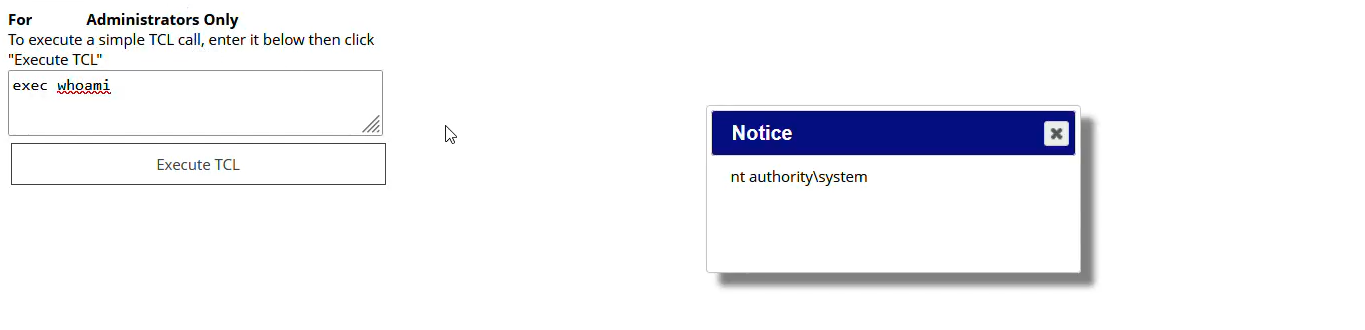
The popup returned:
nt authority\systemFull OS command execution. As NT AUTHORITY\SYSTEM — the highest privilege level on a Windows machine. The TCL interpreter wasn’t sandboxed. It wasn’t restricted. It was running in the context of a Windows service with SYSTEM privileges and passing commands directly to the operating system.
Understanding the Attack Surface
What is TCL exec?
exec in TCL spawns an external process and captures its output:
exec whoami              ;# → nt authority\system
exec ipconfig            ;# → full network configuration
exec dir C:\             ;# → root directory listing
exec type C:\path\to\file ;# → read any file on disk
Any TCL command that can be typed in a terminal can be executed here. There is no sandboxing, no allowlist, no restricted mode. The interpreter has full access to the Windows API and the underlying filesystem.
Why This Is Dangerous Even in an Admin Panel
A common misconception is that features accessible only to administrators are inherently safe to leave unsanitized. The reasoning goes: “If you can access this, you already have admin rights — what more damage could you do?”
This logic breaks down in several scenarios:
1. Privilege escalation — The web application admin might not have OS-level access. An attacker who compromises an admin account gains web-level access. The TCL console bridges the gap between web admin and SYSTEM-level OS control.
2. Lateral movement — From a SYSTEM shell, an attacker can enumerate the internal network, access other machines, dump credentials from memory, and move across the environment in ways that web admin access alone wouldn’t allow.
3. Persistence — With OS command execution, an attacker can install backdoors, create new system users, modify startup services — none of which requires database access or application-level permissions.
4. Stolen credentials — SYSTEM access means access to the Windows registry, credential stores, and the ability to run tools like mimikatz to dump LSASS memory for plaintext credentials.
The admin panel was the entry point. SYSTEM was the destination.
Root Cause
The feature was built to allow administrators to run diagnostic TCL scripts. The intention was internal — a developer tool left accessible in production.
The fundamental issues:
1. Direct eval of user input — The TCL interpreter evaluated whatever string was submitted with no filtering, no allowlist of permitted commands, and no restricted execution mode.
2. No command sandboxing — TCL supports safe interpreters via interp create -safe which restricts access to dangerous commands including exec, open, and file I/O. None of this was implemented.
3. Running as SYSTEM — The service hosting the application was configured to run as NT AUTHORITY\SYSTEM instead of a dedicated low-privilege service account. If the service had been running as a restricted user, the blast radius would have been significantly smaller.
4. Feature left in production — Developer and diagnostic tooling has no place in a production environment. This console existed solely for internal testing and was never removed.
Remediation
Fix 1 — Remove the feature entirely
Diagnostic consoles, script execution interfaces, and developer tools must not exist in production. There is no safe version of “execute arbitrary code from a web input.”
Fix 2 — If the feature must exist — use a safe interpreter
TCL’s safe interpreter mode strips dangerous commands:
set safeInterp [interp create -safe]
# exec, open, file, socket — all removed
$safeInterp eval $userInput
This restricts execution to pure TCL logic with no OS access.
Fix 3 — Strict allowlist of permitted operations
If specific TCL operations are needed, define exactly which commands are allowed:
set allowedCmds {expr string format}
set cmd [lindex $userInput 0]
if {$cmd ni $allowedCmds} {
    error "Command not permitted"
}
Fix 4 — Run services with least privilege
The application service should run as a dedicated low-privilege account — not SYSTEM. Even if code execution is achieved, the attacker’s capabilities are limited to what that account can do.
Fix 5 — Network-level access controls
Admin panels should never be publicly accessible. Restrict to VPN, internal networks, or IP allowlists at the firewall level.
Key Takeaways
- “Admin only” is not a security control — it’s an access control. If the admin account is compromised, every unsanitized admin feature becomes an attacker’s tool
- TCL
execis equivalent to a system shell — any interface that evaluates TCL expressions without sandboxing is an RCE waiting to be found - Developer tools left in production are a critical risk — always audit what features are actually exposed before go-live
- Service privilege matters — SYSTEM-level services turn web vulnerabilities into full machine compromise
- Safe interpreters exist for a reason — if you’re evaluating user-supplied scripts, use them
Found this useful? More writeups coming. Hit me up on X if you want to discuss.