Some privilege escalation findings make you second-guess yourself, because the fix is so obvious you assume you’re missing something. This was one of those. I ran my standard SUID sweep, and the shell itself was sitting there with the SUID bit on.
No chaining, no pivoting, no custom exploit code. Just one binary that should never have been touched.
The Setup
I had a low-privilege shell on a Linux target after working through the initial foothold. Nothing special about the access — a normal, unprivileged user account with no sudo rights. As with every box, the first thing I do once I have a stable shell is hunt for SUID binaries before touching anything else.
Enumeration — Hunting for SUID Binaries
SUID (Set User ID) is one of the highest-value things to check early, because it takes one command and instantly tells you which binaries run as their file owner rather than the calling user. If root owns one of those binaries and it can be abused, privilege escalation is usually a formality.
find / -perm -4000 2>/dev/nullfind /— search the entire filesystem-perm -4000— match files with the SUID bit set2>/dev/null— silence permission-denied noise so the real findings stand out
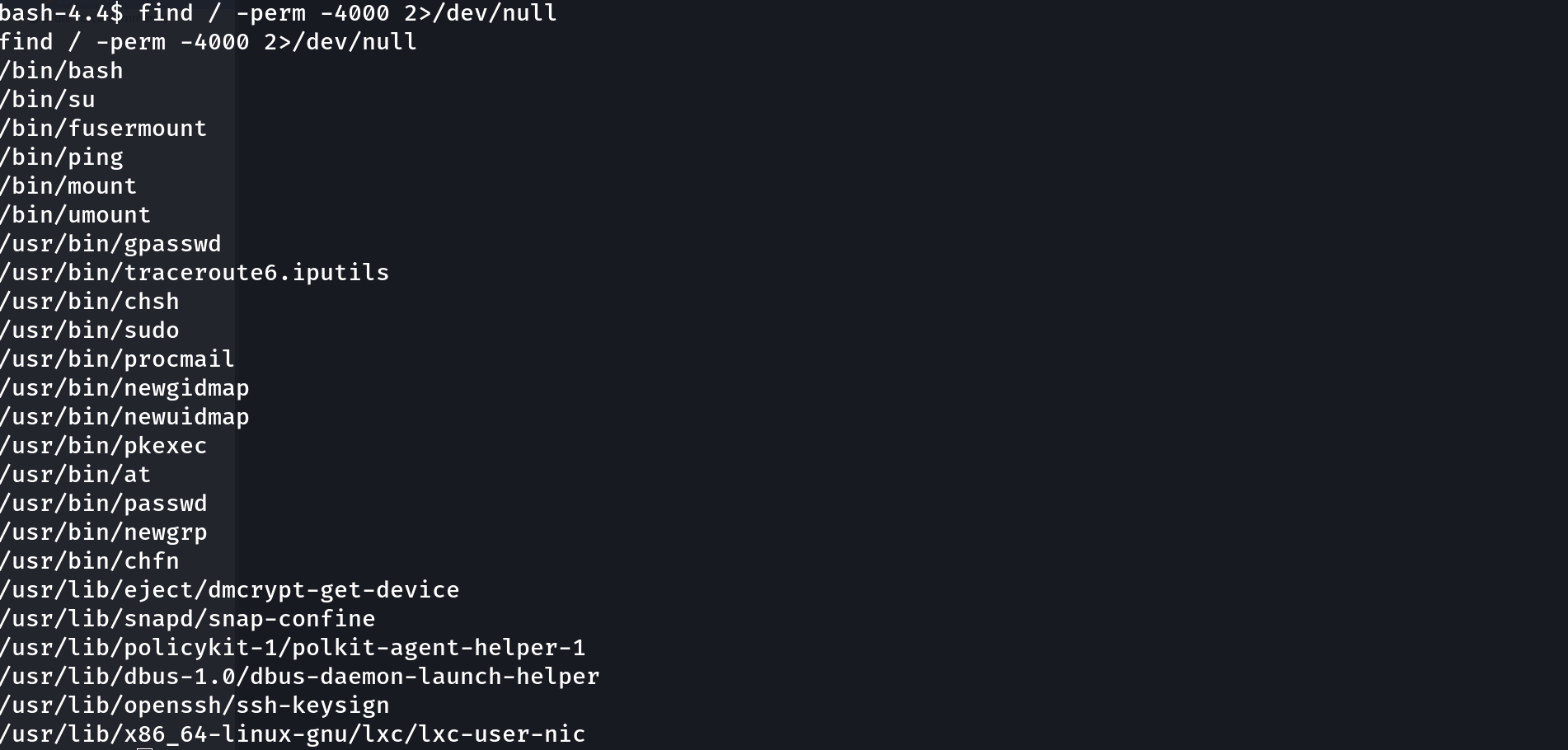
The list came back with the usual suspects — su, mount, umount, passwd, sudo, pkexec — all of which are supposed to be SUID because they need root to do their jobs safely. But right at the top of the output was one line that had no business being there:
/bin/bashThe shell binary itself, SUID root. That’s not a hardened system binary doing a narrowly-scoped privileged task — that’s a full interactive shell that runs as root the moment you invoke it correctly.
Why SUID bash Is Immediate Game Over
There’s no ambiguity to work through here the way there is with something like find or awk, where you need a specific flag or subcommand to break out into a shell. /bin/bash is the shell. If it’s SUID root, the only question is whether bash will actually preserve the elevated privileges when you launch it, or drop them as a safety measure.
GTFOBins lists this exact scenario, and the answer is: bash will keep root, as long as you ask it to correctly.
Exploitation
/bin/bash -p
That’s the entire exploit. Running whoami immediately after confirmed it:
rootWhy This Works — The -p Flag
By default, when bash starts and notices that the real UID and effective UID don’t match — exactly the situation you’re in when launching a SUID binary as a normal user — it treats that as a red flag and drops the elevated effective UID back down to match the real one. This is a deliberate safety mechanism so that accidentally-SUID shells don’t hand out root for free.
The -p (privileged) flag tells bash to skip that safety drop and keep the effective UID exactly as the SUID bit set it:
/bin/bash
# → euid quietly dropped back to the real UID, no privilege gained

/bin/bash -p
# → privileged mode: effective UID stays at 0 (root) ✅
It also skips sourcing ~/.bashrc and the BASH_ENV file on startup, which matters in slightly stricter environments where those could be tampered with — but on this box, the effective UID alone was enough.
Root Cause
There is essentially no legitimate reason for /bin/bash to carry the SUID bit in a modern Linux system. This almost always comes from:
- A deliberate but forgotten “quick fix” during initial setup, where an admin SUID’d bash to work around a permissions problem and never reverted it
- A backup or restore process that copied file permissions from a different, misconfigured system
- A lab or CTF environment intentionally planting it as a soft target (as was the case here)
Fix: Strip the SUID bit immediately.
chmod u-s /bin/bashThen audit every SUID binary on the system against a known-good baseline (dpkg -V on Debian-based systems is a fast way to spot binaries whose permissions have drifted from the package defaults) and cross-reference anything unexpected against GTFOBins.
Key Takeaways
find / -perm -4000 2>/dev/nullshould be one of the first commands you run on any fresh foothold — SUID misconfigurations are cheap to find and often trivial to exploit- A SUID shell binary is as bad as it gets: no chaining required, just the right invocation flag
- The
-pflag is what keeps bash’s effective UID intact after a SUID launch — without it, the shell silently drops back to your real privileges - Compare SUID findings against your distribution’s package manifest; anything that doesn’t match the baseline deserves immediate attention
Questions? Hit me up on X.