Not every privilege escalation needs a CVE or a clever binary chain. Sometimes the box just hands you root because someone typed the same word twice into /etc/passwd and sudoers and called it a day.
This lab, payday, was one of those.
The Setup
I already had a low-privilege shell as www-data on the box — the usual result of popping a web application. From there, the next move is always the same: find out who else lives on this machine, and whether their accounts are worth pursuing.
A quick look at /etc/passwd turned up a normal-looking user account:

patrick:x:1000:1000:patrick,,,:/home/patrick:/bin/bashNothing special about the entry itself — UID 1000, standard shell, standard home directory. Just another user. But user enumeration is only half the job; the real question is whether I can actually get into that account.
Enumeration — Guessing the Obvious
With a named user in hand, the cheapest thing to try first is always credential reuse — starting with the laziest possible guess: username as password.
su patrick
Password: patrick
It worked.
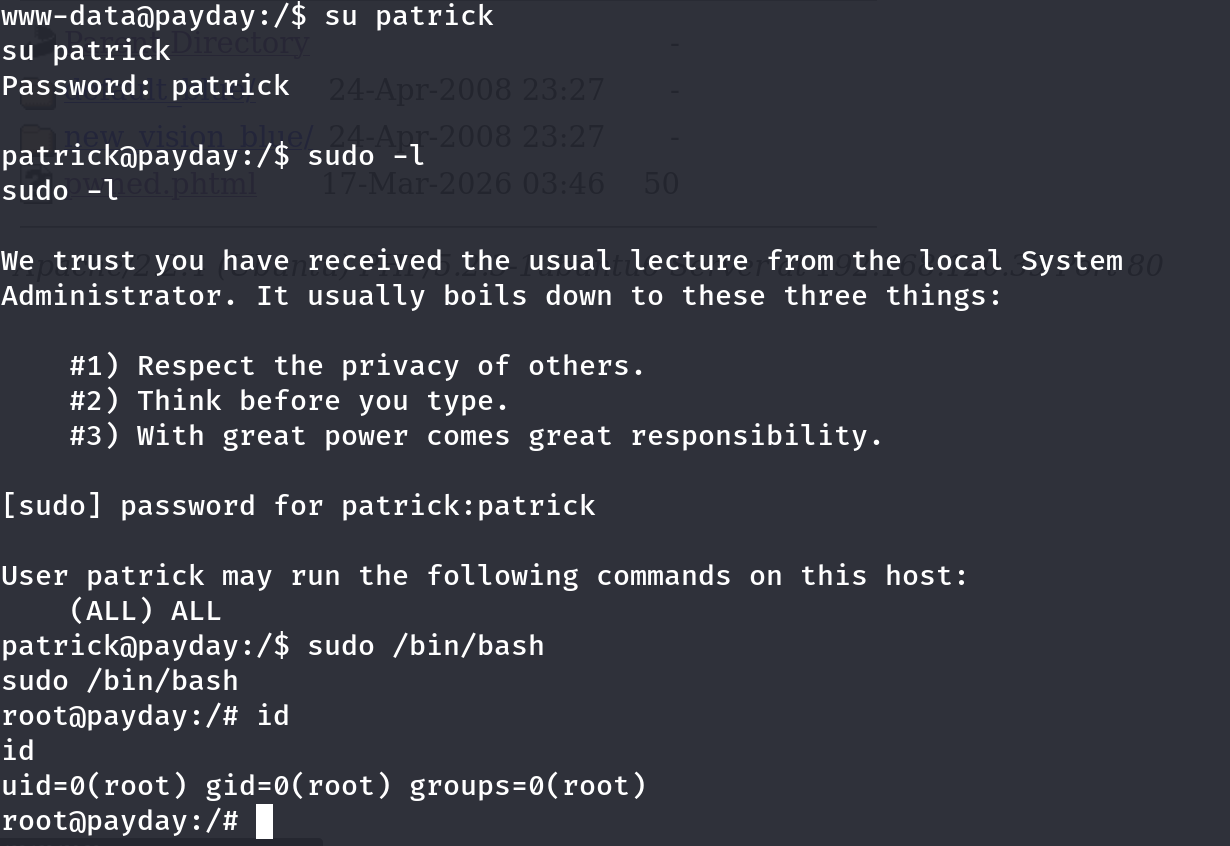
That alone would be worth flagging on a real engagement, but I kept going. Once I had a shell as patrick, the next check is automatic:
sudo -lThe output was about as bad as it gets:
User patrick may run the following commands on this host:
    (ALL) ALL
(ALL) ALL means patrick can run any command, as any user, on this host. There’s no allowlist, no restriction to a specific binary, nothing GTFOBins needs to get creative about. It’s a blank check.
Exploitation
With that entry in place, escalating to root is a single command:
sudo /bin/bashroot@payday:/# id
uid=0(root) gid=0(root) groups=0(root)No password gymnastics, no binary abuse, no waiting on a cron job. The sudoers file simply told the system that patrick is trusted with everything, and sudo /bin/bash spawns a fully-privileged interactive shell in response.
Why This Works
Sudo’s power comes from the sudoers file’s ability to scope exactly what a user is allowed to do — restrict them to one binary, one set of arguments, one target user. (ALL) ALL throws all of that away. It tells sudo: this user is equivalent to root, full stop.
Combine that with a password that’s identical to the username, and you’ve built two independent failures that both point at the same outcome:
- Weak/reused credentials got me into the
patrickaccount in the first place. - An unrestricted sudoers rule turned that account into root the moment I checked
sudo -l.
Neither failure alone would necessarily be fatal — a strong password without the sudo misconfiguration just gives you a normal user shell; a sudo misconfiguration without a way into the account is unreachable. Together, they’re an instant chain.
Root Cause
This is almost always the result of an administrator adding a user to sudoers (or /etc/sudoers.d/) with ALL ALL during setup “temporarily,” intending to scope it down later — and never doing so. It’s one of the most common sudo misconfigurations found in the wild, not just in labs.
Fix: Never grant blanket sudo access. Scope every sudoers entry to the specific binaries and arguments a user actually needs:
# Bad — full sudo equivalence
patrick ALL=(ALL) ALL

# Better — scoped to what's actually required
patrick ALL=(root) /usr/bin/systemctl restart myapp.service
Pair that with a password policy that rejects username-as-password combinations outright, and audit sudo -l output across all accounts on a regular basis.
Key Takeaways
- Always enumerate local users via
/etc/passwdafter landing an initial foothold — named accounts are often reachable with trivially weak or reused credentials - Run
sudo -limmediately after gaining any new user context — it costs nothing and frequently ends the engagement on the spot (ALL) ALLin a sudoers entry is equivalent to handing out root — there is no scenario where this should exist on a production system- Credential reuse (username == password, or passwords shared across accounts) remains one of the most reliable ways into a “random” user account
Questions? Hit me up on X.