Not every service misconfiguration lives on the filesystem. Sometimes the weakness isn’t in a folder’s permissions at all — it’s in the permissions on the service object itself. This one didn’t require write access to any file. It just required the service’s own access control list to be too generous.
The Setup
Another PowerUp enumeration pass with Invoke-AllChecks, and one service stood out for a completely different reason than the unquoted-path finding from the previous writeup:
PS C:\PrivEsc> Invoke-AllChecks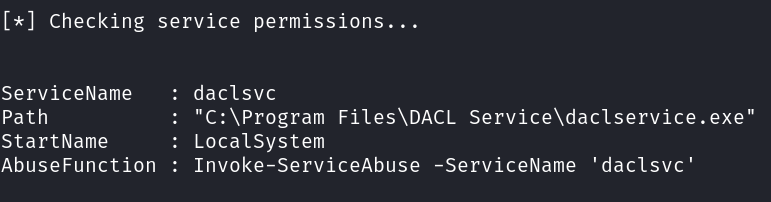
Unlike the unquoted-path case, PowerUp wasn’t flagging this because of the file path — it was flagging it because the service configuration itself was modifiable by a low-privileged account.
Confirming the Weak Service ACL
Every Windows service has its own access control list, separate from filesystem permissions, that governs who’s allowed to query, reconfigure, start, or stop it. I checked exactly what my current low-privilege context could do to daclsvc:
PS C:\PrivEsc> C:\PrivEsc\accesschk.exe /accepteula -uwcqv user daclsvc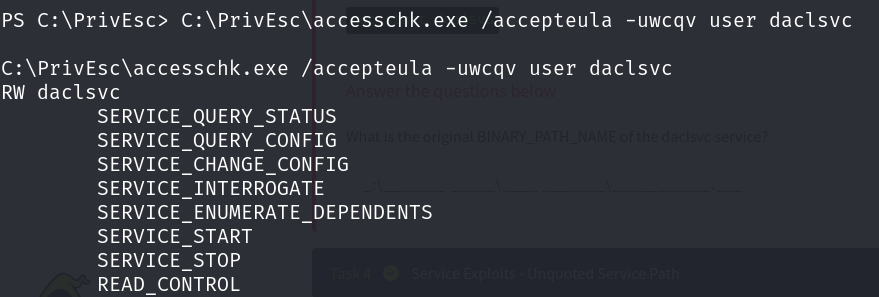
SERVICE_CHANGE_CONFIG combined with SERVICE_START is the whole vulnerability in two permissions. It means my unprivileged user account could point this service at any binary or command it wants, then start it — and since daclsvc runs as LocalSystem, whatever it’s pointed at runs as SYSTEM. No filesystem write access needed anywhere. The service’s own ACL was the misconfiguration.
Exploiting It — Adding a New Administrator
PowerUp ships a function built specifically for this scenario: Invoke-ServiceAbuse. Given a service name, it reconfigures the binary path to a built-in payload, starts the service so that payload executes as the service account, and then restores the original configuration — all in one call.
PS C:\PrivEsc> Invoke-ServiceAbuse -ServiceName 'daclsvc'
That single command chain ran as LocalSystem: it created a brand-new local user, john, with the password Password123!, and immediately added that account to the local Administrators group. From a completely unprivileged starting point, I now had valid credentials for a fully privileged local administrator account — created entirely through the service’s own misconfigured permissions, without ever touching a file on disk.
Because Invoke-ServiceAbuse automatically restores the service to its original configuration after running, a quick check afterward confirmed everything looked untouched:
PS C:\PrivEsc> sc.exe qc daclsvc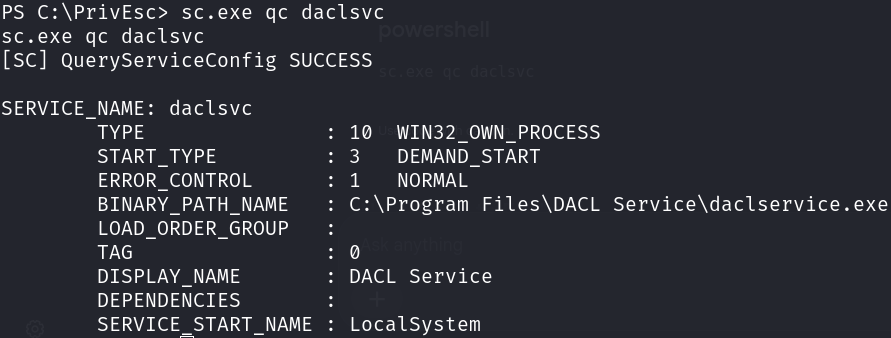
The BINARY_PATH_NAME was back to its legitimate value — the abuse function had cleaned up after itself. The only trace of the exploitation was the new john account sitting in the local Administrators group, ready to be used to log in through RDP or any other authenticated access path.
Root Cause
The root cause here has nothing to do with file or folder permissions — it’s an overly permissive service ACL. Whoever configured daclsvc granted the user group (or a group that low-privileged accounts belong to) rights that should be reserved for administrators: the ability to reconfigure and restart a LocalSystem service.
Fix:
1. Audit service ACLs, not just file/folder ACLs, using accesschk:
   accesschk.exe -uwcqv <group> <service_name>
   Any SERVICE_CHANGE_CONFIG or SERVICE_ALL_ACCESS granted to a non-admin
   group is a direct privilege escalation path.

2. Restrict service permissions to Administrators and SYSTEM only.
   Standard users should never hold SERVICE_CHANGE_CONFIG, SERVICE_START,
   or SERVICE_STOP on a service running as LocalSystem.

3. Use sc.exe sdset (or Set-Service / Group Policy) to correct the security
   descriptor on any service found with an overly permissive DACL.

4. Run services under least-privilege dedicated accounts where possible,
   so that even a successful service abuse doesn't translate directly into
   full SYSTEM access.

5. Include service DACL auditing in routine hardening reviews — PowerUp's
   Invoke-AllChecks surfaces this automatically and should be run as part
   of any periodic internal security review, not just during a pentest.
Key Takeaways
- Service misconfigurations aren’t limited to unquoted paths or writable binaries — the service’s own access control list is a separate, equally exploitable attack surface
SERVICE_CHANGE_CONFIGplusSERVICE_STARTon aLocalSystemservice is a full privilege escalation primitive, regardless of what the underlying binary or filesystem permissions look like- PowerUp’s
Invoke-ServiceAbuseturns a weak service ACL into a fast, reliable admin-account win with a single command - Tools that “clean up after themselves” (like restoring the original binary path) don’t erase the impact of what already ran — check for new accounts and group memberships, not just configuration drift
One More Way to Take This
Invoke-ServiceAbuse’s default payload creates a local admin account, but that’s just one option built on top of the same underlying primitive. Since SERVICE_CHANGE_CONFIG lets you set the binary path to anything, you can just as easily point it directly at a reverse shell payload instead of a net user command, then start (or restart) the service — and the callback comes back as NT AUTHORITY\SYSTEM, no intermediate admin account required. It’s the exact same weak DACL, just a different destination for the binary path. That’s also why I grabbed the sc.exe qc daclsvc output above — it’s the reference point you need to restore the original BINARY_PATH_NAME after manually pointing it at your own payload.
Questions? Hit me up on X.