Scheduled tasks on Windows often run as SYSTEM so they can perform maintenance work without needing a logged-in user. If the script or executable a scheduled task runs is writable by a lower-privileged account, that account can substitute its own code and have it executed as SYSTEM the next time the task fires.
Enumeration
A scheduled task was found configured to run a PowerShell cleanup script on a recurring basis. Reading the script’s contents showed what it was doing and, in its own comments, an acknowledgment of the exact weakness being exploited here:
PS C:\PrivEsc> type C:\DevTools\CleanUp.ps1# This script will clean up all your old dev logs every minute.
# To avoid permissions issues, run as SYSTEM (should probably fix this later)
Remove-Item C:\DevTools\*.log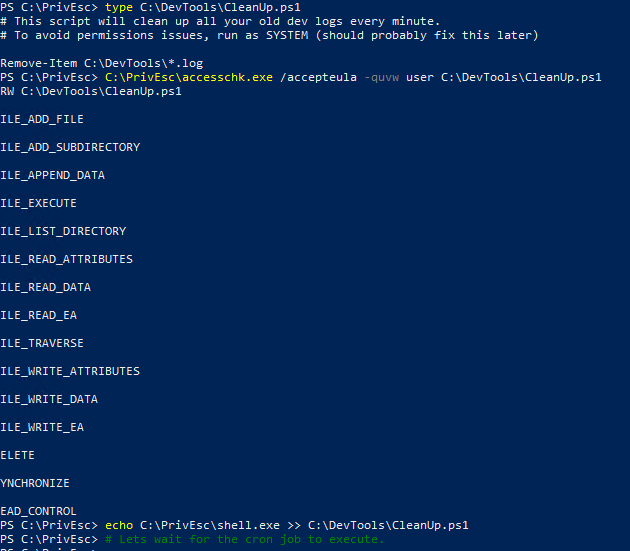
The comments in the script confirm two things directly: it runs every minute, and it runs as SYSTEM. The next step was checking who could modify the script file itself:
PS C:\PrivEsc> C:\PrivEsc\accesschk.exe /accepteula -quvw user C:\DevTools\CleanUp.ps1Breaking down the flags:
/accepteula— accepts the Sysinternals EULA prompt automatically-q— omit the banner-u— suppress errors on inaccessible objects-v— verbose, listing specific rights instead of a summary-w— restrict output to entries granting write accessuser— check permissions specifically for the low-privilegeduseraccount
The output confirmed RW C:\DevTools\CleanUp.ps1 for the user account, with FILE_ALL_ACCESS — full control over the script, including FILE_WRITE_DATA and FILE_APPEND_DATA. A SYSTEM-run script, fully writable by a standard user.
Exploitation
The goal was to make the scheduled task execute a payload instead of (or in addition to) its normal cleanup logic. The script’s content was replaced directly:
PS C:\DevTools> Set-Content -Path C:\DevTools\CleanUp.ps1 -Value "C:\PrivEsc\shell.exe" -Encoding ASCII
PS C:\DevTools> type C:\DevTools\CleanUp.ps1
C:\PrivEsc\shell.exe
Breaking down Set-Content:
-Path C:\DevTools\CleanUp.ps1— the file being written to; the same script the scheduled task runs-Value "C:\PrivEsc\shell.exe"— the new content for the file: a single line that PowerShell will interpret as a command to execute the reverse shell payload-Encoding ASCII— writes the file as plain ASCII text rather than PowerShell’s default UTF-16, ensuring the scheduled task’s PowerShell host parses the file correctly
Set-Content replaces a file’s entire contents in one operation, which is why it was used here instead of appending — it guarantees the script contains exactly one line, with nothing from the original cleanup logic left to interfere.
With the original Remove-Item C:\DevTools\*.log line gone, the scheduled task’s next run would attempt to execute C:\PrivEsc\shell.exe instead — as whatever account the task is configured to run under.
Result
Since the task was already configured to run every minute, no further action was needed beyond waiting for its next scheduled execution:
C:\Windows\system32>whoami
nt authority\system
The callback confirmed nt authority\system — the scheduled task executed the substituted script content with the same SYSTEM privileges it always ran its cleanup routine with.
Root Cause
A script executed by a SYSTEM-level scheduled task had file permissions that allowed a standard user to modify it. The developer comment left inside the script — acknowledging the task “should probably fix this later” — points directly at the source: the task was configured to run as SYSTEM specifically to avoid a permissions problem, without correcting the underlying permissions on the script it runs.
Fix:
1. Restrict write access on any script or executable referenced by a
   scheduled task to Administrators and SYSTEM only, regardless of what
   account the task itself runs under.

2. Avoid defaulting to SYSTEM for a scheduled task just to sidestep a
   permissions error. Fix the underlying permissions issue on whatever
   resource the task needs to access, and run the task under a
   least-privilege dedicated account instead.

3. Audit scheduled tasks and their target scripts/executables together,
   not separately. schtasks /query /fo LIST /v lists task configuration;
   accesschk.exe against each referenced file confirms who can modify it.

4. Treat any comment in production code acknowledging a known permissions
   shortcut ("run as SYSTEM to avoid this for now") as a flag for immediate
   review, not a long-term fix.
Key Takeaways
- A scheduled task’s own privilege level is irrelevant if the script or binary it executes can be modified by a less-privileged account — the task will faithfully run whatever content is there
Set-Contentfully replaces a file’s contents in one step, which is more reliable for this kind of substitution than appending withechoorAdd-Content- Developer comments left in scripts are worth reading during enumeration — they sometimes describe the exact misconfiguration in plain language
accesschk.exeshould be run against both the scheduled task’s target file and, separately, any folder it lives in, since either one being writable is enough- This technique needs no privilege escalation tooling beyond what’s already on the system —
type,Set-Content, and patience for the next scheduled run are sufficient
Questions? Hit me up on X.