Every Windows service has a registry key under HKLM\SYSTEM\CurrentControlSet\Services\<service name> that stores its configuration — including the path to the executable it runs. If a low-privileged user has write access to that registry key, they can change what the service executes, without needing any file-level write access at all. This writeup covers finding and exploiting exactly that.
Enumeration
The first step was checking whether any service registry key could be modified by the current low-privileged user. This check was run as part of an automated enumeration pass:
[+] Looking if you can modify any service registry()
    HKLM\system\currentcontrolset\services\regsvc (Interactive [TakeOwnership])
What this output means: the service named regsvc has a registry key that the Interactive group (any user logged on locally, whether via console or RDP) has permission to modify, including the ability to take ownership of the key. This is a direct signal that the key’s access control list (ACL) is misconfigured.
Confirming the Permission With accesschk
To confirm exactly which rights were granted and to whom, I ran accesschk directly against the registry key:
PS C:\PrivEsc> C:\PrivEsc\accesschk.exe /accepteula -uvwqk HKLM\System\CurrentControlSet\Services\regsvcBreaking down the flags:
/accepteula— auto-accepts the Sysinternals EULA prompt so the command runs non-interactively-u— suppress errors for objects that can’t be accessed, so the output stays clean-v— verbose output, showing the full list of specific rights rather than a summary-w— show only objects that grant write access (the only thing that matters for this check)-q— omit the banner-k— target a registry key, not a file or service object
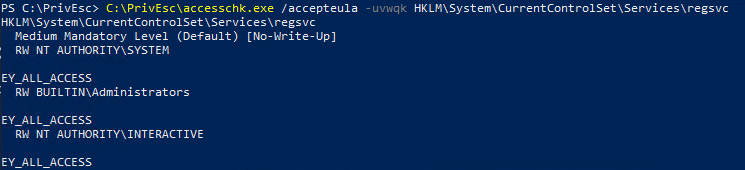
The output confirmed NT AUTHORITY\INTERACTIVE has KEY_ALL_ACCESS on HKLM\System\CurrentControlSet\Services\regsvc. KEY_ALL_ACCESS is exactly what it sounds like — full read and write control over every value stored under that key, including the one that tells Windows what executable to run when the service starts.
Checking the Service’s Current Configuration
Before changing anything, I queried the service’s existing configuration to understand what I was about to overwrite:
PS C:\PrivEsc> sc.exe qc regsvc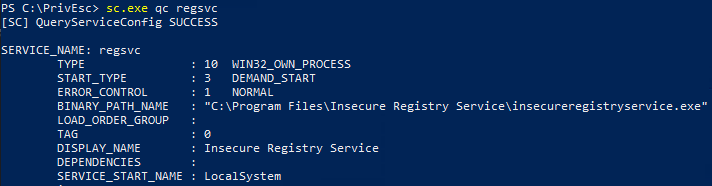
The relevant fields:
BINARY_PATH_NAME— the executable Windows launches when the service starts. CurrentlyC:\Program Files\Insecure Registry Service\insecureregistryservice.exeSERVICE_START_NAME— the account context the service runs under. Here it’sLocalSystem, the highest-privileged built-in account on the machine
Because the service runs as LocalSystem, whatever executable ends up in BINARY_PATH_NAME runs as LocalSystem too, the moment the service starts.
Exploitation
With write access to the registry key confirmed, the BINARY_PATH_NAME equivalent registry value — ImagePath — was changed directly, without touching the filesystem at all:
PS C:\PrivEsc> reg add HKLM\SYSTEM\CurrentControlSet\services\regsvc /v ImagePath /t REG_EXPAND_SZ /d C:\PrivEsc\reverse.exe /f
PS C:\PrivEsc> net start regsvc
Breaking down the reg add command:
reg add HKLM\SYSTEM\CurrentControlSet\services\regsvc— targets the same registry key confirmed writable in the accesschk step/v ImagePath— the specific value being written; this is the registry name for whatsc.exe qcdisplays asBINARY_PATH_NAME/t REG_EXPAND_SZ— the data type for the value, matching the type Windows expects for this key (an expandable string, meaning it can contain environment variables)/d C:\PrivEsc\reverse.exe— the new data for the value: a reverse shell executable already staged on disk/f— force the write without a confirmation prompt, since the value already exists and would otherwise ask to overwrite
net start regsvc then starts the service using the newly written configuration. Since the registry key — not the file system — is what Windows reads to decide what to launch, the service executed C:\PrivEsc\reverse.exe instead of its original binary.
Result
C:\Windows\system32>whoami
nt authority\system
The service started under its configured account, LocalSystem, and launched the substituted binary — resulting in a shell running as nt authority\system.
Root Cause
The registry key controlling a LocalSystem service’s configuration had an access control list that granted KEY_ALL_ACCESS to the Interactive group, rather than restricting it to Administrators and SYSTEM. This is functionally identical to a weak file-system ACL on a service binary, except the misconfiguration lives in the registry rather than on disk — meaning a filesystem-only permission audit would miss it entirely.
Fix:
1. Restrict the ACL on HKLM\SYSTEM\CurrentControlSet\Services\<service> keys
   to Administrators and SYSTEM only. Standard users and the Interactive
   group should never hold KEY_WRITE or KEY_ALL_ACCESS on a service key.

2. Use regedit's permissions dialog, or PowerShell's Set-Acl / icacls-style
   tooling for the registry (Set-ItemProperty combined with
   Set-Acl on the registry provider path), to correct the ACL.

3. Audit service registry key permissions as a standard part of Windows
   hardening reviews, not just service file and folder permissions —
   accesschk.exe -kwsu HKLM\SYSTEM\CurrentControlSet\Services can enumerate
   this across every installed service at once.

4. Where possible, avoid running non-essential services as LocalSystem.
   A misconfigured ACL on a service running under a limited account has a
   far smaller impact than the same misconfiguration on a SYSTEM service.
Key Takeaways
- Service misconfigurations aren’t limited to the filesystem — the registry key backing a service has its own independent ACL, and it needs to be checked separately
ImagePathin the registry is the same valuesc.exe qcdisplays asBINARY_PATH_NAME— write access to one is write access to the otherKEY_ALL_ACCESSfor theInteractivegroup on a service key is sufficient on its own to escalate to whatever account that service runs under- No filesystem write access, no unquoted path, and no weak service DACL were needed here — the registry key itself was the entire vulnerability
- Automated enumeration tools that flag “modifiable service registry” findings should always be followed up with a direct accesschk confirmation before exploitation, to see exactly which group and which rights are involved
Questions? Hit me up on X.