Some Windows privilege escalation paths don’t involve services, the registry, or scheduled tasks at all. If a GUI application is running under a more privileged account and is reachable from the current desktop session, its own file dialog box can be enough to get a shell under that account.
Enumeration
The desktop had a shortcut labeled “AdminPaint” alongside the usual icons:
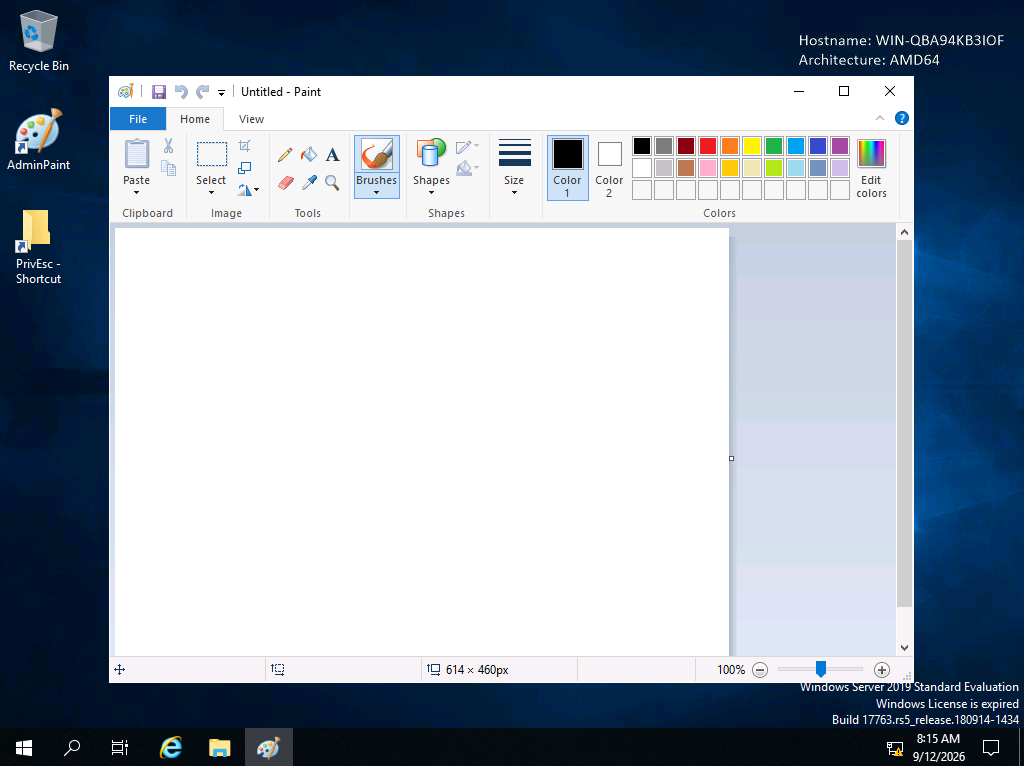
An instance of MS Paint (mspaint.exe) was already open on the desktop. The next step was confirming which account that process was actually running as, since a GUI window being visible doesn’t by itself say anything about its privilege level:
C:\Users\user>tasklist /V | findstr mspaint.exe
Breaking down the command:
tasklist— lists all currently running processes on the system/V— verbose output, which includes the “Session Name,” “User Name,” and window title columns needed to see which account owns each processfindstr mspaint.exe— filters the output down to just the Paint process
The output confirmed mspaint.exe was running under WIN-QBA94KB3IOF\admin — a privileged account, distinct from the low-privileged session being used to view and interact with it.
Why This Is Exploitable
Almost every Windows GUI application with a “File → Open” or “File → Save As” menu option opens a standard Windows file picker dialog — the same file browser used throughout the operating system. That dialog isn’t a stripped-down file selector; it’s a fully functional Explorer window in disguise, complete with an address bar, folder navigation, and the ability to type an arbitrary path directly.
Since the Paint process itself was running as admin, its file dialog also runs in that same process context. Anything launched from inside that dialog — including another program — inherits the same privilege level as Paint itself. This means the file dialog can be used to browse to and execute cmd.exe, spawning a command prompt under the admin account, without ever needing Paint to do anything with images at all.
Exploitation
From the already-open Paint window, File → Open was selected to bring up the file dialog. Instead of browsing normally, the full path to the command interpreter was typed directly into the dialog’s address bar:
file:/c:/windows/system32/cmd.exe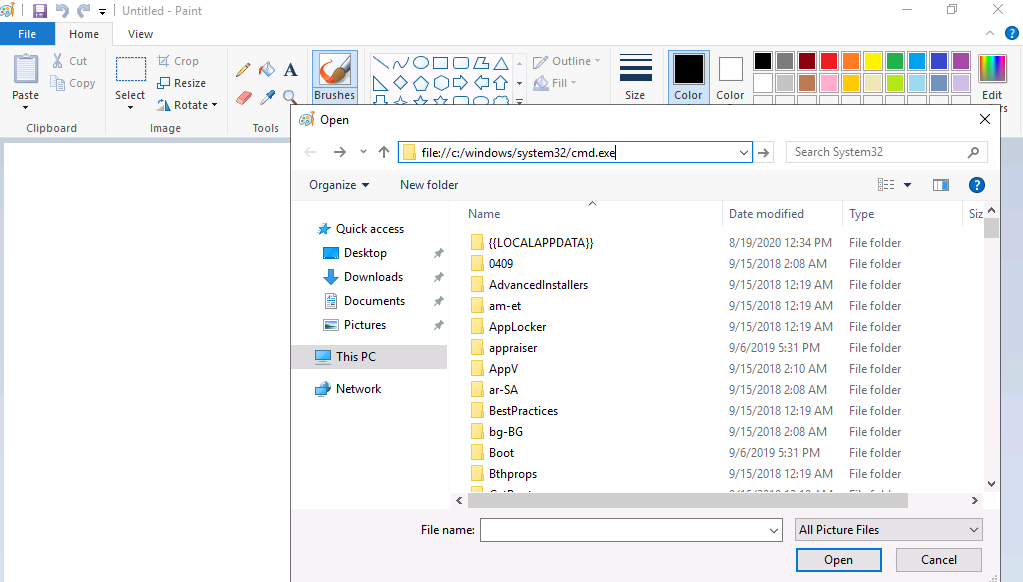
Typing a file: path directly into the address bar and pressing Enter navigates the dialog to that exact location — in this case, C:\Windows\System32, with cmd.exe now visible and selectable in the file list. Since the file type filter defaults to image formats, cmd.exe wasn’t guaranteed to display through normal browsing, but navigating by direct path bypasses that restriction and lists the actual directory contents.
With cmd.exe selected, double-clicking it (or selecting it and pressing “Open”) launches it exactly as if it had been executed by Paint itself — under Paint’s own account context.
Result
PS C:\Windows\System32> whoami
win-qba94kb3iof\admin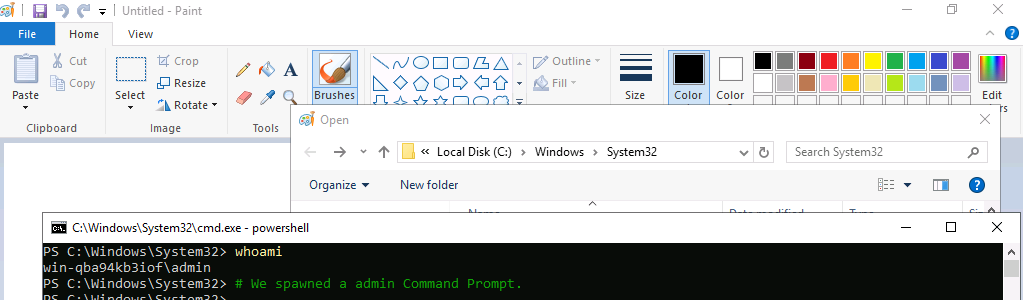
The spawned shell returned win-qba94kb3iof\admin — full command-line access under the privileged account, obtained entirely through a file picker dialog belonging to an already-running, unrelated GUI application.
Root Cause
A GUI application was left running under a privileged account, on a session reachable by a lower-privileged user. Because standard Windows file dialogs function as full-featured file browsers capable of launching arbitrary executables, any privileged GUI application reachable in this way is equivalent to having an interactive shell under that same account.
Fix:
1. Never leave privileged GUI applications open or running on a shared or
   lower-privileged desktop session. If an admin needs to run a GUI tool,
   do it in an isolated session that standard users cannot interact with.

2. Where a privileged GUI tool must be exposed to lower-privileged users,
   use application allowlisting (AppLocker, WDAC) to prevent execution of
   cmd.exe, powershell.exe, and other interpreters from within its file
   dialogs.

3. Avoid RDP or console session sharing between privileged and
   unprivileged accounts. Each privilege level should have its own isolated
   session.

4. Periodically audit running processes for privileged accounts with
   tasklist /V, and treat any privileged GUI application visible from a
   lower-privileged session as an immediate finding.
Key Takeaways
- A visible GUI window doesn’t tell you its privilege level on its own — always confirm the owning account with
tasklist /Vbefore assuming anything about a running application - Standard Windows file dialogs are full file browsers, not restricted pickers — typing a
file:path or a full executable path directly into the address bar bypasses any file-type filtering - Any privileged GUI application reachable from a lower-privileged session is functionally equivalent to an interactive shell under that account
- This technique needs no exploit code, no service misconfiguration, and no registry changes — just an already-running privileged application and its own file dialog
- The same approach works with almost any GUI application that exposes a file picker, not just Paint — Notepad, WordPad, and many third-party applications behave identically
Questions? Hit me up on X.