Not every serious finding needs a payload. Sometimes the vulnerability is already sitting in the response, in plain text, and all it takes to find it is actually reading what the browser downloads.
The Setup
I had Burp Suite sitting in the middle of my traffic while browsing the target application, doing the usual thing — clicking through the app, letting Burp’s proxy log every request so I could go back later and look for anything interesting in the responses. Nothing exotic, no active scanning yet. Just normal usage, captured.
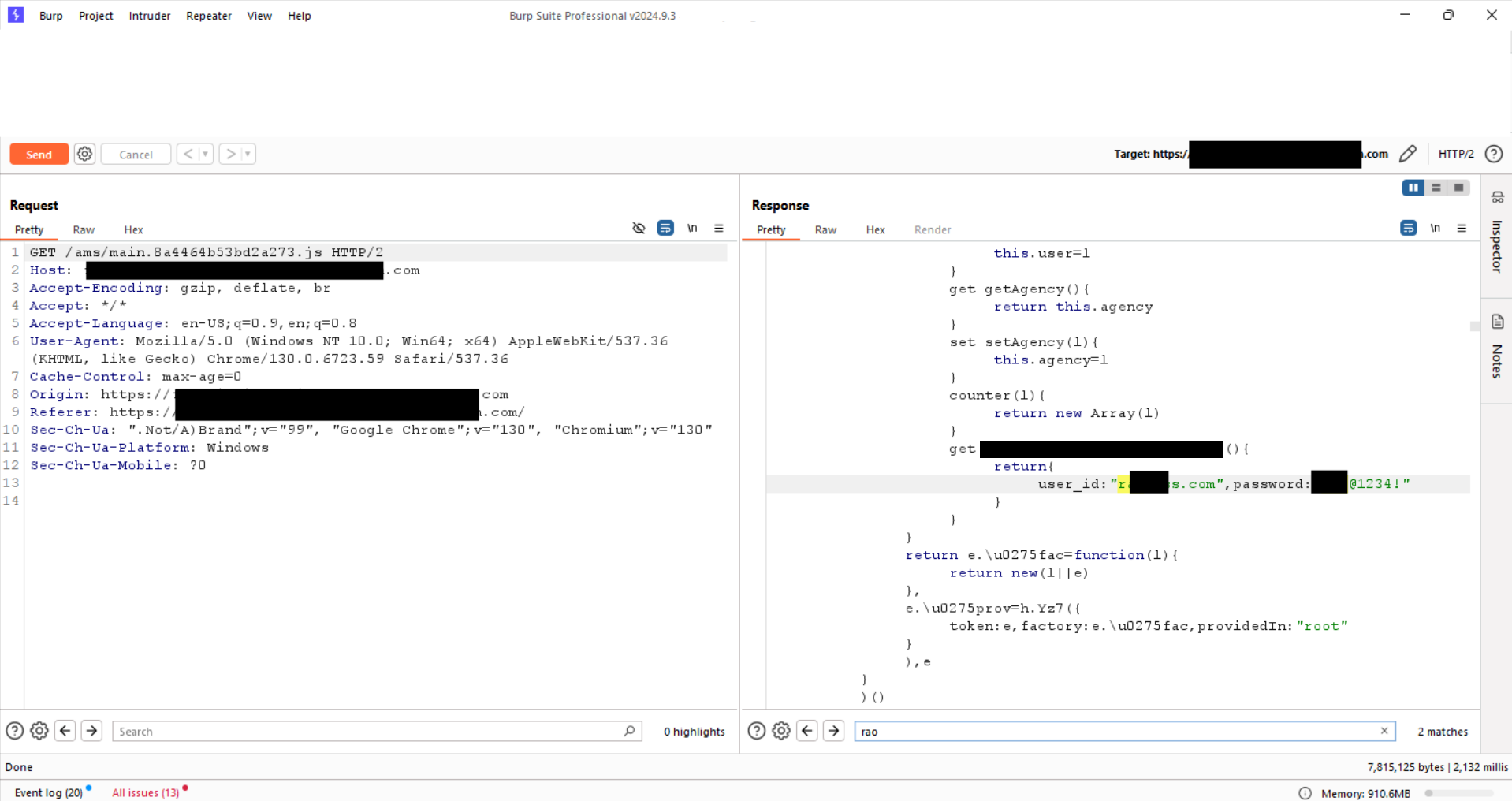
One of the requests that came through was completely unremarkable on its face:
GET /ams/main.8a4464b53bd2a273.js HTTP/2A minified, hash-named Angular bundle — the kind of file every single page load pulls in without a second thought. The kind of file most testers scroll straight past because “it’s just the frontend JS.”
That instinct is exactly the gap that makes this bug class so common.
Reading the Bundle Instead of Skipping It
Minified JavaScript looks like noise, but it’s still just text — and text can be searched. Instead of treating the bundle as a black box, I pulled up the response in Burp and started scanning through the deobfuscated structure: class definitions, getters, setters, the usual shape of a compiled Angular service.
Buried inside one of these classes was a getter that had no business existing in a production bundle:
get accountUserDetails(){
    return{
        user_id: "r***@***s.com",
        password: "***@1234!"
    }
}
A hardcoded user_id and password, sitting inside a getter tied to an internal accounting/finance module, shipped straight to the browser of every single visitor. Not behind auth. Not fetched dynamically from a protected endpoint. Just baked directly into the static asset served on page load.
Why This Is a Real Finding, Not Just “Ugly Code”
It’s tempting to look at this and think “so what, it’s client-side, everyone can see client-side code anyway.” That reaction misses the point. The issue was never whether the code is visible — client-side JavaScript is always visible by definition. The issue is what the developers chose to put inside code they knew would be visible.
A credential pair, tied to a naming convention that strongly suggests it belongs to a real internal accounting/finance system, was compiled directly into a publicly served bundle. That means:
- No authentication required to obtain it. Anyone who loads the page gets the credential, whether they’re a legitimate user, a competitor, or an attacker running automated JS scraping for exactly this pattern.
- It’s trivially discoverable at scale. Tools like TruffleHog, GitLeaks-style regex scanners, or even a basic
grep -i passwordagainst saved JS bundles catch this instantly. This isn’t a “sophisticated attacker” bug — it’s a “anyone who thinks to look” bug. - The blast radius depends entirely on where that credential is valid. If that getter maps to a real accounting platform, SSO provider, or internal API, this single leaked pair could be the entry point into a much larger system — invoicing data, financial records, vendor details, whatever that account has access to.
This is the same underlying lesson as every hardcoded-secret finding: “client-side” and “public” are the same thing. If it’s shipped to the browser, it should be treated as already leaked.
Root Cause
The root cause is a development-time shortcut that never got cleaned up before shipping to production: a real (or real-looking) credential pair was hardcoded directly into application source, and that source was compiled into a bundle served to every visitor without any secret ever being stripped, environment-injected, or moved server-side.
This almost always happens the same way:
- A developer hardcodes a credential during local testing or integration work, intending it as temporary
- The code ships to production without a review step that specifically checks for hardcoded secrets
- No secret-scanning is run against built frontend assets before deployment — only source repos get scanned, if that
Fix:
1. Remove the hardcoded credential immediately and rotate it — assume it has
   already been harvested by automated scrapers, not just a hypothetical risk.

2. Never place credentials, API keys, or tokens in any code that compiles into
   a client-side bundle. Anything shipped to the browser must be treated as
   fully public, regardless of minification or obfuscation.

3. Move credential-dependent logic server-side. The frontend should call an
   authenticated backend endpoint that performs the action using a securely
   stored credential — the browser should never hold the secret itself.

4. Run secret-scanning against BUILT/COMPILED output, not just source code.
   Minification and bundling can hide secrets from a source-only scan while
   leaving them fully intact and searchable in the shipped artifact.

5. Add this check to CI/CD: fail the build if common secret patterns
   (password=, api_key=, hardcoded JWTs, etc.) are detected in any file about
   to be deployed.
Key Takeaways
- Don’t skip minified JS bundles during testing — they’re some of the easiest places to find real, high-impact secrets, precisely because most people assume they’re not worth reading
- “It’s just client-side code” is not a mitigating factor — it’s the whole problem. Anything sent to the browser is public the moment it leaves the server
- A single hardcoded credential can be the entire difference between “no impact” and “full access to an internal system,” depending on where that credential is actually valid
- Secret scanning needs to run against compiled/bundled output, not just raw source — minification hides nothing from a determined reviewer, but it does hide things from source-only tooling
- This finding required zero exploitation technique. Just patience, and the discipline to actually read what the application sends you
Questions? Hit me up on X.