Cron jobs that run as root are one of my favorite things to find on a box, because they almost always do something interesting on a schedule — and “interesting” often means “handles a secret it shouldn’t be handling in full view of everyone else on the system.”
This one baked a plaintext password straight into its command-line arguments. That’s all it took.
The Setup
I had a shell as www-data on a box I’ll refer to as zipper — a low-privilege web server account, the kind of foothold you get from exploiting almost any file upload or command injection bug in a web app. www-data typically can’t read root-owned files, can’t sudo anything, and has no obvious SUID binaries to abuse. Time to watch what root does automatically.
Enumeration
Static enumeration (LinPEAS, manual find sweeps for SUID/SGID, checking sudo -l) came up dry. So I switched to dynamic enumeration and ran pspy64 — a tool that polls /proc to show every process that starts on the system, including short-lived ones spawned by cron, without needing root to do it.
A few minutes in, this showed up:

CMD: UID=0    PID=1     | /sbin/init maybe-ubiquity
CMD: UID=0    PID=3676  | /usr/lib/p7zip/7za a /opt/backups/backup.zip -p******************** -tzip @enox.zip enox.zip upload_1628773085.zip upload_1774184036.zip upload_1774185149.zip
CMD: UID=0    PID=3673  | bash /opt/backup.sh
CMD: UID=0    PID=3672  | /bin/sh -c    bash /opt/backup.sh
CMD: UID=0    PID=3671  | /usr/sbin/CRON -f
Cron was firing /opt/backup.sh as root on a schedule, and that script shelled out to 7za (the p7zip archiver) to zip up files from an uploads directory — passing an archive password with the -p flag. pspy masked the actual characters in its live view, but the fact that a password was being passed as a command-line argument to a process spawned by root was the real finding. Command-line arguments are visible to every local user via /proc/<pid>/cmdline for as long as the process is alive — no special privileges required to read them.
I went and read the script directly to confirm where the password was actually coming from:

#!/bin/bash
password=`cat /root/secret`
cd /var/www/html/uploads
rm *.tmp
7za a /opt/backups/backup.zip -p$password -tzip *.zip > /opt/backups/backup.log
There it was. The script read a secret straight out of /root/secret — a file www-data had no permission to read directly — and then passed it, unmasked, as part of the 7za command line. Every time this cron job fired, that password sat in plaintext in the process table for anyone fast enough (or patient enough, using something like pspy) to catch it.
Exploitation
The archive log itself, /opt/backups/backup.log, was also readable by www-data since it landed under /opt/backups:
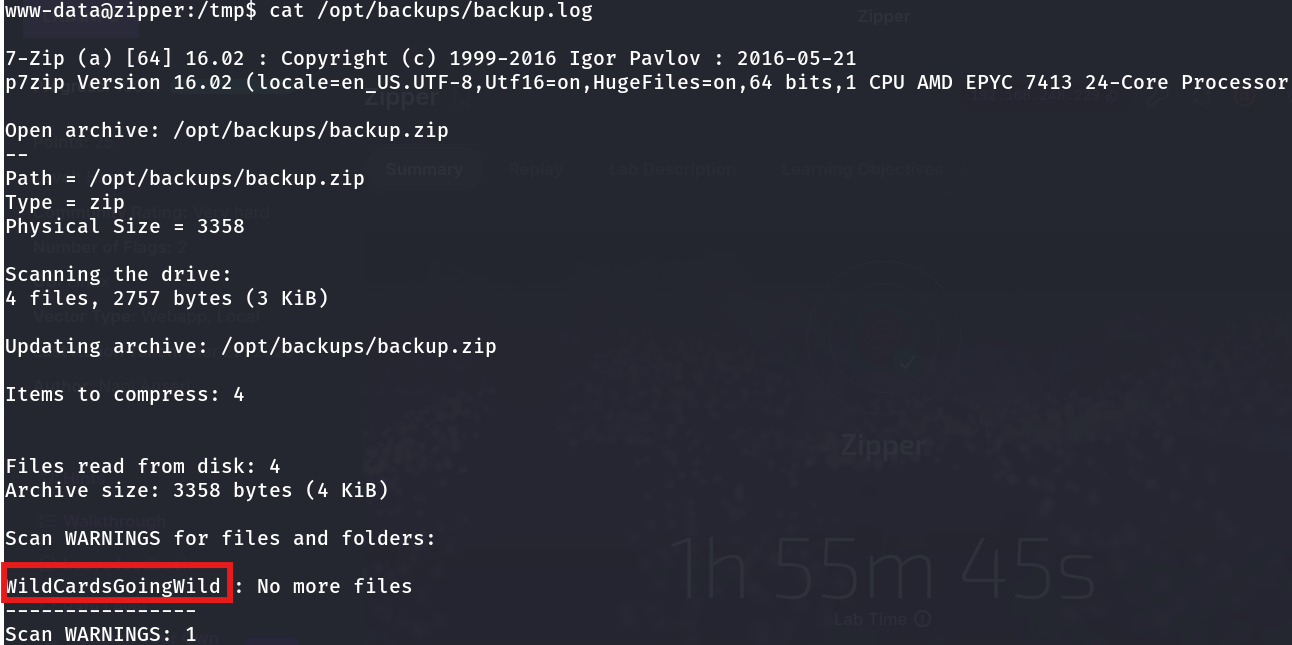
That log didn’t leak the password directly — 7-Zip doesn’t echo the password it was given back into its own output — but it confirmed the job was running exactly as the script described, on a real schedule, with real files. The actual capture had to happen live, against the process list, while the cron job was executing.
So I ran pspy again and waited for the next scheduled run, watching the process table closely for the 7za invocation. When it fired, the full, unmasked command line — password included — was visible in /proc for the brief window the process existed, exactly as cat /root/secret had put it together in the script.
With the password in hand, I tried the obvious next step — reusing it as the root account’s own password:
su root
Password: <the password captured from the process listing>
And that was root. The secret that was meant to protect a backup archive turned out to be the same one protecting the root account.
Why This Works
Two separate mistakes stack here:
- Secrets passed as CLI arguments are never actually private on Linux. Every process’s full command line, including all arguments, is world-readable through
/proc/<pid>/cmdline(and shows up inps auxoutput too) for the entire lifetime of the process. There’s no permission model that hides this from other local users — it’s exposed by design, because process listings are meant to be informative. - Password reuse. Even with the CLI-argument leak, this would only have exposed the backup archive’s password. It escalated to root only because whoever set this box up reused the same secret for both purposes.
pspy (or any /proc polling approach) is the tool that turns “a root cron job exists” into “I can read what that root cron job is doing, live, including anything it passes on argv” — without needing any special privilege to do so.
Root Cause
The root cause is that /opt/backup.sh treats a sensitive value as if command-line arguments were private, when they are one of the most exposed places a Linux process can put data. Add password reuse between the backup secret and the root account, and a low-privilege enumeration tool becomes a full root exploit chain.
Fix:
# Never pass secrets as CLI arguments. Feed them via stdin, an env var
# set only for the child process, or a file descriptor instead.
password=$(cat /root/secret)
7za a /opt/backups/backup.zip -tzip *.zip < <(printf '%s\n' "$password")
# or, for tools that support it, use an env-var driven password prompt
# rather than -pPASSWORD on the argv

# Restrict who can even run pspy-style monitoring where practical,
# and rotate the backup secret independently of any system account password
More broadly: audit every script that runs as root via cron for secrets appearing in its invoked command lines, and never let a backup/archival password double as an authentication credential elsewhere on the system.
Key Takeaways
pspy(or manually polling/proc) is essential for finding root-owned cron jobs and short-lived processes that static enumeration tools like LinPEAS will never catch- Command-line arguments are never a safe place to pass secrets on Linux — any local user can read another process’s full argv via
/proc/<pid>/cmdlinewhile it’s running - Even a well-scoped secret (like a backup archive password) becomes a full compromise the moment it’s reused as a system or root account password
- When enumerating a box with no obvious SUID/sudo path, switch from static to dynamic enumeration and watch what root actually does over time, not just what’s sitting on disk
Questions? Hit me up on X.